The Starbucks case illustrates one of the strongest arguments for progressive web app development. A single web-based application can provide an app-like experience across devices while retaining the reach and discoverability of the web.
The project was designed around several practical challenges:
- Customers in emerging markets using unreliable mobile networks
- A native iOS app that was already 148MB, creating a heavier download for some users
- Desktop users converting at a much lower rate than users of the native app
According to Formidable’s account of the project, the finished PWA was approximately 233KB, and daily active users roughly doubled compared with the native experience. The broader lesson is that progressive web app development can give businesses a way to reach users across devices without maintaining separate native applications for every platform.
PWAs are not automatically the right choice for every business. The best architecture depends on the application’s functionality, device requirements, distribution strategy, performance expectations, integrations, and long-term maintenance needs.
What Exactly is a Progressive Web App?
Businesses consider progressive web app development when they want to deliver an app-like experience without requiring users to download a traditional mobile application. PWAs can combine web reach, search discoverability, installability, offline capabilities, and selected device features in a single application.
The Simplest Definition That Actually Makes Sense
A progressive web app is an application built using standard web technologies, HTML, CSS, and JavaScript, that delivers a user experience comparable to a platform-specific app. Like a website, it runs on every platform from a single codebase.
Like a native app, it installs on the device, operates offline, and integrates with device features such as push notifications and the camera, all without an app store visit. The “progressive” part means the experience works at a baseline level for every visitor and enhances on more capable devices.
The Three Technical Foundations of a PWA
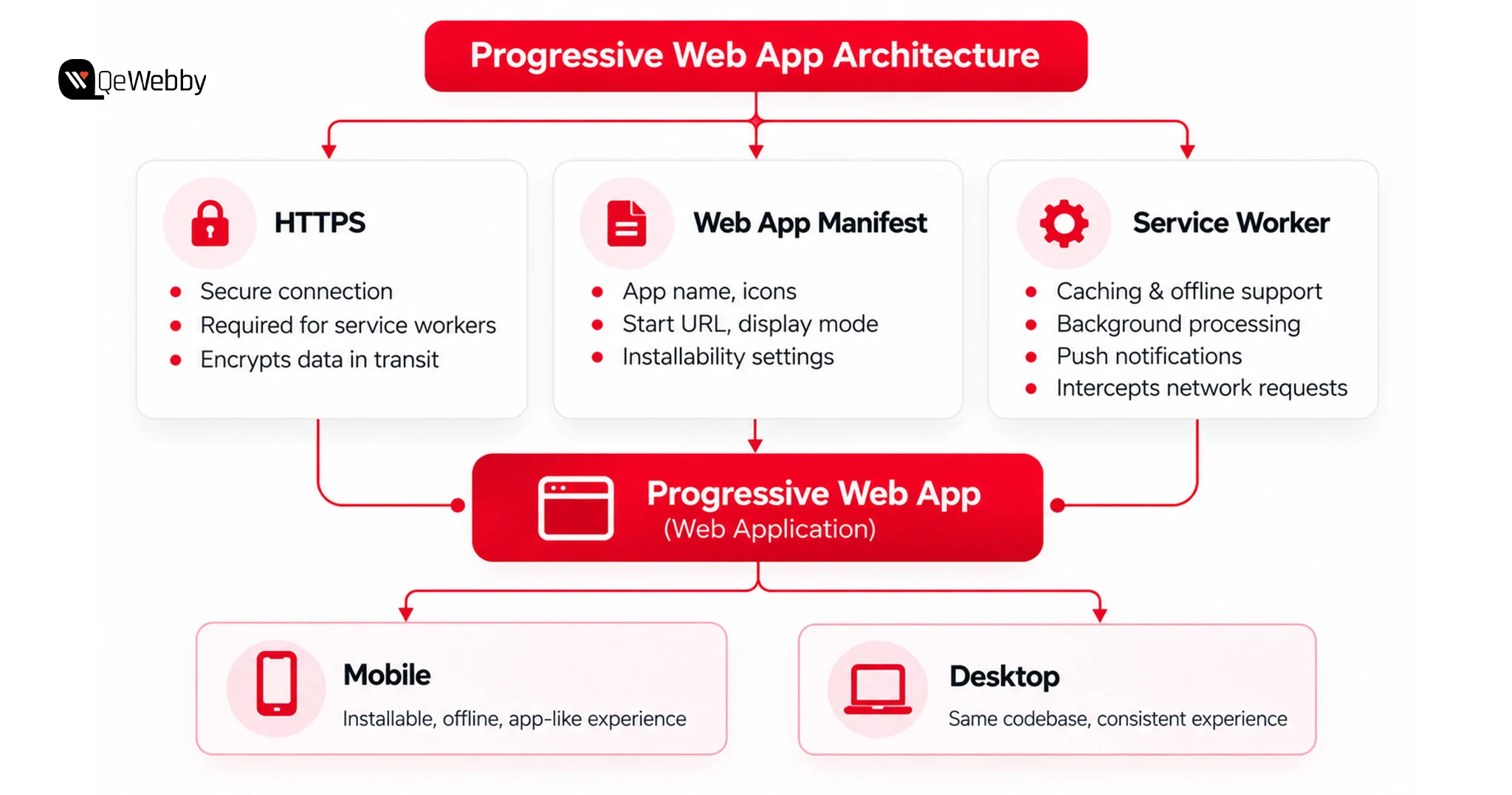
Most PWAs rely on three core web technologies: HTTPS, a Web App Manifest, and a Service Worker. Together, these technologies provide the foundation for secure delivery, installation, caching, and other app-like capabilities.
#1. HTTPS
A PWA must run in a secure context, normally through HTTPS. Service workers require a secure context in production, with localhost commonly used for local development.
#2. Web App Manifest
The Web App Manifest provides metadata that helps browsers understand how an application should behave when installed. It can define the application name, icons, start URL, display mode, and related presentation settings.
#3. Service Worker
A service worker runs separately from the main web page and can intercept network requests. Developers can use it to implement caching strategies, offline experiences, background processing, and web push where supported.
PWA vs Native App vs Traditional Website: The Quick Comparison
A PWA combines the reach of the web with selected app-like capabilities such as installation, offline functionality, and push notifications.
| Capability |
Traditional Website |
PWA |
Native App |
| Installable |
Usually no |
Yes, where supported |
Yes |
| Offline functionality |
Possible with additional implementation |
Yes, when implemented |
Yes |
| App store distribution |
No |
Not required |
Typically required |
| Web search discoverability |
Yes |
Yes |
Different from web SEO |
| Push notifications |
Limited / browser-dependent |
Supported where browser and platform allow |
Yes |
| Cross-platform codebase |
Usually yes |
Primarily yes |
Typically separate platform implementations |
| Deep device/hardware access |
Limited |
More limited than native |
Broadest access |
Why Businesses Choose Progressive Web Apps
Businesses may choose progressive web apps when they need broader web reach, faster deployment, shared development across platforms, or app-like functionality without requiring a traditional app-store download.
The Cost Case is Impossible to Ignore
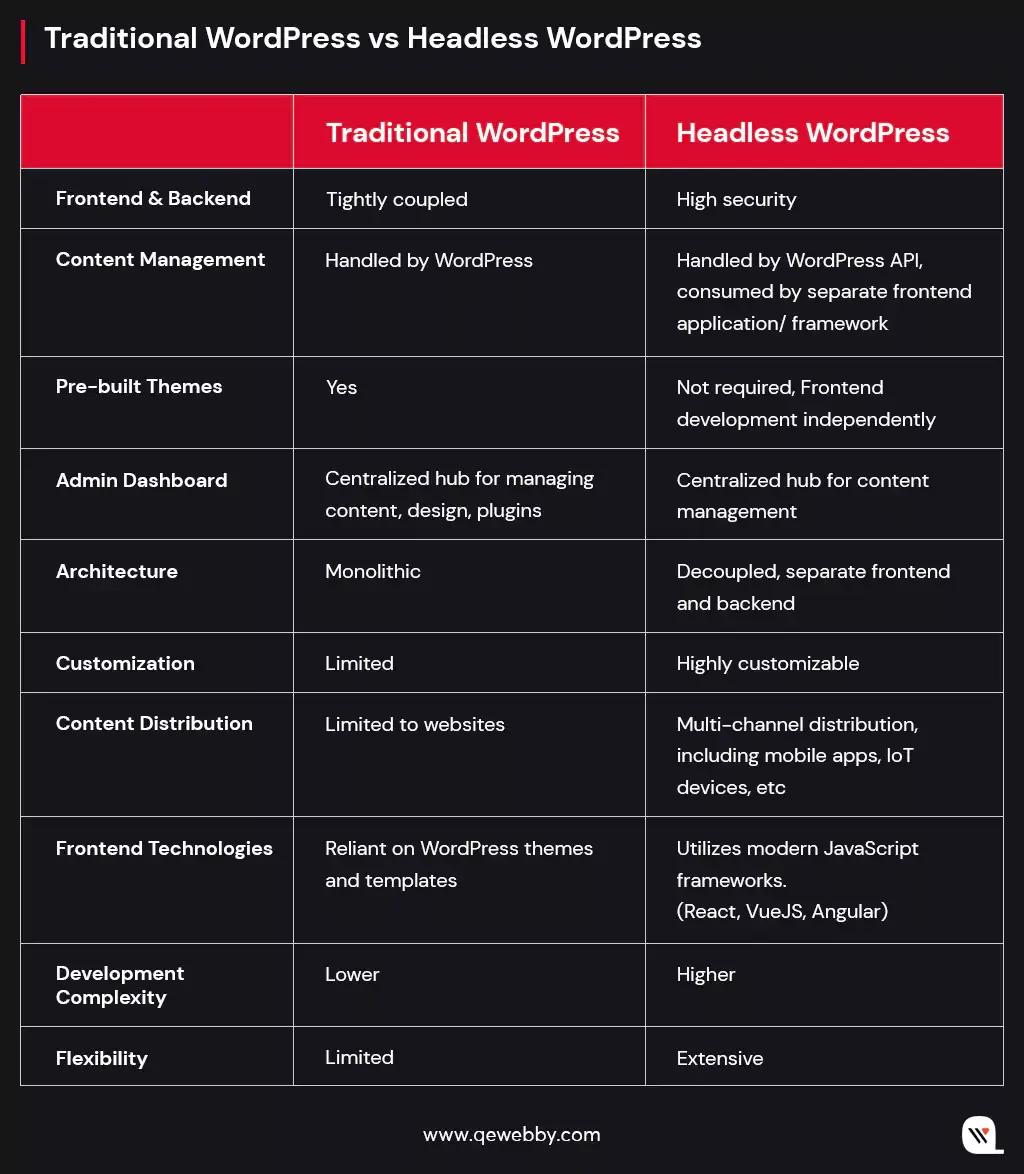
A PWA can reduce development effort compared with maintaining separate iOS and Android applications because much of the application can share a web-based codebase. The actual cost difference depends on functionality, integrations, offline requirements, device capabilities, testing requirements, and the amount of platform-specific work involved.
PWAs can also benefit from web search discoverability and can be distributed directly through the web rather than requiring users to download an application from an app store.
Speed and Performance on Real-World Networks
Uber’s own engineering team makes the performance case directly. Its m.uber web app shipped a core ride-request bundle under 50KB, loading in under three seconds on 2G networks, according to Uber’s engineering blog.
This illustrates an important PWA principle: performance budgets matter when an application needs to serve users on lower-end devices or slower networks. A well-optimized web application can reduce the amount of data required before users can begin interacting with the experience.
Push Notifications Without an App Store
eXtra Electronics hit the acquisition ceiling many retailers face, where email required a signup step before it could re-engage anyone. According to the case study, once eXtra layered web push onto its PWA, push-driven sales increased by 100% and the channel overtook email as its best-performing retention channel.
The important implementation lesson is to treat push notifications as a user-experience feature rather than simply an acquisition channel. Give users control over notification preferences, request permission at an appropriate point in the journey, and ensure notifications provide clear value.
The Core Features Every PWA Needs to Work Properly
Progressive Web Apps (PWAs) combine the accessibility of standard websites with the rich user experience of native applications. A web application must satisfy specific technical criteria and structural design patterns to qualify as a PWA and work properly.
Architecture and Implementation Considerations
Most PWAs are built around three core technologies: HTTPS, a Web App Manifest, and a Service Worker, although browser-specific installability requirements continue to evolve.
The three foundational technologies: HTTPS, the Web App Manifest, and service workers—provide the basis for many PWA capabilities. Production implementations also require careful decisions around caching, storage, installation, performance, and browser compatibility.
User Experience & Architectural Essentials
Beyond the technical checklist, a PWA needs several core design patterns to behave and feel like a high-performance application.
- Installability & Guided UI Instructions – Installation behavior varies by browser and platform. Chromium-based browsers can provide install UI when an application meets the relevant installability requirements, while iOS uses its own installation flow. For iOS users, applications may need to provide contextual guidance explaining how to add the web app to the Home Screen.
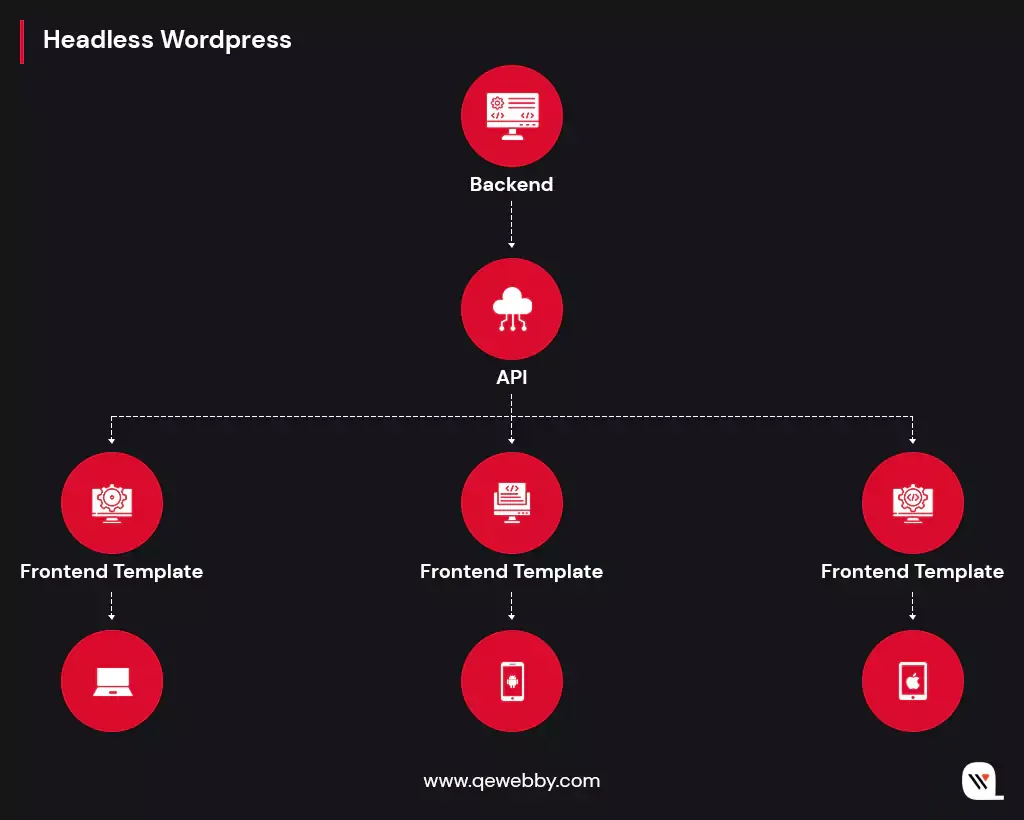
- The App Shell Architecture – PWAs separate static layouts from dynamic data to hit cold start times under 2 seconds. The app shell contains the core HTML, CSS, and JavaScript required to render the application’s basic interface. Appropriate caching strategies can allow these resources to load quickly on subsequent visits while dynamic content is retrieved separately.Many production PWAs also depend on API integration to connect the frontend with business systems such as CRM, ERP, inventory, payment, or customer platforms.
- Progressive Enhancement – A PWA degrades gracefully. Every feature works reliably as a standard website on older browsers, while modern browser APIs enhance the experience: biometric authentication through passkeys, local data storage, push notifications, only where the platform supports them.
- Resilient Data Storage & Caching – Static bundles and assets, CSS, JS, fonts, images, belong in the Cache Storage API. Structured, user-specific JSON data and application state belong in IndexedDB. That split keeps users navigating cached information without interruption even when connection speeds drop or disappear entirely.
Weak implementation of these patterns can leave users with an experience that feels closer to a conventional website than a well-designed PWA.
How to Develop a Progressive Web App: A Step-by-Step Guide
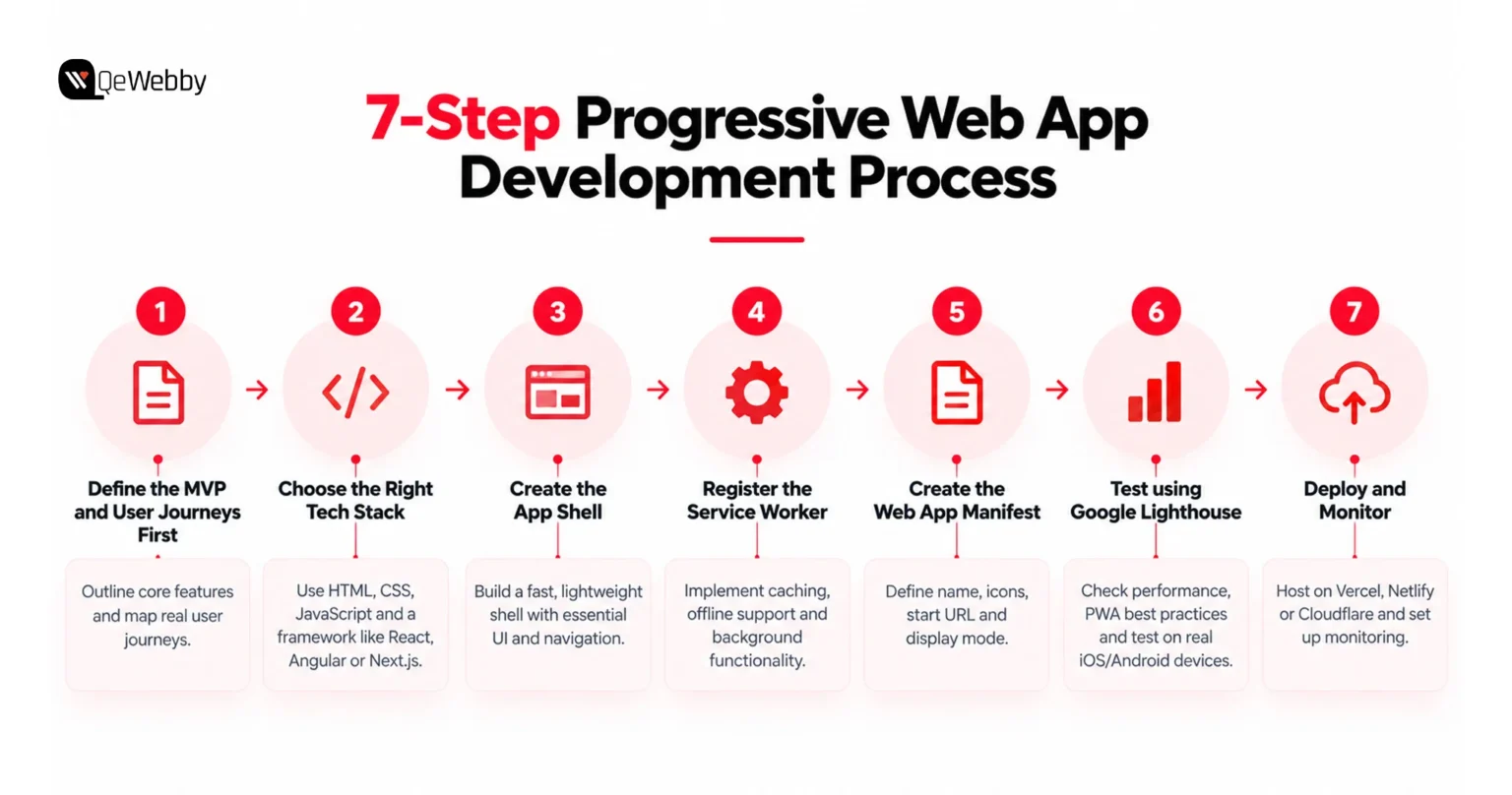
The following are the 7 steps to a production-ready PWA in order:
Step 1: Define the MVP and User Journeys First
Before writing code, outline what the app does and which features actually have to be there at launch. Write user stories in plain language: “As a user, I want to browse products offline so I can shop without WiFi” and map real user journeys, not assumed ones.
Step 2: Choose the Right Tech Stack
PWAs get built with HTML, CSS, JavaScript, and a front-end framework on top. React can provide a flexible component-based architecture, Angular provides established tooling for application development, and frameworks such as Next.js can be useful when server-side rendering, static generation, or a React-based architecture aligns with the project’s SEO and performance requirements.
Step 3: Create the App Shell
The app shell should contain the minimum resources required to render the application’s core interface. Keep the initial payload focused on essential navigation and UI elements, while retrieving dynamic content through APIs or other appropriate data sources.
Step 4: Register the Service Worker
Register the service worker after a stable version of the core app has been released. The boilerplate is taken care of by Workbox. One error that should be highlighted is that HTML navigations that cache first can leave users on an old release. Rather, use network-first for navigations and have a specific offline page.
Step 5: Create the Web App Manifest
The manifest is a JSON file that specifies the name, icons, colors, starting URL, and display mode of the app. The “standalone” setting for the display option will impart a full-screen feel to the installed app. All the necessary sizes are needed for icons; otherwise, the install dialog will not appear.
Step 6: Test using Google Lighthouse
Lighthouse is useful as an initial diagnostic tool, but it should not be treated as the sole production release gate. Test the application on real iOS and Android devices and across relevant browsers. Production validation should also include functional testing, accessibility testing, Core Web Vitals, API performance, and real-user monitoring where appropriate.
Run Lighthouse throughout development rather than waiting until the final release candidate. Re-testing after significant feature or architecture changes can help identify regressions earlier.
Step 7: Deploy and monitor.
Platforms such as Vercel, Netlify, and Cloudflare Pages can host PWA projects, but the application still needs to implement and configure its manifest, service worker, HTTPS, caching, routing, and other PWA requirements correctly.
If you prefer not to build the application in-house, a development partner can handle architecture, design, development, testing, deployment, and ongoing support. A basic PWA may take several weeks to develop, while complex applications with integrations, offline synchronization, or enterprise requirements can take considerably longer.
What is the PWA Development Cost?
Cost comes down to three variables: how complex the app is, what your distribution goals are, and whether you’re building traditionally or leaning on no-code/AI platforms.
1. Typical PWA Development Costs
A shared web-based codebase can reduce development effort compared with maintaining separate iOS and Android applications. However, the actual cost difference depends on functionality, integrations, offline requirements, device capabilities, testing requirements, and the amount of platform-specific work involved.
Tiered Complexity Cost Breakdown:
| PWA Complexity |
Indicative Development Cost |
| MVP / Basic PWA |
$10,000–$30,000 |
| Mid-Complexity PWA |
$30,000–$75,000 |
| Advanced PWA |
$75,000–$150,000+ |
| Enterprise PWA |
$150,000+ |
These figures are indicative estimates, not fixed industry pricing. The final cost depends on features, integrations, architecture, security, offline requirements, testing, and ongoing support.
2. Ongoing Maintenance Costs
Maintenance depends on the application’s architecture and operating requirements rather than following a universal percentage. Ongoing costs can include security updates, browser compatibility work, dependency upgrades, performance monitoring, bug fixes, infrastructure, API changes, and feature enhancements.
For budgeting purposes, businesses should estimate maintenance separately from the initial development cost and account for both technical support and infrastructure expenses.
3. Three-Year Total Cost of Ownership (TCO)
The initial development budget is only part of the total cost of operating a PWA. Over three years, businesses should also account for maintenance, infrastructure, third-party services, API changes, security updates, monitoring, browser compatibility, and ongoing feature development.
Because these costs vary significantly by application and operating model, a project-specific TCO calculation is more useful than a universal PWA-to-native ratio.
4. “Hidden” Cost Benefits of PWAs
Beyond raw development hours, PWAs eliminate several hidden financial bottlenecks tied to native apps.
- Bypassing the App Store Tax – Native apps force platform-specific payment gateways, which claim 15% to 30% commission on in-app purchases and subscriptions. Web-based transactions can avoid the app-store commission structure that applies to certain native-app purchases. However, businesses still need to account for payment processing fees, taxes, infrastructure, and other transaction costs. For a subscription business at $1M ARR, that alone saves $150,000 to $300,000 per year.
- Store Rejection & Friction Costs – Native applications distributed through app stores must go through platform review processes and comply with the applicable store guidelines. PWAs can be deployed directly to the web without that app-store submission process.
5. AI-Powered and No-Code Platforms
AI-assisted development and no-code platforms can be useful for prototypes, internal tools, simple workflows, and early product validation. They do not eliminate the need for engineering when an application requires complex integrations, advanced authentication, offline synchronization, high performance, security controls, or enterprise-scale architecture.
Before selecting a platform, businesses should evaluate not only the subscription price but also usage-based charges, hosting, data storage, integrations, scalability, vendor dependency, and the ability to export or maintain the resulting application.
When a PWA Is Not the Right Choice
PWAs are flexible, but they are not a universal replacement for native applications. A native approach may be more appropriate when:
- The application depends heavily on Bluetooth, NFC, advanced sensors, or other platform-specific APIs.
- Reliable background processing is a core requirement.
- AR/VR or graphics-intensive functionality is central to the product.
- App-store discovery and distribution are major parts of the acquisition strategy.
- The product requires deep integration with platform-specific capabilities that browsers cannot consistently provide.
- The application’s core value depends on capabilities that vary significantly between browsers or operating systems
For online retailers, a PWA can also be considered alongside broader WooCommerce development services when planning the storefront architecture, integrations, and customer experience.
The right decision should be based on the application’s technical requirements and business objectives rather than choosing a technology simply because it has a lower initial development cost.
Which One to Choose: A PWA or a Native App
Every PWA guide promotes PWA, and every native guide promotes native. Few give a straight answer grounded in the actual business situation.
When PWA is the Right Choice
Progressive Web Apps are the best bet when it comes to increasing reach for any business. As it helps in targeting the mobile audience and with major traffic across the internet coming from mobile users, deploying PWA makes more sense. Plus, it offers features like offline mode and minimum memory usage; it becomes a lightweight version of your business apps that users can easily use.
When Native App Still Wins
Native apps remain preferable when consistent cross-platform access to Bluetooth, NFC, or advanced hardware APIs is required.
The Honest Decision Table
Businesses unsure which path fits often get the most value from a short consultation with a web app development service before any budget gets committed.
| Business Need |
Choose PWA |
Choose Native |
| One budget, mobile and desktop |
Yes |
No |
| Deep hardware access (Bluetooth, NFC) |
No |
Yes |
| Organic search discovery matters |
Yes |
No |
| App store discovery drives growth |
No |
Yes |
| Frequent updates, no review delay |
Yes |
No |
| Heavy background processing or AR |
No |
Yes |
Common PWA Development Mistakes That Kill the Project
There are a few common development errors that can result in performance problems, compatibility concerns, and expensive rework.
1. Building a PWA for the Wrong Use Case
Not all apps are suited to be a PWA. However, where hardware capabilities like Bluetooth, NFC, or complex biometrics are critical to the success of the application, browser restrictions, particularly on iOS, can constrain functionality. Also, it is important to test on actual devices of the iPhone and iPad as Safari works differently from the Android browsers.
2. Poor Caching Strategy
Caching makes things faster, but caching everything is a common mistake. Avoid aggressive caching of dynamic pages, login sessions, and API responses, or they can show stale content or cause disruption to the users’ login. Instead, just cache static assets and update any changed files strategically without clearing the entire cache on every release.
3. Ignoring Offline Data Synchronization
Offline support is more than caching pages. If users can create, edit, or submit data while disconnected, the application needs a clear synchronization strategy for retries, duplicate requests, stale data, and conflicting updates. Define these behaviors before implementing offline functionality so the application does not create inconsistent records when the connection returns.
4. Wrong Service Worker Implementation
Service workers are an essential part of a PWA; however, if poorly implemented, they can lead users to still run the old version of the app. They should be designed to manage updates gracefully, handle network failures without issues, and optimize for reliability from installation.
5. Treating HTTPS as the Entire Security Strategy
HTTPS protects data in transit, but it does not make a PWA secure by itself. Production applications still need appropriate authentication, authorization, API security, input validation, session management, secure storage practices, dependency management, and monitoring. Enterprise PWAs should also define how sensitive data is handled when devices are shared, lost, or used offline.
6. Implementing Push Notifications Without Considering User Experience
Push notification permission should generally be requested at an appropriate point in the user journey rather than immediately after page load. Notifications should provide clear value, respect user preferences, and account for differences in browser and operating-system support. The implementation should also include appropriate permission handling, delivery monitoring, and fallback behavior where push is unavailable.
7. Choosing the Wrong Technical Foundation
Fast loading time is not the only aspect of a successful PWA. By selecting the correct architecture and implementing clever caching, setting up reliable service workers, and adhering to best practices on every platform, you can provide a faster, more reliable experience without pricey remedies downstream.
Is Progressive Web App Development Right for Your Business?
Progressive web app development can provide a practical balance between web reach, app-like functionality, performance, and development efficiency. However, the right architecture depends on the product.
PWAs are particularly compelling when businesses need broad device coverage, web discoverability, frequent deployments, and selected offline or device capabilities without maintaining separate native applications.
Native development can still be the better option when deep hardware access, intensive background processing, advanced graphics, or app-store distribution is central to the product.
The best approach is to evaluate the application’s requirements, users, integrations, performance expectations, security needs, and long-term operating costs before choosing the technology.
Building a production-ready PWA requires more than adding a service worker and installable manifest. The architecture also needs to account for performance, responsive design, API integrations, offline behavior, authentication, security, browser compatibility, testing, deployment, and ongoing maintenance.
A development partner can help evaluate whether a PWA, native application, or hybrid approach is appropriate for your business and then build the solution around your specific requirements.
Planning a Progressive Web App? Talk to the QeWebby team about your application requirements, technical architecture, and development roadmap.