Top Benefits of Outsourcing WordPress Development (Beyond Just Saving Money)

Someone hires a WordPress developer. Three months later, the site still isn’t live. Feature velocity stalls. Technical debt piles up until delivery grinds down. The paycheck clears every two weeks. The launch date keeps sliding. The business ends up worse off than when it started.

Nobody likes admitting how often this happens. Especially in the “velocity-first” trap: teams that look fast out of the gate, then stall once they hit a codebase they never understood.

That’s why most companies get outsourcing wrong. They treat it like a coupon to dodge a salary line, nothing more. That framing skips the mechanics that decide whether a project ships or turns into a slow bleed of lost rankings and drained ad income.

Hiring in-house is expensive. Offshore development often costs less. Everyone knows that part. What rarely makes the pitch is the engagement model. How the work’s structured matters more than where the developer sits. Someone embedded in your process, who understands the codebase before touching it, tends to succeed.

This guide covers both the cost savings everyone expects and the operational advantages that usually become obvious after a few months. Protecting your revenue through deployment discipline. Keeping full ownership of your assets and credentials.

What Outsourcing WordPress Development Actually Means in Practice

In practice, outsourcing WordPress development means handing site builds, customizations, and maintenance to outside specialists who bring operational elasticity and technical chops you don’t have to build in-house. It’s not one transaction. It’s a spectrum: bounded freelance tasks on one end, dedicated offshore engineers sitting inside your Slack and Jira on the other.

1. The Three Primary Engagement Models

The structure you pick determines the risk you’re carrying, not the other way around.

  • Freelancers (Task-Based): Good for a bounded fix with a clear finish line. Cheap, sure. But the “bus factor” is real. One person disappears, and the project stalls.
  • Agencies (Project-Based): Makes sense for multi-discipline builds (design, dev, QA) under a tight deadline. You’re paying for someone else to absorb the coordination overhead. That shows up in the blended rate.
  • Dedicated Offshore Developers (Integrated): Where most SMBs and agencies land for ongoing work. The developer works exclusively for you, learns your codebase, workflows, and engineering standards. This is the model that actually holds up over time, unlike distant vendors working strictly off a ticket queue with zero context.
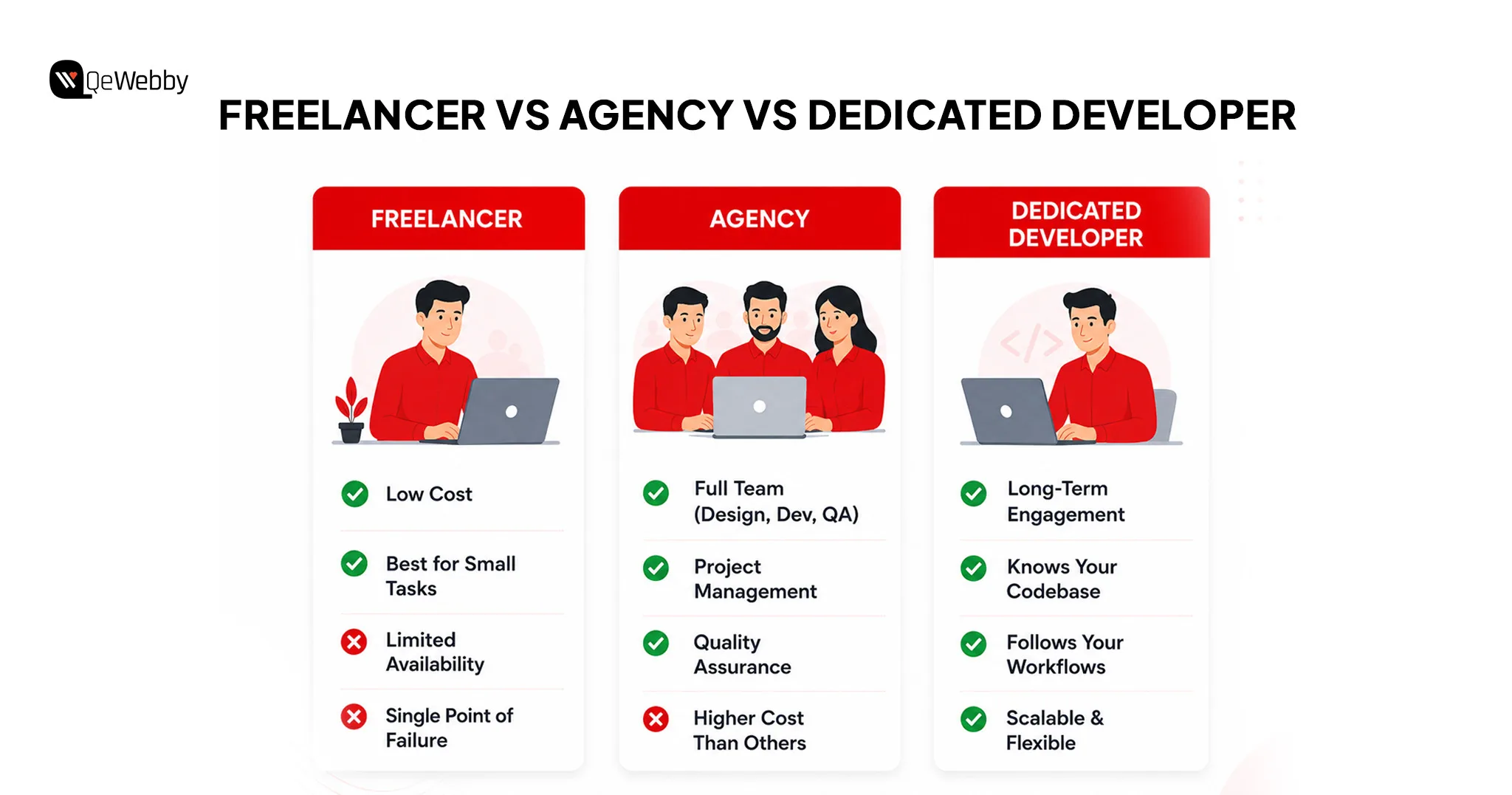
Freelancer Agency Developer

2. Operational Elasticity and the “Follow-the-Sun” Model

Scale up for a launch. Scale down once things settle. No long-term hire to unwind when the busy season ends.

In practice, this usually runs on a follow-the-sun loop. Internal teams hand off tasks at the end of their day. Offshore teams in India, Southeast Asia, or Eastern Europe pick up the work overnight. By morning, it’s sitting there ready for testing. Your development cycle effectively continues around the clock.

3. The “Revenue Firewall”: Deployment Discipline

At scale, outsourcing stops being about “just building” and becomes about enforced deployment controls. Here’s why that matters: a bad deploy on a high-traffic site isn’t a support ticket. It’s a revenue event. Ad income and search rankings can take a hit within hours, not weeks.

  • Deployment Constraints: Serious partners work inside strict pipelines (the kind WordPress VIP mandates), which means pre-production code review and continuous performance monitoring, not a quick push and a prayer.
  • SEO as Engineering: Treated as a technical deliverable. Commits get checked against structured data and Core Web Vitals before they ship, not after something breaks.

4. Architectural Optimization (The “Plugin Diet”)

Professional outsourcing tends to strip out technical debt and plugin bloat. Amateur builds lean on heavy plugins for features that barely matter, chewing through CPU and PHP resources they don’t need to.

Experienced developers move that weight off the WordPress application layer entirely. Security firewalls, image optimization, caching: pushed to the server or edge network instead. The site ends up leaner. Faster. More stable.
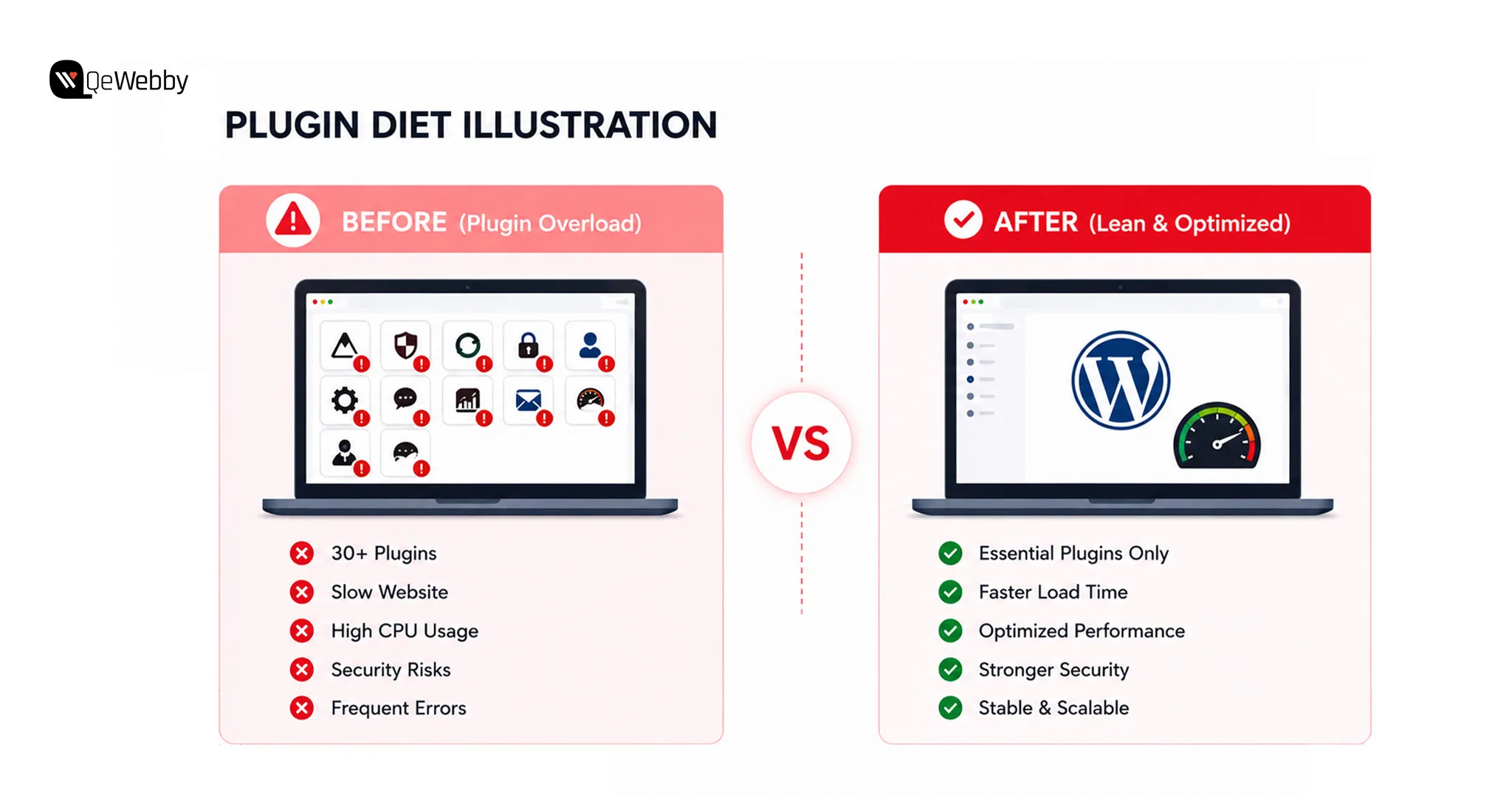
Plugin diet illustration

5. What Must Remain In-House

Even in a fully outsourced setup, a few things stay close to home.

  • Site Strategy: Hosting stack decisions, architectural direction, which plugins actually carry weight in the build.
  • Asset Ownership: Full ownership of source code, hosting panel, domain registrar, DNS. No exceptions.
  • Brand Voice: Content direction and messaging hierarchy stay internal. Nobody outside the business should be deciding how it sounds.

The Expected Benefits (That Everyone Already Knows)

It Costs Less Than an In-House Developer

Hiring in-house starts weeks before anyone writes code. Scope the role. Build the application process. Post it. Screen resumes. Interview. Onboard. None of that ships a single feature. And that’s before salary, benefits, and overhead even show up on the spreadsheet.

Outsourcing skips all of it. The business pays for work when it needs the work, not a fixed headcount sitting there during a slow quarter.

Is it cheaper for defined-timeline projects specifically? Almost always, yes, because benefits, office space, and equipment costs disappear entirely. That’s the structural reason the savings number from the intro holds up whether the business has five employees or five hundred.

It Gives Instant Access to Specialists

Outsourcing puts a business in front of a global bench of developers who’ve already solved the exact WordPress problem the business is hitting for the first time. Custom themes, advanced functionality, the stuff an internal generalist genuinely cannot pull off no matter how sharp they are.

One in-house hire usually knows a bit of everything. Outsourcing flips that. Now it’s specialists who do one narrow thing extremely well, every day, across dozens of client sites.

Top 6 Unexpected Benefits Nobody Talks About Until After They Try It

The following, however, is what comes on the calendar after three months of planning for the outsourcing arrangement, and it’s really why companies that attempt outsourcing hardly ever come crawling back to the traditional approach.

Unexpected Benefit 1: The In-House Team Suddenly Achieves More

Few businesses realize this before they outsource. When the company sets up its own WordPress team, all the technical problems become everyone’s problem. A malfunctioning plug-in isn’t just a headache for the developer.

It’s also a problem for the marketing manager who needs a page launched right now, the founder dragged into a Slack channel against their will, and the sales team watching helplessly as the promised landing page fails to launch.

Move development outside the building, and the marketing team markets. Sales sells. The founder actually gets to think about strategy instead of getting looped into a debugging session over a plugin conflict nobody understands.

Outsourcing web development buys agility, and it lets a business scale operations without adding headcount. Internal attention stays locked on the work only internal people can do, while the outside team handles execution.

Unexpected Benefit 2: Development Happens While the Business Sleeps

Offshore teams often sit in a completely different time zone. By the time the internal crew logs on, a full development cycle has usually already happened overnight.

That gap isn’t a scheduling headache to work around. Used right, it means development and support run around the clock instead of going quiet at 6pm.

For anything deadline-driven, or an urgent fix that can’t wait until Monday, that overlap is a genuine edge. No single-time-zone in-house team, however good, can match it.

Unexpected Benefit 3: The Site Gets Built Faster Than Any Internal Team Could Manage

Outsourced agencies start immediately. The team already exists. Compare that to hiring in-house, where finding one qualified WordPress developer can eat most of a two-month project window before a single line gets written.

Experienced outsourced teams have already shipped dozens, sometimes hundreds, of WordPress projects. They show up with workflows, starter templates, and processes that have already absorbed the trial and error that slows down a first-time internal build.

Four months for an internal team. Six to ten weeks for a specialized outsourced one, doing the same job. Not because anyone’s cutting corners. Because the team has run this playbook enough times to know exactly where the delays hide.

Unexpected Benefit 4: Built-In Quality Control the Business Does Not Have to Manage

Professional outsourced agencies bring their own QA process, code review, and testing protocol to every project by default. Quality stops being something a business owner has to invent from scratch.

That means functionality tests, cross-browser checks, security audits, and performance passes, all measured against actual WordPress coding standards, not just whatever the last developer happened to know.

Something breaks after launch? A reputable agency fixes it. Not the business owner, alone, on a laptop at 11 pm trying to remember which plugin update caused the mess.

Unexpected Benefit 5: Scale Up or Down Without a Single HR Conversation

Outsourcing lets a business dial development effort up or down based on actual demand, no long-term contract required. For anything with seasonal swings or a sudden growth spurt, that’s hard to overstate.

One month the business needs a full team for a major launch. Next month, just routine maintenance. Outsourcing absorbs both without redundancy costs or an uncomfortable conversation about cutting hours.

This matters most for agencies juggling several client projects on unpredictable timelines, where a fixed in-house headcount either sits idle or gets buried depending on the week.

Unexpected Benefit 6: The Business Gains a Security Advantage It Did Not Budget For

WordPress gets targeted constantly, simply because it runs so much of the web. Bring in a team with dedicated security chops, and proactive measures against data breaches and unauthorized access come standard, not bolted on afterward.

Only 22% of companies handling WordPress security in-house actually have a documented breach response plan. Outsourced agencies that specialize in this tend to be better equipped by default. Security is the job, not a side task someone’s developer squeezes in between features.

Ongoing outsourced maintenance means plugin updates happen on schedule, vulnerabilities get patched before bots find them, and backups actually get verified instead of just assumed to be running somewhere in the background.

First-time outsourcers often start small, a single contained project through a WordPress development service, instead of jumping straight into a long-term commitment. Low risk, and it lets the business judge code quality, communication speed, and delivery discipline before scaling anything. For what a site needs before it even gets to this stage, see our breakdown of must-have WordPress features for a client website.

Outsourcing vs In-House: The Honest Comparison Nobody Wants to Do

What the Real Numbers Look Like Side by Side

Factor In-House Developer Outsourced Team
Monthly cost $3,831 to $7,045 $500 to $3,000 depending on scope
Time to start 4 to 12 weeks to hire 1 to 5 days to onboard
Skill range One person’s knowledge Full team of specialists
Scalability Fixed headcount Flexible up or down instantly
Quality control Business manages it Agency manages it
Time zone coverage Business hours only 24-hour development possible
Risk Business owns all of it Shared via contract and SLA

When In-House Still Makes More Sense

Outsourcing isn’t right for every business. Pretending otherwise helps nobody. In-house tends to win when:

  • The product IS the WordPress site, as with a SaaS platform where development is the core business activity rather than a supporting function
  • Daily work requires deep knowledge of internal proprietary systems an external team cannot realistically access
  • The business has already built a strong internal development culture worth preserving
  • The budget comfortably supports a full-time senior developer and their long-term retention without strain
Book a Free Strategy Consultation

The Hybrid That Most Growing Businesses Land On

Most companies don’t end up fully in-house or fully outsourced. They land somewhere in between: one internal developer or technical lead owns strategy, requirements, and review, and an outsourced team handles execution.

That setup gives the business control without the full overhead, plus specialist skills on demand without paying for them year-round. Leverage expertise from wherever it happens to sit, deliver strong results to clients, and keep internal focus exactly where it belongs, on what only the internal team can actually do.

How to Outsource WordPress Development Without Getting Burned?

Here are some of the key steps that you can follow to ensure efficient outsourcing of WordPress development.
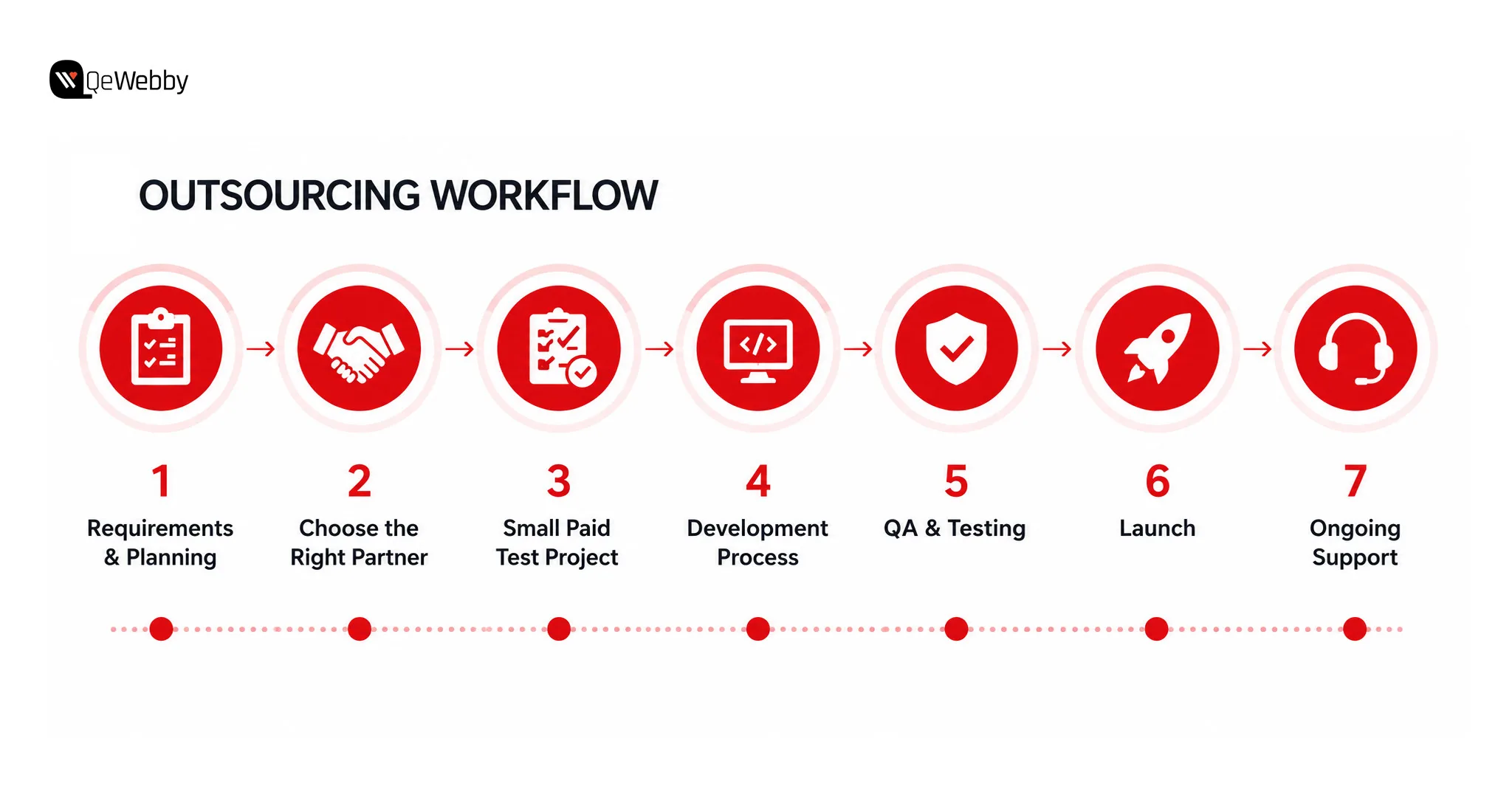
Outsourcing Workflow

Define Exactly What Is Needed Before Talking to Anyone

The most common outsourcing mistake happens before the first vendor call. Businesses start pricing conversations before they actually know what the project requires.

Write a one-page brief. Project goal, pages or features needed, a realistic budget range, timeline, and any technical requirements tied to existing systems. A clear brief gets an accurate quote. A vague one gets an inflated quote padded with contingency buffers to cover everything the vendor can’t predict.

Evaluate Agencies on the Right Things

Look for a WordPress-specific portfolio, verifiable client reviews, a QA process they can actually explain, and a documented post-launch support policy.

Read the reviews. Check the case studies. Strong testimonials, especially from other agencies rather than anonymous reviewers, are a decent signal the provider hits deadlines and communicates clearly under pressure.

Ask for two or three references before signing anything. Then actually call them. Most businesses skip this step. Most of them regret it exactly once.

Start With a Paid Test Before Committing to a Long Engagement

Send a small, clearly scoped paid task before signing anything long-term. It reveals quality and communication style faster than any portfolio review or interview ever will.

For agencies specifically, ask for examples of past agency partnerships. A reliable WordPress provider follows documented coding standards and runs a clear QA process without needing to be asked twice.

Use milestone-based payments tied to specific deliverables. Never pay the full project cost upfront, no matter how confident the agency sounds on the sales call.

Agencies that resell WordPress development work to their own clients often lean on a white-label WordPress development service to make the model work. The outsourced team builds under the agency’s brand, the agency delivers to its client, and the end client never learns a third party touched the project. It’s how small agencies take on bigger, more numerous clients without hiring full-time staff they can’t yet justify.
Talk to a wordpress consultant

The Question Every Business Asks Before Outsourcing: “What If It Goes Wrong?”

Most outsourcing articles stay relentlessly upbeat and skip the part sitting behind every business owner’s hesitation: what actually happens when it goes sideways. That deserves a straight answer, not another list of upsides.

The Real Risks of Outsourcing WordPress Development

  • Poor quality code that is difficult to maintain or hand over to a different developer later
  • Communication breakdowns that cause delays and missed deadlines
  • IP and data security concerns tied to sharing hosting credentials and content access with an outside team
  • Dependence on a single organization, where the project comes to a halt the instant the organization goes silent
  • Hidden expenses due to scope creep, additional revision costs, or regular fees which were never made clear at the beginning

How to Safeguard the Business While Outsourcing?

Put down everything into an agreement including deliverables, deadlines, revision cycles, code ownership, and post-launch support policies in black and white. No exceptions.

Develop in a staging environment and never give outsourced developers access to the live site until they have proved themselves on a different project first.

Ensure that it is clearly stated in the agreement that the business holds 100% ownership of the code and assets provided

Green Flags That Tell the Business an Agency Can Be Trusted

  • They ask detailed questions about the project before quoting, not the other way around
  • They can explain their QA and testing process clearly without being asked
  • They provide a written contract without the business needing to request one
  • Communication is fast, professional, and specific from the very first interaction
  • They have verifiable client reviews on third-party platforms like Clutch, Google, or Upwork, not just testimonials sitting on their own website

Before signing with anyone, it’s worth running through our WordPress security checklist, so the business knows exactly what to ask a prospective vendor about their security practices.
Hire Dedicated WordPress Developers

Outsourcing WordPress Development Is Not a Cost Decision. It Is a Growth Decision.

The businesses that outsource WordPress development and never look back aren’t doing it because they ran out of budget for an internal hire. They’re doing it because they figured out the internal team’s time is worth more than any WordPress problem.

However, the question was never really whether outsourcing costs less. It does. What matters more is what the business does with the time and budget it just got back.

Write down every WordPress task that ate up internal time last month. That list is exactly what an outsourced team should be handling, and exactly what the internal team should never have been doing in the first place. If the list runs long, a conversation with a WordPress development service is worth having before next month looks identical.

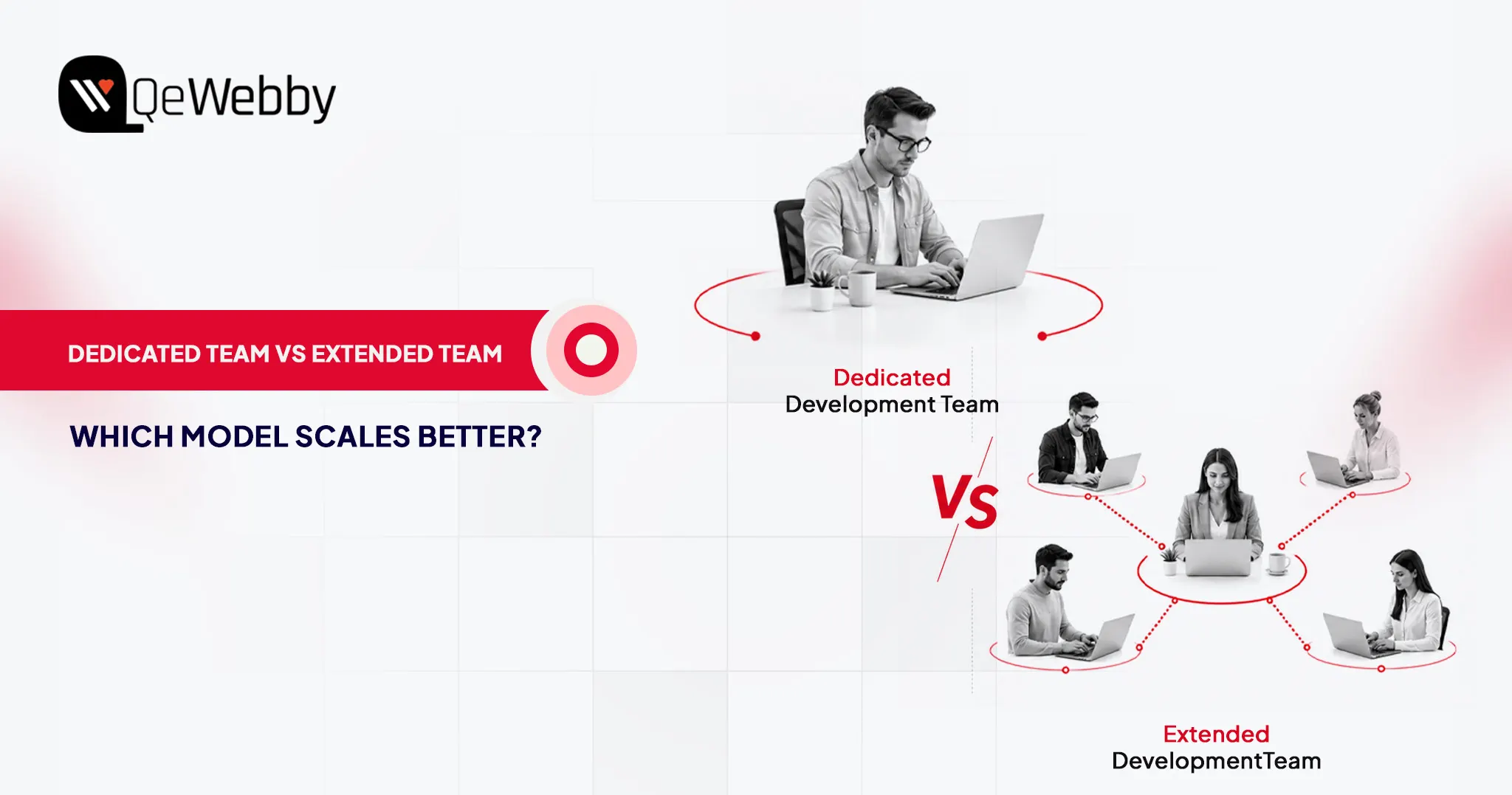
Still deciding between a dedicated freelancer and a full outsourced team?

Our comparison of dedicated vs extended team WordPress breaks down which structure fits which stage of growth, and pairs with any new build.
Managed WordPress Maintenance vs DIY: What B2B Companies Need to Know

Managed WordPress maintenance is a service where a specialist team handles your site’s core updates, security monitoring, backups, and performance tuning on an ongoing basis so nothing falls on your internal team. It’s the standard choice for B2B companies where the website drives lead generation and downtime has a real cost. DIY maintenance, by contrast, works only when someone in-house has both the technical skill and the spare hours to stay on top of updates, threats, and backups manually. Below, we break down exactly what’s included in managed maintenance, what DIY really costs in time and risk, and how to decide which fits your business.

Managed WordPress maintenance is best for B2B companies that rely on their website for lead generation, security, and uptime, while DIY maintenance is suitable only for small or low-risk sites with in-house technical expertise and time to manage updates, security, and performance manually.

Many companies face the dilemma of whether to manage WordPress maintenance in-house or outsource it to specialists. While the DIY approach may seem cost-effective, it can quickly become a burden for stretched marketing and IT teams, especially as the complexity of plugins and cyber threats grows.

With over 300,000+ websites powered by WordPress, competition is high. Making regular updates, implementing security monitoring, maintaining backups, and optimizing performance are crucial. DIY maintenance demands technical expertise and constant attention, whereas outsourcing to trusted providers offers predictable performance, quicker issue resolution, and robust security.

This article will outline the pros and cons of each approach, helping B2B owners, IT managers, and digital marketers select the most suitable maintenance model to ensure business continuity and optimize site performance.

What Is Managed WordPress Maintenance?

Managed WordPress maintenance is a continuous process where a specialist team handles everything from core updates to theme changes, security monitoring, backups, performance tuning, and more. It differs from the DIY approach to handling updates, security, and bug fixes. This reduces the time and expertise required to run a website – how?

Managed WordPress maintenance often comes with hosting services bundles, which add to the WordPress-optimized infrastructure. It offers better scalability and ensures high availability for the site without disruptions. With such a service, you can provide predictable performance, strong security, and rapid bug fixes without the hassle of managing servers.

What’s Included in Managed WordPress Maintenance?

Managed WordPress maintenance typically covers:

  • Core, plugin, and theme updates — applied and tested automatically, not manually
  • Security monitoring — active scanning and threat response, not just a firewall plugin
  • Automated backups — with tested, quick-restore points
  • Performance tuning — server-level and site-level optimization
  • Uptime monitoring — with alerts before customers notice a problem

Most B2B providers bundle these into a monthly retainer ranging from $100–$500+ depending on site complexity versus the $0–$100/month in tools plus staff hours a DIY approach requires.

Who Should Choose Managed WordPress Maintenance?

Managed WordPress maintenance is recommended for:

  • B2B companies generating leads through their website
  • Sites with CRM, marketing automation, or gated content
  • Teams without dedicated WordPress engineers
  • Businesses requiring high uptime, security, and predictable performance
key-factors-to-choose-managed-wordpress-maintenance-service-company

Key Features of Managed WordPress Maintenance Services

  • Automated WordPress updates for core systems, plugins, and themes.
  • Regular site backups with quick restore points that ensure faster recovery in case of incidents.
  • 24/7 security monitoring with comprehensive malware scanning, firewall implementations, and multi-factor authentication.
  • Performance optimization for the website through server-level caching, CDN integrations, and database fine-tuning for faster loading.
  • Complete uptime and health monitoring of the website
  • Access to WordPress expert teams to resolve plugin conflicts, errors, and best practice applications.
  • End-to-end testing of the website, including staging environment configurations and automation.
  • Migration assistance and disaster recovery options

Pros of a Managed WordPress Maintenance Service

  • Managed WordPress maintenance services can help you save time and focus on content, growth, and business priorities.
  • Ensures better website security posture through continuous monitoring, regular updates, and established procedures.
  • Faster, more consistent performance via WordPress-tuned infrastructure and caching/CDN layers.
  • Expert, WordPress-specific support that shortens troubleshooting and reduces downtime.
  • Effortless scalability for campaigns and traffic spikes without manual capacity planning.
  • Peace of mind with automated backups and quick restores if something goes wrong.

Cons of a Managed WordPress Maintenance Service

  • Managed WordPress services can have a higher initial cost but offer more returns in the long term.
  • Businesses have less control over server configurations, advanced customizations, and plugins.
  • No flexibility to run different types of sites or migrate them to another CMS.
  • Some managed services are often limited to specific plugins, which can reduce your options.

What Does DIY WordPress Maintenance Involve?

DIY WordPress maintenance is an approach of taking full responsibility for your website’s care, updates, and performance without relying on any managed service. It requires hands-on management to ensure your WordPress site is up-to-date, secure, and runs smoothly. This includes regular updates, backups, performance checks, and troubleshooting to ensure optimal system performance.

Who Should Choose DIY WordPress Maintenance?

DIY maintenance may be suitable for:

  • Small, low-traffic sites
  • Teams with in-house WordPress expertise
  • Non-critical marketing websites

Key Features of DIY WordPress Maintenance Approach

  • Regular updates for WordPress core, plugins, and themes
  • Routine backups and testing restore points.
  • Security monitoring (utilizing plugins such as Wordfence or Sucuri).
  • Database cleanup and optimization.
  • Spam comment management and user account reviews.
  • Broken link checks and form testing.
  • Performance monitoring and error log review.
  • SEO audits and content updates.
  • Manual documentation and training for involved team members.

Pros of DIY WordPress Maintenance Approach

  • Complete control over server setup, plugins, updates, and customizations.
  • Lower cost, as you avoid fees charged by managed service providers.
  • Flexibility for advanced or unique technical needs, including specialized plugins or scripts.
  • Ability to optimize, experiment, and troubleshoot as needed.

Cons of DIY WordPress Maintenance Approach

  • Time-consuming and requires ongoing attention to detail.
  • Increased risk if security vulnerabilities, plugin conflicts, or errors go unnoticed.
  • Requires technical knowledge to troubleshoot, restore, and prevent major issues.
  • Mistakes during updates or backups can result in downtime or data loss.
  • No guaranteed expert support, leaving all maintenance and fixes up to the site owner.

Now that you know what managed WordPress maintenance is and the DIY approach to it, let’s compare them to understand which is best for you.

book-a-free-consultation

Detailed Comparison of Managed WordPress Maintenance vs DIY Approaches

Comparing managed WordPress maintenance services with a DIY approach requires consideration of cost, expertise requirements, security, performance, scalability, and support.

Key Differences at a Glance

The main difference between managed WordPress maintenance and DIY maintenance lies in responsibility, risk, and scalability. Managed services offer proactive security, automated updates, and expert support, while DIY maintenance requires manual effort, technical expertise, and carries higher operational risk as websites grow.

Let’s start with the cost considerations of using both methods for B2B companies.

Feature DIY WordPress Maintenance Managed WordPress Maintenance
Cost (Estimation) $0–$100/month $100–$500+/month
Time Commitment 5–15+ hours/month (staffed) Minimal (provider handles most tasks)
Required Expertise Moderate to high technical troubleshooting skills Minimal WordPress usage/familiarity
Security & Risk Manual, expertise-dependent; higher exposure Proactive, expert auditing, 24/7 monitoring
Performance Manual optimization; plugin/setup dependent Server, CDN, cache optimized by experts
Scalability & Support Poor, increasingly complex with growth Automated scaling, multi-site support

1. Cost Considerations for B2B Companies

Managed services typically cost $100- $500+ per month for enterprise-grade offerings. At the exact time, DIY costs are as low as $0-$100/month, depending on the type of plugins, tools, and internal staff support you may need.

Managed solutions provide bundled packages that include security updates, backups, support, and uptime guarantees. A DIY approach may be cheaper, but it often comes with hidden costs. For example, you need to hire in-house staff who can work dedicatedly on WordPress maintenance or divert existing staff from core business activities.

Especially for the complex B2B sites, managed WordPress maintenance services make more sense due to a predictable cost structure. DIY, on the other hand, is an approach where prices escalate with an increase in the technical complexity of the website.

2. Time Commitment and Required Expertise

DIY maintenance takes more time than managed services due to the extensive workforce needed. Regular security checks, updates, and patches can take days and even months with an in-house team. Plus, you may have restricted resources, which adds to the complexities of an already delayed process of WordPress maintenance.

3. WordPress Site Backups: Managed Service vs DIY

Ensuring you have proper backups is crucial, especially in the event of an incident or cyber attack, as it will help you recover quickly. DIY backups offer the benefit of complete control over backup configurations, but manually testing, removing, and adding backups can be tedious.

On the other side, a managed WordPress maintenance service ensures automation of the backup process. Set a daily schedule according to your requirements for the backup, and the system will automatically create a backup.

4. Plugins & Core Updates

If you choose the DIY approach, maintaining each plugin, ensuring timely updates, and security can be complex. For example, if you have multiple sites, you have to update plugins across all of them. This can increase manual efforts if you choose the DIY approach.

One of the key benefits of WordPress maintenance provided through managed services is the automation of plugin updates. Many WordPress website maintenance packages offer end-to-end plugin update automation by default.

Plus, managed hosting providers handle server maintenance, PHP updates, and server-side software. This means you can optimize core updates by outsourcing WordPress maintenance.

5. Performance Optimizations

Managed WordPress maintenance handles licenses and support, as well as pre-configuring all servers across sites for optimal performance. On the contrary, the DIY approach requires manual configurations, which are necessary to fine-tune site performance.

Each site may have unique challenges in terms of performance, loading time, and server management. Therefore, if you have multiple sites, managed WordPress maintenance is a sensible option.

6. Security And Risk Management

A DIY approach relies heavily on your internal team’s technical expertise. Routine tasks, such as malware scanning, patching vulnerabilities, configuring firewalls, and monitoring suspicious activity, must be performed manually and consistently to ensure optimal security.

Any delays or missed updates can expose your site to significant risks. Especially for B2B companies handling sensitive customer data, CRM integrations, or gated assets, these become crucial. Managed WordPress maintenance, however, offers a proactive security posture.

Providers run continuous 24/7 monitoring, apply real-time threat detection, and implement enterprise-grade firewalls and malware removal tools. Security patches are deployed instantly, reducing the attack window and minimizing operational disruptions. Most managed services also include incident response support, helping you recover quickly without diverting internal resources.

Security Verdict

For B2B websites handling customer data or lead funnels, managed WordPress maintenance provides significantly lower risk than DIY approaches due to continuous monitoring, faster patching, and expert incident response.

Now that you know the difference, it’s time to understand a step-by-step approach to WordPress maintenance.

How to Get Started with WordPress Maintenance

WordPress maintenance is a continuous process and needs constant monitoring. This is why you need to plan the entire maintenance. With a managed service, you don’t need to worry about planning or execution. However, if you choose DIY, you need to be mindful of specific tools and access permissions, which you will need before implementing the WordPress maintenance approach.

What You Need Before You Begin (Tools, Access, Resources)

First and foremost, you will require access to WordPress admin, hosting panel, SFTP/SSH, database (phpMyAdmin), DNS, and license portals for premium plugins/themes. You will need to install and configure a reliable backup plugin or service. Verify the off-site storage and ensure multiple copies of the site are stored at different locations. Other prerequisites are,

  • Add a reputable security plugin with a WAF, malware scanning, login security, and optionally two-factor authentication (2FA).
  • Create a safe sandbox to test updates and restores before deploying them to production, which is often included in various services and specialized tools, such as BlogVault workflows.
  • Monitor uptime alerts, performance metrics, and scan the site regularly for malware.

You have all the prerequisites. Now is the time to implement WordPress maintenance.

Step-by-Step Guide to Setting Up and Managing WordPress Site Maintenance

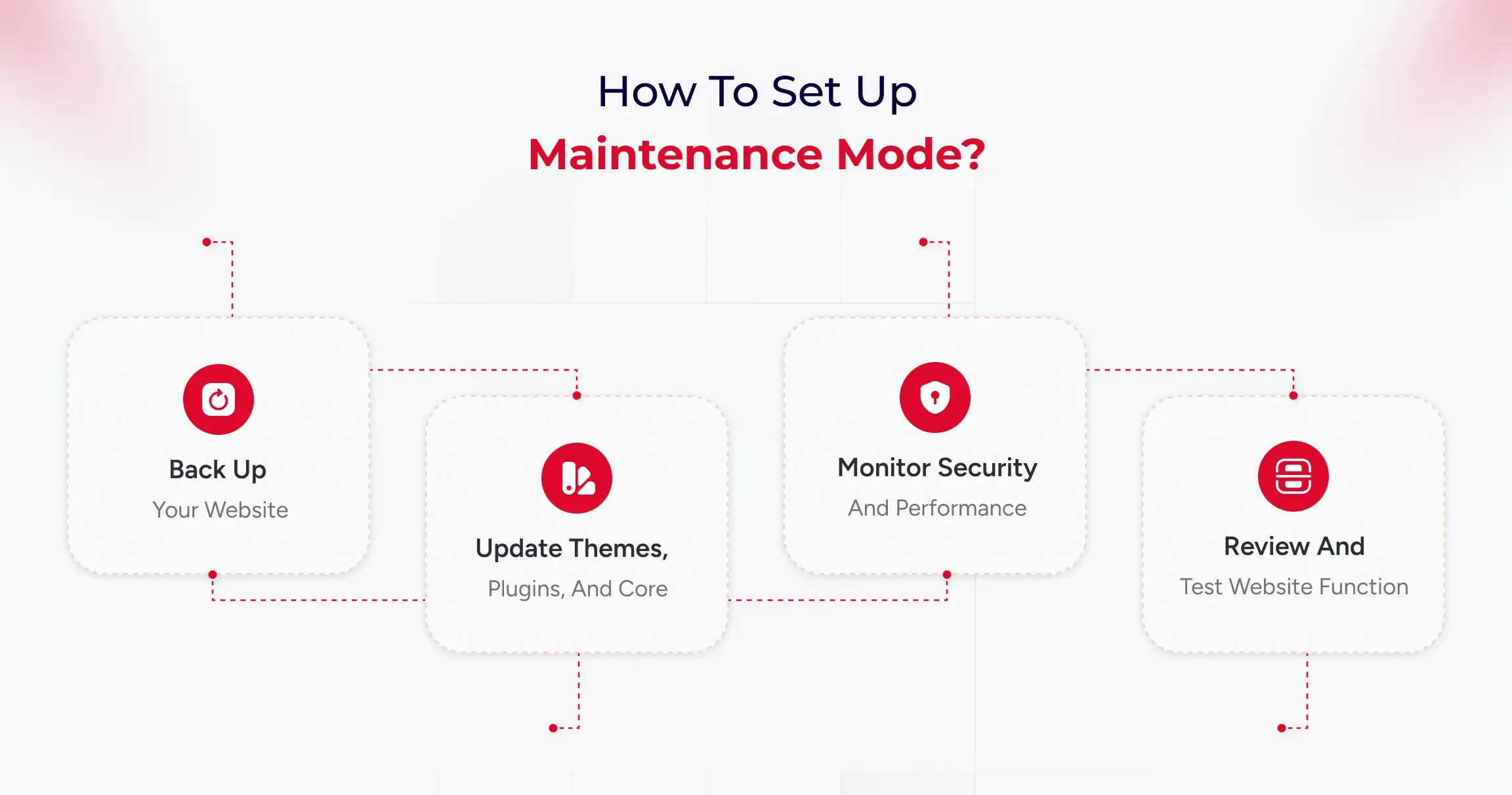
WordPress maintenance involves five ongoing tasks: backing up data, updating software, monitoring security, optimizing performance, and testing functionality. Managed services automate these tasks, while DIY approaches require manual execution and technical oversight.

how-to-set-up-maintenance-mode

Step 1: Back up your website

Think of a backup as a safety copy of your entire site, including both the visible content (themes, plugins, uploads) and the hidden infrastructure (the database with posts, pages, users, and settings). Set up automatic full backups on a schedule and store copies off-site (such as Google Drive, Dropbox, or a backup service) so you can restore if anything breaks or gets hacked.

Run a quick “test restore” occasionally to be sure those backups actually work before you need them in an emergency.

What to do in practice:

  • Install a reputable backup tool and schedule both file and database backups (daily/weekly, depending on how frequently your site changes).
  • Save backups to external storage and keep several recent versions for safety.
  • Make a quick note of restore steps so you’re not guessing during a crisis.

Step 2: Update themes, plugins, and core

Updates fix bugs, patch security holes, and improve compatibility, so keeping WordPress core, plugins, and themes current is one of the easiest ways to stay secure and stable. Before updating, ensure that a fresh backup exists. For larger or more complex sites, test updates on a staging copy first to avoid breaking live pages.

After updating, give the site a quick check to confirm layouts, forms, and key features still work as expected.​

What to do in practice:

  • Update weekly (or sooner for security releases), starting with plugins, then themes, then core if needed, while having a recent backup ready.
  • Remove plugins and themes you don’t use; fewer moving parts means fewer risks and faster pages.
  • For significant updates, consider delaying a couple of weeks if your site is sensitive, and test on a staging environment first to catch conflicts early.

Step 3: Monitor security and performance

Security monitoring identifies malware, suspicious logins, and known vulnerabilities, allowing you to respond quickly if something’s amiss. Enable basics like strong passwords, two-factor authentication, and limited login attempts, and use a security scanner to run routine checks automatically. At the same time, keep an eye on performance uptime alerts, page speed, and Core Web Vitals.

What to do in practice:

  • Turn on daily security scans and get alerts for downtime and unusual activity (user activity logs help pinpoint what changed and who did it).
  • Review speed weekly: large images, bloated plugins, and full caches can slow you down, so optimize images, purge cache, and prune heavy add-ons.
  • Set a cadence: daily automated scans/uptime checks, weekly performance updates, monthly backup tests, and a deeper audit for peace of mind.

Step 4: Review and test website functionality

After changes or on a regular schedule, click through your most essential paths like a visitor to ensure everything still works, such as menus, contact forms, checkout, and search. Check for broken links, missing images, and unusual layout shifts, as even minor issues can frustrate users or lead to lost conversions.

If something’s off, roll back using your latest backup or disable the last update to isolate the problem, then retest before going live again.​

What to do in practice:

  • Keep a short checklist: homepage load, key landing pages, forms, login, cart/checkout, and search.
  • Run a quick broken link and spam comment cleanup as part of routine maintenance to keep the site tidy and trustworthy.
  • If you manage multiple sites, consider using a central panel to view updates, uptime, and performance at a glance, saving you time.

How to Choose the Best Managed WordPress Maintenance Service for Your Company

When selecting a managed WordPress maintenance partner, consider it as finding a long-term team member. Your provider should offer consistent performance, strong security, reliable support, and a plan that aligns with your business goals.

For B2B organizations, it’s vital to choose partners that understand complex site setups and the need for smooth digital operations. A good service should require little involvement from your internal teams.

Updates, monitoring, backups, and performance tuning should happen regularly. The best providers keep your site stable and anticipate issues before they arise.

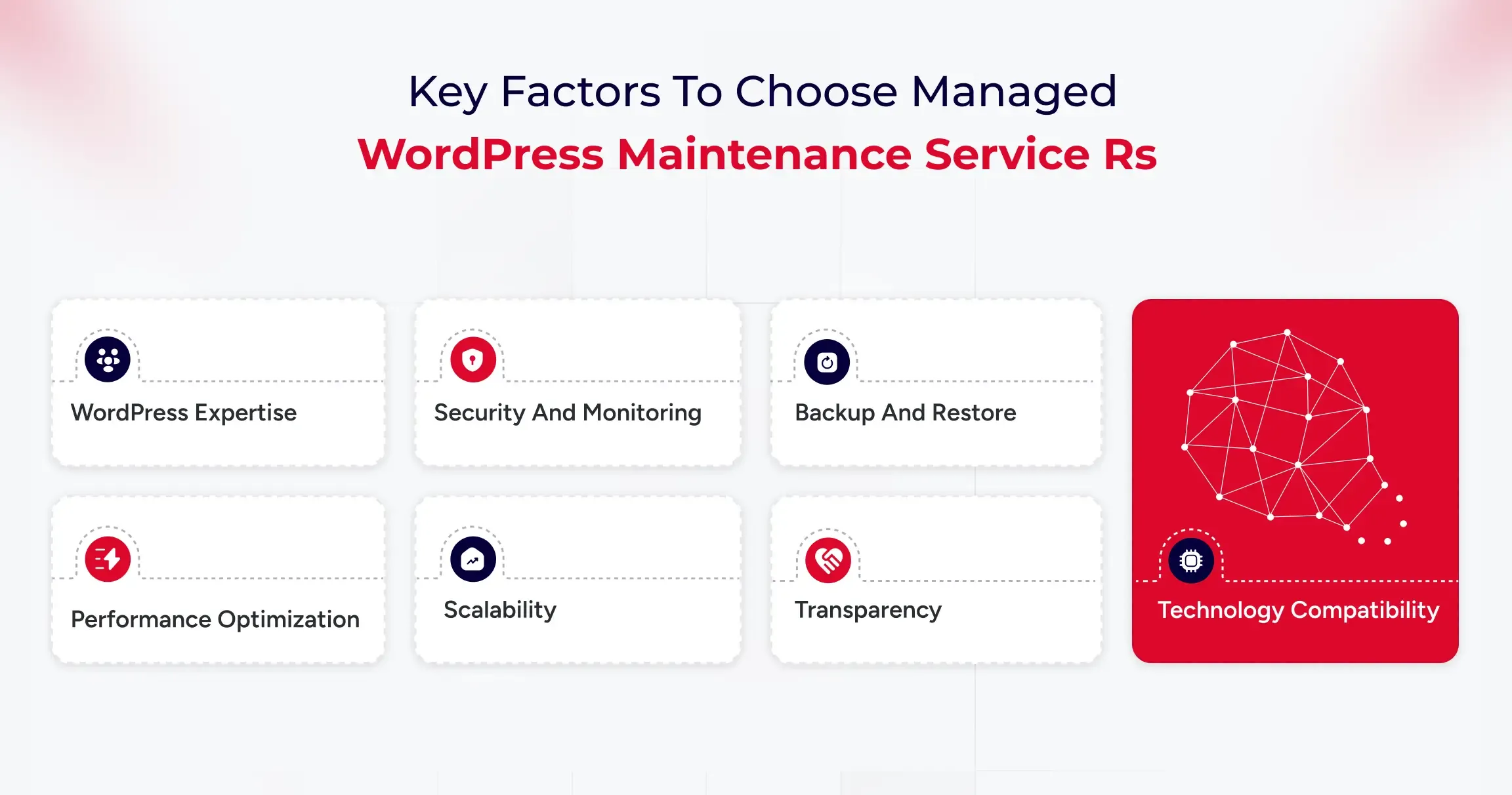
Key Factors to Consider

  • WordPress Expertise: Ensure the team has experience with enterprise-level WordPress and can handle plugin conflicts and performance optimization.
  • Security and Monitoring: Look for 24/7 threat detection, web application firewall (WAF) protection, and clear incident response plans to reduce risks during attacks.
  • Backup and Restore: The provider should offer daily backups, off-site storage, and tested restore options to ensure business continuity.
  • Performance Optimization: Evaluate their caching methods and load testing to support high traffic.
  • Scalability: Your provider should support growth, such as adding subdomains or expanding to multi-site setups.
  • Transparency: Request access to uptime logs, performance metrics, and support documentation to understand what’s being maintained.
  • Technology Compatibility: Ensure the service works with your preferred plugins, tools, and systems.

Affordable Maintenance Solutions for Small Businesses

Small businesses often struggle to strike a balance between costs and reliability. While enterprise-level services offer extensive coverage, many companies don’t need such expensive plans. It’s essential to find providers that deliver affordable packages without sacrificing key security, updates, and backups.

Cost-effective maintenance solutions typically include automated updates, uptime monitoring, malware scanning, regular backups, and basic performance improvements, often at a fraction of the cost of a full-time technical team. These services help businesses stay secure and ensure their site runs smoothly.

The right plan should be easy to manage and reliable, allowing you to focus on attracting customers and growing your business. If a provider offers add-ons, transparent pricing, and straightforward service agreements, it’s likely a good fit.

User Experiences and Feedback on Managed WordPress Maintenance

Many B2B companies find that outsourcing WordPress maintenance reduces their workload and improves website reliability. Regular updates, automated backups, security monitoring, and performance optimization are key benefits.

Professional maintenance helps prevent problems, providing stability during busy times and product launches. Companies with multiple websites, especially those with managed plans, benefit from this, as it reduces plugin conflicts and downtime.

Most users are satisfied but suggest choosing a service with clear deliverables and proactive communication. Overall, businesses appreciate the peace of mind that comes with outsourcing this task.

Common Challenges and How Services Address Them

Here are some of the key challenges that managed WordPress maintenance services can handle.

Frequent Updates and Compatibility Issues

B2B companies often struggle with keeping WordPress up to date, which can lead to compatibility issues if not thoroughly tested. Managed maintenance services test updates in staging environments and apply them only after confirming stability, preventing downtime, and ensuring smooth website functionality.

Growing Security Risks and Vulnerabilities

Security is a significant concern for businesses that use WordPress. Risks like plugin vulnerabilities and malware can disrupt operations. Managed maintenance services offer comprehensive security monitoring, regular scans, robust firewalls, reliable backups, and swift threat responses to maintain a secure environment and minimize downtime and recovery times.

Performance Degradation as Websites Scale

As websites expand, they may become slower, which can impact SEO and user engagement. Maintenance services enhance performance by optimizing caching, cleaning images and databases, configuring CDN, and making hosting adjustments, ensuring the site remains fast and competitive.

Internal Resource Limitations and Time Constraints

Managing WordPress can distract internal teams from essential tasks. Technical issues take time away from campaigns and content creation. Managed maintenance services handle website upkeep, allowing teams to focus on core business activities.

Selecting the Right Maintenance Partner

Choosing a maintenance provider can be a challenging task. Some plans focus solely on basic updates and overlook important areas, such as security and performance. Selecting a service with clear agreements, detailed reporting, and B2B experience ensures effective management and proactive problem-solving.

talk-to-wordpress-expert

Final Verdict: Managed vs DIY WordPress Maintenance

Managed WordPress Maintenance is a strategic investment that protects brand reputation, boosts digital performance, and supports scalability for B2B organizations. As websites become increasingly vital for lead generation and customer experience, reactive management is no longer sufficient.

A dedicated maintenance partner ensures precise execution of updates and optimizations, minimizing the risks of downtime and security breaches. For growth-focused businesses, this leads to consistent performance, enhanced search visibility, and a digital infrastructure that evolves to meet changing business objectives.

How Top Agencies Deliver More with White-Label WordPress Development

Most agencies struggle at scale due to resource limitations. White-label WordPress development services can help agencies scale without spreading their resources too thin. However, finding the right white-label WordPress development agency can be a complex process.

Agencies need to evaluate development, WordPress customization, and SEO expertise. However, there are many additional aspects that an agency needs to consider before selecting a white-label WordPress development service. With 43.3% of websites on the internet now using WordPress, the demand for development expertise is also higher.

This is why many agencies face questions like

  • Does investing in a white-label development service make sense?
  • What are the tasks an agency can outsource?
  • How does it impact SEO?
  • Is outsourcing the only answer to cost reduction and scalability?

In this article, you will get a comprehensive guide on why you need a white-label WordPress development agency for your projects, its benefits, and tasks that can be outsourced. So, let’s get started.

What are White Label WordPress Development Services?

White-label WordPress development services help agencies in building WordPress websites, plugins, and applications. Agencies can rebrand websites as their own. Such a partnership allows agencies to scale their services and easily expand offerings without hiring in-house staff.

What Makes White Label WordPress Unique?

White-label WordPress development offers flexibility for agencies. It ensures a custom-branded solution for agencies through outsourced development. This makes sure agencies reduce costs, simplify branding, and offer tailored solutions.

Brand Consistency Without Technical Overhead

White-label WordPress development services enable companies to deliver professional websites, ensuring consistent branding and a seamless user experience. This is particularly important if you want to ensure consistency across devices and screens.

Especially when 64.2% of total traffic comes from mobile devices, it is essential to ensure branding consistency. Agencies can outsource the technical work to specialized developers and offer sites that can be rebranded for clients.

Cost-Effectiveness and Resource Optimization

Such services reduce the need for hiring in-house resources, training, and managing development teams. Due to outsourcing, the development cost has been reduced. Additionally, the time required to build websites for clients decreases, ensuring faster delivery.

Enhanced Service Portfolio and Expertise Access

Companies can easily access specialized WordPress developers and experts. It also helps create custom themes, develop plugins, provide WooCommerce solutions, and optimize performance. WordPress outsourcing service providers employ SEO best practices, security protocols, and strategies for the site. This helps agencies ensure their clients’ visibility is higher.

While the above aspects do make white-label WordPress development unique, the real question is how it fares against the standard development approach.

book-a-free-consultation

The Difference Between White Label and Standard WordPress Development

Here are some key differences between white-label and standard WordPress development approaches.

Aspect White Label WordPress Development Standard WordPress Development
Ownership Client owns the final product; development team remains invisible to the end customer Direct relationship between client and development team; complete transparency of providers
Branding Developed under your brand name, the third-party provider remains anonymous Development team’s branding may be visible; direct attribution to developers
Cost Structure Lower upfront costs; eliminates hiring and training expenses Higher initial investment; includes whole team setup and resource allocation
Project Timeline Faster turnaround due to specialized, ready-to-deploy teams Longer development cycles include team assembly and project planning phases
Customization Level Limited customization focuses on rebranding existing solutions Full customization capabilities; complete control over features and functionality
Scalability Highly scalable, easy to scale up/down based on project demands Requires significant resource planning; scaling involves hiring and team management
Quality Control Dependent on the provider’s standards, less direct oversight Direct quality control, complete management of development standards and processes
Communication Indirect communication through a white label provider Direct communication with the development team, immediate feedback loops
Project Complexity Best suited for standard features and simple-to-moderate projects Ideal for complex, highly customized solutions requiring unique features
Resource Management No need for internal resource management; the provider handles team allocation Full responsibility for team management, resource allocation, and coordination

Why Top Agencies Use White-Label WordPress Partners?

Agencies often adopt white-label partnerships to get the perfect blend of strategic and practical benefits. It enables agencies to scale their services without incurring significant expenses on hiring in-house teams, focus on their core strengths, and ensure better delivery.

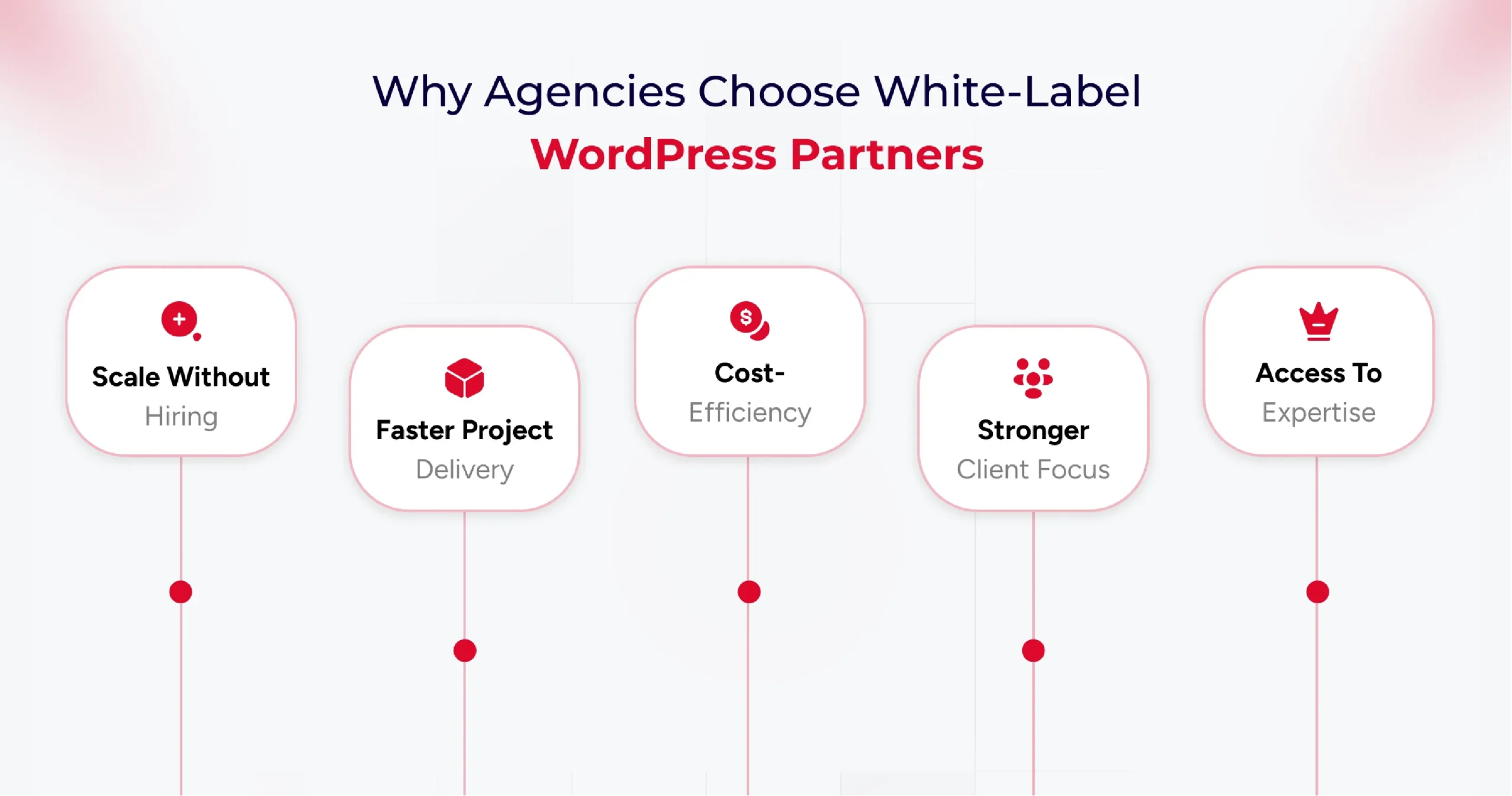
Why Agencies Choose White-Label WordPress Partners

Here are some key reasons agencies use white-label WordPress partners,

1. Scalability without Hiring

White-label WordPress development services provide access to professionals who help agencies complete projects efficiently and deliver high-quality output. The best part is that agencies don’t need to hire these talented professionals in-house. So the cost of hiring, training, and managing talent is borne by the white-label WordPress development agency.

2. Faster Project Delivery

Partnering with a White-label WordPress agency ensures faster project delivery for top agencies and brands. With a team of dedicated experts, white-label service providers provide you with complete flexibility to add or reduce resources as per project needs.

3. Cost-Efficiency

Reduced hiring costs are just one of the many cost efficiency benefits of partnering with WordPress outsourcing services. As an agency, you can reduce the cost of development, content creation, SEO, and CMS management with this partnership.

4. Focus on Strategy and Client Relationships

Offering a finished product under the agency’s own brand creates a consistent and professional client experience. This partnership enables you to maintain smoother client relationships and ensure your team focuses on strategic tasks rather than development ones.

5. Access to Specialized Skills

Finding the right talent for your agency can be complex in a crowded market. Plus, if you need a specialized talent, hiring, onboarding, and ensuring the timely delivery of projects can be overwhelming. Partnering with a white-label development agency, you get access to specialized talents without the hassle of hiring them in-house.

Knowing the benefits of outsourcing to a white-label development agency leads to another crucial question: “What to outsource?” Yes, prioritizing specific tasks and operations for outsourcing is key to successful project delivery.

Top Tasks to Outsource Through White Label WordPress Providers

White-label WordPress providers ensure a range of services that you can outsource. But strategically planning the prioritization of tasks becomes essential. Here are some tasks that you can outsource to a WordPress development agency.

Custom WordPress Website Creation

As an agency, you can outsource the design and development of unique WordPress themes specific to your branding needs. It can help you customize a WordPress website for your clients based on their particular needs.

Plus, you can outsource custom plugin development to add unique functionalities and features to the website. And if you are looking to cater to an e-commerce brand, consider outsourcing WooCommerce development to a WordPress development agency.

You can also outsource website migration tasks, which allows you to seamlessly move the existing resources to newer WordPress versions or environments.

Ongoing Website Maintenance and Support

A key task to outsource is website maintenance. You can ensure higher website uptime by outsourcing the maintenance activities to a white-label development agency. These service providers continuously monitor your website and optimize it for performance based on analytics.

Using such services also ensures daily backups of your website. So, your site is always ready for recovery, even in the event of an incident. Plus, you get complete end-to-end technical support from a white-label development service provider.

SEO Implementation and Optimization

One of the most essential activities to outsource is search engine optimization. As an agency, you need to ensure maximum visibility for clients to ensure higher conversions. Plus, 53% of mobile visitors abandon pages, that take longer than 3 seconds to load. This makes outsourcing performance optimization to specialists crucial for your brand. A white-label WordPress development service helps you optimize SEO and provide better visibility.

This includes,

  • SEO strategy development tailored to your client’s brand and target audience.
  • Identify related keywords, ensure better AIO and GEO strategies.
  • Optimize the website content, meta descriptions, titles, and images for search engines.
  • Address technical aspects of a website to ensure a better site structure, improved crawlability, and enhanced mobile-friendliness.
  • Implement link-building strategies to acquire high-quality backlinks from reputable websites with a high domain authority.
  • Create a content strategy and develop SEO-friendly resources that can offer the target audience better value.

Now that you know what tasks you need to outsource, understanding the impact and benefits of partnering with a white-label WordPress development agency becomes crucial.

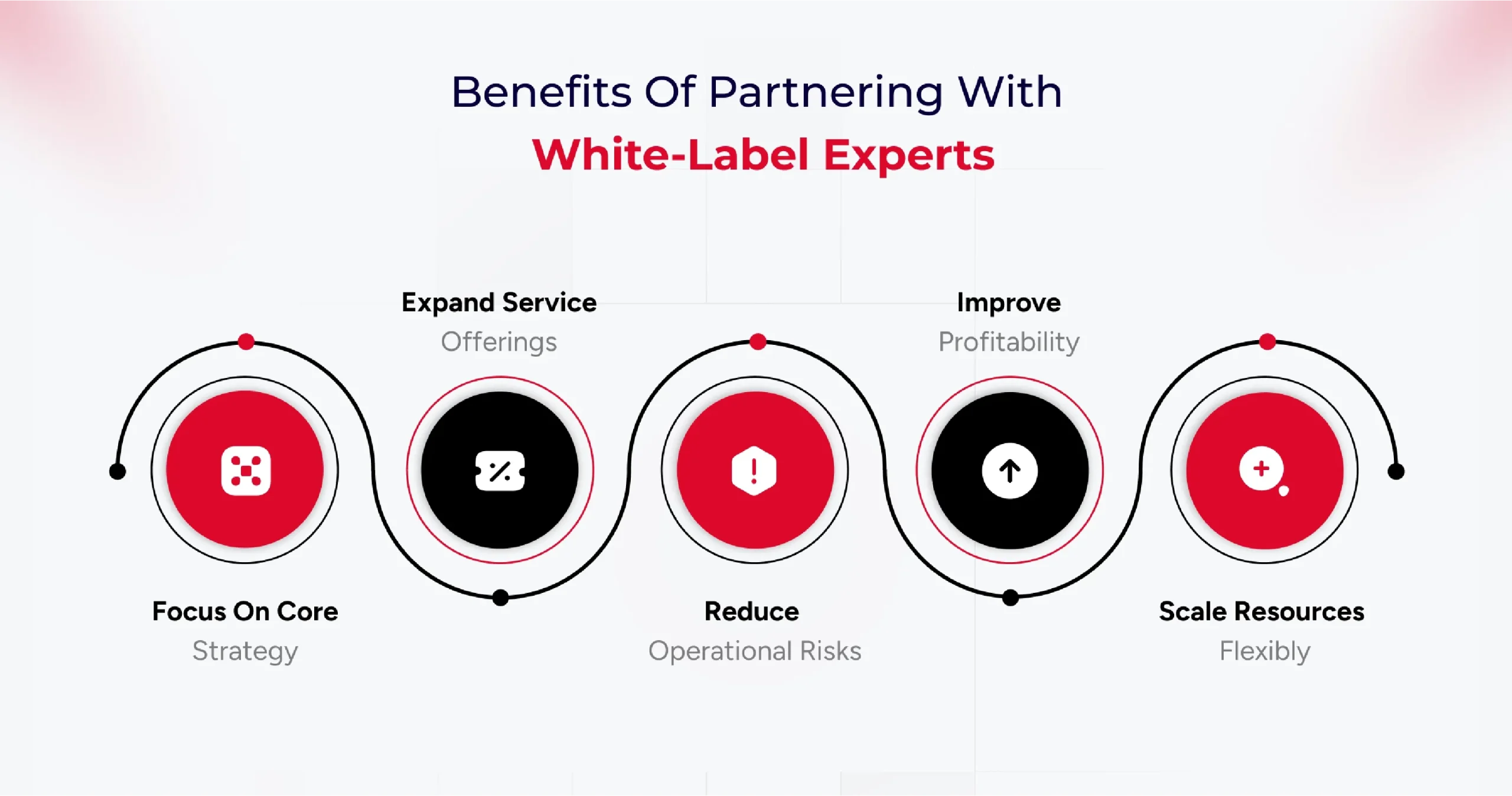
Benefits of Partnering with White-Label WordPress Experts

Partnering with a white-label WordPress development agency, you can get many strategic advantages. From access to specialized talent to reduced hiring overhead and faster project deliveries, the benefits are numerous. Understanding these benefits is crucial in making informed decisions about whether to partner with a WordPress outsourcing agency.

benefits-of-partnering-with-white-label-experts

Some of the key benefits of partnering with a white-label development agency are,

  • Higher Focus on Core Competencies – Such services allow your team to focus on client relationships, strategy, and business development.
  • Service Offering Expansion – You can partner with a white-label development agency to easily scale your business offerings.
  • Risk Mitigation – Partnering with a white-label agency ensures a single point of contact for the client, providing a seamless experience. It offers better client loyalty and brand ownership.
  • Higher Profitability – With this partnership, your agency can handle more clients and increase its profitability through reduced operational costs.
  • Better Cost Efficiency – The reduced cost of recruitment, training, salaries, employee insurance, and other resources makes this partnership cost-efficient.
  • Faster Time-to-Market – Experienced teams and experts from a WordPress development agency help you deliver client projects faster. It enables you to launch a new service and meet deadlines quickly.
  • Better Flexibility & Scalability – Scaling your agency services becomes easier by partnering with a WordPress outsourcing service. Plus, you get better flexibility in adding resources as per project requirements.

A significant benefit of a white-label WordPress development service is lower cost. However, freelance developers can also help reduce the cost of development. This is why understanding the difference between freelance and white-label development becomes vital.

White-Label WordPress vs Freelance Developers (Comparison Table)

Here are some key differences between freelance and white-label development,

Criteria White-Label WordPress Design & Development Team Freelance WordPress Developer
Team Composition Multi-skilled team covering development, design, SEO, project management, and ongoing support Solo expert focuses on their core skills, may specialize in a niche
Scalability Highly scalable, can handle multiple projects and increased workloads efficiently Limited capacity is restricted by individual bandwidth and availability
Backend Support for Agencies Robust WordPress backend support; acts as a silent, invisible partner behind agency branding with long-term updates, troubleshooting, and security Often limited to core development, ongoing WordPress support depends on the freelance arrangeme
Branding Opportunities Enables agencies to offer white-label, branded services; clients see only agency brand Works under their own name; agency branding requires a special arrangement
Expertise Coverage Comprehensive covers design, speed optimization, plugin/theme customization, hosting, security, and maintenance Variable—may be deep in specific areas (e.g., WooCommerce, custom plugins), but broad coverage is often lacking
Cost Structure Higher upfront cost, but billed per actual work delivered; better cost efficiency for ongoing and larger projects Budget-friendly for small projects, flexible payment, and often lower overall costs
Project Management Dedicated account/project managers streamline workflow, communication, and deadlines Direct communication and feedback; management handled personally by the freelancer
Support & Maintenance Ongoing reliable WordPress backend support for agencies; regular updates, security, and fixes Support may be limited; post-project support depends on the freelancer’s availability and preferences
Availability Consistent—team approach ensures resources are deployed as needed Variable; freelancers may juggle multiple projects at once, affecting responsiveness
Delivery Consistency Quality assured with standardized workflows and quality checks Personalized service but variable consistency; may lack process rigor
Flexibility Can rapidly shift resources between projects as agency needs change; offers agency-focused customization. Maximum flexibility in hours and approach, direct negotiation possible

How to Choose the Right White-Label WordPress Partner

Identify your agency’s specific needs, such as full website development, plugin customization, backend support, or ongoing maintenance, before beginning your search. The ideal partner should offer in-depth WordPress expertise, align with your service requirements, and have a proven track record of delivery in similar agency models.

Essential Qualities to Look For in a Partner

  • Technical Expertise: Seek partners with a specialized team, proficiency in WordPress technologies (PHP, JavaScript, HTML, CSS), and proven experience in custom themes, plugins, performance optimization, and secure backend setups.
  • Quality Assurance: Look for robust testing processes, quality control, and attention to SEO, speed, and user experience in delivered projects.
  • White-Label Branding: The partner should work entirely behind your agency’s brand, never revealing their identity to end clients, and seamlessly adopting your branding elements.
  • Scalability & Consistency: A reliable team should scale with your project demands and provide standardized quality, regardless of order volume or complexity.
  • Communication & Support: Prioritize clear communication channels, timely responses, and dedicated support contacts. Regular updates, milestone tracking, and responsive problem-solving are vital.
  • Security and Confidentiality: Insist on NDAs and evidence of strong data protection measures, such as encryption protocols and internal security policies.
  • Ethics & Client Relationship: The partner should demonstrate transparency, intellectual property protection, and a commitment to long-term collaborative success.
lets-discuss-your-agency-goals

Reviewing Past Work and Client Testimonials

Request portfolios, live website samples, and detailed case studies. Authentic client testimonials and reviews offer valuable insights into reliability, strengths, and real-world performance.

Quality, diversity, and relevance of past work indicate the partner’s capability to meet your agency’s standards and niche needs.

Service Agreement Factors You Should Know

Review the contract thoroughly, focusing on:

  • Project scope and deliverables
  • Timelines and benchmarks
  • Payment terms and pricing structures
  • Flexibility to tailor services
  • Post-launch support and maintenance commitments
  • Intellectual property ownership and confidentiality clauses

Clarify all terms to avoid hidden costs or misunderstandings. An explicit agreement ensures accountability and smooth execution.

Checklist for Agency Owners

Here is a checklist that you can follow as an agency owner while selecting the right white-label WordPress development service.

  • Define the exact services required for your agency’s workflow.
  • Assess the technical proficiency and WordPress specialization of the partner.
  • Review portfolios, case studies, and client testimonials for validation.
  • Confirm the partner’s experience in white-label branding and backend agency support.
  • Evaluate communication style, clarity, and responsiveness.
  • Verify security practices and willingness to sign NDAs.
  • Inspect their process for quality assurance and timely delivery.
  • Ensure flexibility in services and cost structures suited to agency budgets.
  • Clarify post-project support and troubleshooting commitments.
  • Audit for alignment in values, ethics, and collaborative approach.

Conclusion

In a fast-moving digital market, being slow is not an option for your agency. This is where a white-label development agency comes into play. It helps your agency deliver projects faster, customize the website as per branding needs, and ensure better profitability.

The key, however, lies in choosing the right partner. Agencies must carefully evaluate technical expertise, SEO know-how, communication practices, scalability, and security standards before committing. A strong partnership can empower agencies to focus on strategy, strengthen client relationships, and maintain brand ownership, all while delivering high-performing websites that meet their clients’ needs.

Ultimately, white-label WordPress development is not just about cost savings; it’s about getting higher flexibility, ensuring faster delivery, and building a sustainable growth model for agencies. By outsourcing the right tasks to the right partner, agencies can stay agile, competitive, and ready to deliver more value in an ever-evolving digital market.

How to Hire a Dedicated WordPress Development Team for Enterprises?

Did you know 60% of enterprises struggle to scale their WordPress websites due to a lack of specialized teams? If your business is growing fast, relying on scattered freelancers or overstretched IT staff may cost you time, money, and missed opportunities.

Enterprise websites demand more than just a digital presence they require enterprise WordPress development solutions that can handle scale, performance, and security. Yet many organizations still stretch their in-house IT teams thin or juggle scattered freelancers, leading to inefficiencies and missed opportunities.

According to Gartner, it projects that by 2026, 65% of enterprises will rely on third-party development partners for digital transformation. These stats highlight a growing reality: more businesses are turning to a dedicated WordPress development team often offshore, to manage projects end-to-end.

Whether you’re overhauling an outdated site, launching a customer portal, or integrating enterprise-grade systems, the right partner can transform your website into a scalable, revenue-driving asset.

Why Hiring a WordPress Development Team Is a Smart Enterprise Move

Digital expectations are at an all-time high. Enterprises can no longer rely on generic website solutions or patchwork freelancers. What they need is a dedicated WordPress development team for large-scale projects, one that can think strategically, execute precisely, and evolve continuously with the business.

Here’s why this move makes business sense:

1. Tailored Solutions for Complex Enterprise Needs

Decision-makers often land on your site with a specific intent—looking for answers, confidence, or a sign you “get it.” Good UX doesn’t just help them find what they need—it reassures them they’re in the right place.

  • Custom feature development to support unique workflows.
  • Enterprise-grade architecture designed for scalability and security.
  • Seamless third-party system integrations (CRM, ERP, APIs).

An experienced enterprise WordPress development solutions provider ensures your website is built for complexity without sacrificing usability.

2. Faster Time-to-Market

Speed matters especially when launching new services or rolling out updates.

  • A dedicated team works with streamlined processes and clear priorities.
  • Offshore teams enable 24/7 development cycles, reducing delivery timelines.
  • Task distribution across specialists (frontend, backend, QA, DevOps) accelerates execution.

This means quicker iterations, faster launches, and the ability to pivot with market changes.

3. Cost-Efficient Without Compromising Quality

Hiring senior in-house developers is costly and time-intensive. Offshore teams, by contrast, offer:

  • Competitive pricing with enterprise-level quality.
  • Savings on recruitment, onboarding, and infrastructure.
  • Flexible models (hourly, project-based, full-time) for budget control.

According to Deloitte, 70% of enterprises outsource software development to cut costs and boost efficiency and WordPress is no exception.

4. Access to Specialized Global Talent

When you hire an offshore WordPress development team for enterprises, you’re not limited by location. You gain:

  • Access to global WordPress specialists with cross-industry expertise.
  • Teams that stay updated with certifications and evolving best practices.
  • The right person for each role, every time.

5. Ongoing Support and Maintenance

Enterprise websites can’t “set and forget.” They require constant attention:

  • Updates, bug fixes, and backups.
  • Real-time support with strict SLAs.
  • Security patching and performance audits.

A dedicated team ensures your site remains fast, stable, and secure 24/7 eliminating the stress of last-minute fixes.

6. Alignment with Business Goals

This alignment keeps your website in step with your enterprise strategy.

  • Learn your brand voice, goals, and customer journey.
  • Use agile sprints, reporting, and check-ins for transparency.
  • Build a partnership focused on outcomes, not just tasks.

A professional team doesn’t just code; it collaborates. They:

7. Freeing Up Internal Resources

Let your staff focus on strategy, sales, and innovation — while experts handle:

  • Backend logic and frontend UI/UX.
  • Performance optimization, SEO, and analytics.
  • Security and compliance.

This division of labor increases efficiency and minimizes risks.

book-a-free-consultation

Essential Skills For Choosing the Right WordPress Development Team

Hiring a team isn’t just about coding knowledge. The best dedicated WordPress developers for large-scale projects combine technical expertise with soft skills that ensure long-term success.

Technical Skills: The Backbone of Your Website

The technical skills a WordPress development team brings to the table are non-negotiable, especially when you’re building an enterprise-grade website. These skills ensure your website runs smoothly, integrates seamlessly with other systems, and delivers an optimized user experience.

Custom Theme & Plugin Development

WordPress is incredibly flexible, but to unlock its full potential, you need developers who can build custom themes and plugins that meet your specific needs.

  • Custom Themes: If you need a unique design that matches your brand, a skilled team can create a custom theme from scratch. This means you’ll stand out from the thousands of other WordPress websites with off-the-shelf themes.
  • Custom Plugins: A good team will be able to build plugins tailored specifically for your business functions, whether it’s an advanced form, payment gateway integration, or special functionality you can’t find in existing plugins.

Custom development is vital to ensuring your site is future-proof, scalable, and capable of growing with your business needs.

REST API and Third-Party Integrations

Today’s WordPress websites are rarely standalone. They need to integrate with other tools, platforms, and services, from CRMs to marketing automation tools. The ability to work with REST APIs and integrate third-party services seamlessly is crucial.

An experienced WordPress development team should be able to connect your site to external APIs, such as social media platforms, payment gateways, and CRM systems.

They should also be adept at using RESTful APIs to allow for smoother, more efficient communication between your site and other services, resulting in faster load times and more powerful features.

Performance Optimization & SEO

A fast, high-performing website is essential for user experience and search engine rankings. Your WordPress development team should have a strong grasp of:

  • Performance optimization: From image compression and caching strategies to optimizing database queries and reducing server load, a good team knows how to make your site fast — no matter how much traffic you get.
  • SEO best practices: While SEO experts focus on content, your WordPress development team plays a big role in making sure the website is built with search engine rankings in mind. This includes ensuring proper site structure, fast load times, clean code, and accessibility.

These technical capabilities ensure that your site isn’t just functional but also visible and high-performing.

Security Best Practices

Security should never be an afterthought, especially when dealing with enterprise data and user information. A WordPress development team should be well-versed in security best practices:

  • SSL certifications, firewall configurations, and user access control.
  • They should be proactive in ensuring your site is protected from hacking attempts, malware, and potential vulnerabilities, and they should conduct regular security audits.
  • They must also stay up-to-date with the latest WordPress security protocols, which can evolve quickly.

In an era of data breaches and cyberattacks, you can’t afford to compromise on security.

Soft Skills: Where Collaboration Meets Innovation

While technical know-how is critical, soft skills are what transform a good WordPress development team into a great one. These are the traits that help teams collaborate, solve problems, and adapt to your evolving business needs.

Communication and Collaboration

Clear communication is key to the success of any development project, particularly when you’re working with remote or offshore teams. Your WordPress development team should be:

  • Responsive and transparent, keeping you in the loop about progress, challenges, and milestones.
  • Collaborative, willing to work with your internal teams, designers, and content creators to ensure your vision comes to life seamlessly.
  • Able to explain technical concepts in plain language, so you always understand what’s going on with your website, even if you’re not a tech expert.

Without strong communication, even the most skilled developers can miss the mark, leading to frustration, delays, and budget overruns.

Problem-solving and Innovation

Development is rarely a straight path. Problems and challenges will inevitably arise. You need a team that’s not only capable of solving problems but also innovative enough to come up with creative solutions.

  • The best WordPress teams are solution-oriented, willing to dig deep and find fixes that others might overlook.
  • They should have experience troubleshooting complex issues, whether that’s fixing site slowdowns, resolving conflicts between plugins, or troubleshooting complex integrations.
  • Beyond problem-solving, they should also bring a spirit of innovation, suggesting ways to improve your site’s functionality, design, or user experience that you hadn’t considered.

In the fast-paced digital world, innovation is a key driver of business success, and your WordPress team should be ready to contribute ideas that take your website to the next level.

Time Management

When it comes to development, time is of the essence — especially when there are multiple stakeholders and tight deadlines. Your WordPress development team should be skilled in:

  • Prioritizing tasks based on business needs and project timelines.
  • Managing resources to ensure work is being done efficiently without unnecessary delays.
  • Meeting deadlines and providing regular updates on progress.

Time management isn’t just about meeting deadlines; it’s about maximizing productivity and delivering results on time — without sacrificing quality.

Experience with Enterprise-Grade Solutions

Finally, you want a team that has experience working with enterprise-grade WordPress solutions. This means they’re familiar with:

  • Handling large-scale websites with thousands (or millions) of visitors, high data traffic, and complex workflows.
  • Integrating enterprise-level tools like ERP systems, CRM software, and other third-party business solutions.
  • Ensuring that your WordPress site is not only scalable but also maintainable as it grows over time.

Their experience in working with large-scale projects will help them anticipate challenges and set up your site for success well into the future.

7 Easy Steps to Hire a Dedicated WordPress Development Team

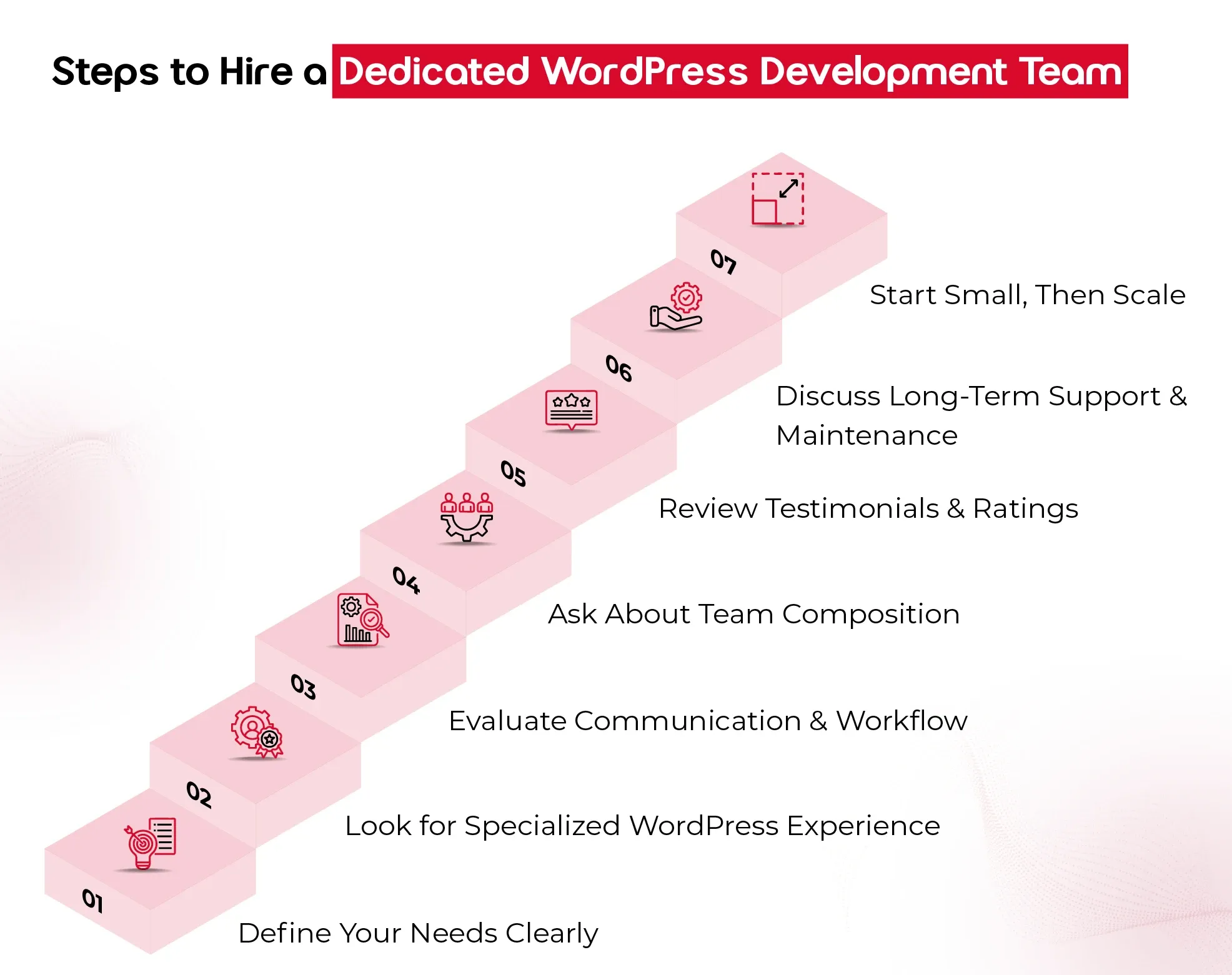
Hiring the right WordPress development team can feel like a big decision and it is. Your website isn’t just a digital storefront; it’s the engine powering customer experiences, driving conversions, and reflecting your brand at every click. So, choosing the right team to build, scale, and support it is worth getting right. Here are the essential steps to help you make a smart, confident hiring decision.

steps to hire a dedicated word press development team

1. Define Your Needs Clearly

Before you even start looking for a team, take a step back and ask: What do you need this team to do?
Are you:

  • Building a website from scratch?
  • Redesigning an existing platform?
  • Adding custom features or integrations?
  • Needing ongoing support and maintenance?

Documenting your goals, technical requirements, timeline, and budget upfront gives you clarity—and makes it easier for the team you hire to deliver the results you expect.

2. Look for Specialized WordPress Experience

Not all developers who “know WordPress” are the same. For enterprise-grade projects, you need a team that specializes in:

  • Custom WordPress development (not just tweaking themes)
  • Scalable architecture and database management
  • Performance optimization and security
  • API integrations with CRMs, ERPs, or marketing tools

Ask to see case studies or a portfolio that reflects similar work to your needs. The right team won’t just say “yes” they’ll ask thoughtful questions, spot risks, and bring proactive solutions.

3. Evaluate Communication & Workflow

A great development team doesn’t just build well — they communicate well. Pay attention to how they:

  • Respond during your initial inquiry
  • Handle your questions (Are they clear, honest, and transparent?)
  • Explain their development process and timelines

You want a team that’s structured, easy to reach, and keeps you in the loop throughout the project. Especially if you’re hiring an offshore WordPress development team, time zone compatibility, tools for collaboration (like Slack or Trello), and clear project documentation become extra important.

4. Ask About Team Composition

An experienced WordPress development team is more than just developers. Ideally, you’re getting:

  • A project manager to guide and coordinate
  • Front-end and back-end developers
  • Designers (if design is in scope)
  • QA testers ensure everything runs smoothly

Understanding who’s involved and what roles they play helps you assess whether the team can handle your scope effectively, especially for large or ongoing enterprise projects.

5. Review Testimonials and Ratings

What others say about them matters. Look for:

  • Verified reviews on platforms like Clutch
  • References from past clients (especially other enterprises)
  • Detailed testimonials that speak to delivery quality, communication, and problem-solving

If they have a 5/5 rating on Clutch, that’s a great sign — but always dig deeper. Strong reviews should reflect more than surface-level praise.

6. Discuss Long-Term Support and Maintenance

Building the site is just one part of the journey. Make sure your potential team offers:

  • Post-launch support
  • Bug fixes
  • Regular updates and security monitoring
  • Scalability planning as your business grows

Your WordPress site should evolve with you, so choose a team that’s in it for the long haul, not just the build phase.

7. Start Small, Then Scale

If you’re unsure, start with a smaller engagement, like a test project, performance audit, or a single feature build. This gives you a real-world look at how the team works before committing to a larger, long-term contract.

book-my-consultation

Final Thought

In today’s digital-first landscape, a website isn’t just a marketing tool; it’s the backbone of customer experience and enterprise growth. Partnering with an offshore WordPress development team for enterprises gives you the best of both worlds: cost efficiency and access to specialized global talent. From custom architecture to long-term support, a skilled team ensures your website scales as your business grows.

At QeWebby, our dedicated WordPress developers for large-scale projects combine technical excellence with enterprise-level strategy. With a proven 5/5 Clutch rating and experience across industries, we help enterprises build, scale, and secure WordPress websites that drive measurable results.

Beyond Contracts: 9 Strategies that Strengthen Agency-Client Relationship

A strong agency-client relationship serves as the cornerstone of successful collaborations in the business world. This partnership is vital across various industries, including marketing, advertising, public relations, and consulting, among others. By investing in nurturing and maintaining these relationships, both agencies, and clients can unlock new opportunities, achieve their objectives, and thrive in an increasingly competitive marketplace.

Let’s examine these key strategies!

9 Strategies that Strengthen Agency-Client Relationships

The cornerstones for nurturing robust agency-client relationships are effective communication, transparency, and reliability. These pillars form the foundation for collaboration, innovation, and mutual success between agencies and clients. And for that reason, we categorize our 9 strategies as

  • Communicating to Connect and Convey:
    1. Prioritize understanding and aligning with the client’s needs.
    2. Foster an environment that encourages new ideas.
    3. Acknowledge achievements together.
  • Embracing Transparency in Business:
    1. Maintain clear and open channels for trust and credibility.
    2. Establish a mechanism for ongoing improvement.
    3. Remain flexible and responsive to change.
  • Building Trust Through Reliability:
    1. Consistently deliver high-quality work to build trust.
    2. Nurture the partnership for continued growth.
    3. Blend agency and client creativity to generate innovative solutions.
Communicating to Connect and Convey

1. Prioritize Understanding and Aligning with the Client’s Needs

Understanding and aligning with the client’s needs should be the cornerstone of any agency-client relationship. By taking the time to truly comprehend the client’s goals, challenges, and objectives, agencies can tailor their strategies and solutions to meet their specific requirements. Active listening, thorough research, and collaborative workshops are key to achieving this alignment. For example, an advertising agency working with a client launching a new product would conduct in-depth research into the target audience and market trends, ensuring that their campaign resonates with the client’s vision.

Pro Tip : Regularly revisit and reassess client needs throughout the project lifecycle to ensure ongoing alignment and relevance.

2. Foster an Environment that Encourages New Ideas

Fostering an environment that encourages new ideas is essential for driving innovation and creativity in agency-client relationships. Agencies should create a culture that values experimentation, rewards creativity, and celebrates out-of-the-box thinking. By providing opportunities for team members to share their ideas and perspectives, agencies can inspire fresh thinking and generate innovative solutions. For example, an advertising agency might hold regular brainstorming sessions where team members are encouraged to pitch unconventional ideas for upcoming campaigns.

Pro Tip : Create a safe space for team members to share ideas without fear of judgment, fostering a culture of innovation and creativity.

3. Acknowledge Achievements Together

Acknowledging achievements together is a powerful way to reinforce the positive aspects of the agency-client relationship. Agencies should celebrate project milestones, successes, and achievements with clients, recognizing the collective efforts that led to success. By sharing in the excitement of accomplishments, agencies can strengthen the bond with clients and foster a sense of partnership and camaraderie. For example, a branding agency might host a virtual launch event to celebrate the successful rebranding of a client’s company, inviting key stakeholders from both organizations to participate.

Pro Tip : Celebrate both big and small wins with enthusiasm and sincerity, reinforcing the value of collaboration and shared success.

Embracing Transparency in Business

4. Maintain Clear and Open Channels for Trust and Credibility

Clear and open communication is essential for building trust and credibility in agency-client relationships. Agencies should establish transparent communication channels, provide regular updates on project progress, and address any concerns or issues promptly. By maintaining transparency and honesty, agencies can demonstrate their commitment to the client’s success. For example, a digital marketing agency might use project management software to keep the client informed about campaign performance metrics and optimization efforts in real-time.

Pro Tip : Practice active listening and empathy to truly understand the client’s perspective and build stronger rapport.

5. Establish a Mechanism for Ongoing Improvement

Establishing a mechanism for ongoing improvement is critical for ensuring that agency-client relationships continue to evolve and grow over time. Agencies should solicit feedback from clients, conduct performance reviews, and implement action plans to address any areas for improvement. By continuously striving to enhance their services and processes, agencies can demonstrate their commitment to client satisfaction and success. For example, a PR agency might conduct quarterly reviews with clients to gather feedback on media outreach efforts and identify opportunities for refinement.

Pro Tip : Embrace feedback as a gift and use it as a catalyst for continuous learning and improvement within the agency.

6. Remain Flexible and Responsive to Change

Remaining flexible and responsive to change is essential for navigating the ups and downs of agency-client relationships. Agencies should be adaptable in their approach, willing to adjust strategies and tactics in response to changing client needs, market conditions, or external factors. By demonstrating flexibility and agility, agencies can show their clients that they are committed to finding solutions that meet their evolving requirements. For example, a social media marketing agency might pivot their campaign strategy in response to shifts in consumer behavior or market trends, ensuring that the client’s objectives are still met.

Pro Tip : Anticipate change and have contingency plans in place to quickly adapt and pivot when necessary.

Building Trust Through Reliability

7. Consistently Deliver High-Quality Work to Build Trust

Consistently delivering high-quality work is paramount for building trust with clients. Agencies should set clear expectations, adhere to deadlines, and strive for excellence in every project. By exceeding client expectations and consistently delivering results, agencies can establish themselves as reliable and trustworthy partners. For instance, a content marketing agency might conduct thorough research and quality checks to ensure that all content produced aligns with the client’s brand voice and objectives.

Pro Tip : Set internal quality standards and conduct regular quality assurance checks to ensure all deliverables meet or exceed client expectations.

8. Nurture the Partnership for Continued Growth

Nurturing the partnership for continued growth is essential for ensuring the long-term success and sustainability of agency-client relationships. Agencies should invest in building strong, personal connections with clients, demonstrating their dedication to mutual success. By regularly checking in with clients, offering strategic guidance, and identifying opportunities for expansion or additional services, agencies can foster a partnership that thrives over time. For example, a web development agency might provide ongoing support and maintenance services to help the client’s website evolve and grow alongside their business.

Pro Tip : Invest in building long-term relationships by regularly checking in with clients, providing strategic guidance, and offering value-added services that support their growth objectives.

9. Blend agency and client creativity to generate innovative solutions

Collaborating with clients to blend agency and client creativity can lead to the development of innovative solutions. By leveraging the unique perspectives and expertise of both parties, agencies can create campaigns, designs, and strategies that stand out in the market. Encouraging brainstorming sessions, soliciting input from the client’s team, and embracing a culture of experimentation are effective ways to foster this collaboration. For instance, a design agency might involve the client’s marketing team in the creative process to develop a website that reflects the client’s brand identity while incorporating cutting-edge design elements.

Pro Tip : Encourage experimentation and don’t be afraid to challenge conventional thinking to unlock truly innovative ideas.

End Note

Fostering strong agency-client relationships is not only beneficial but imperative in today’s competitive business landscape. By implementing the nine strategies outlined in this blog – from prioritizing understanding and alignment with client needs to nurturing partnerships for continued growth – agencies can elevate their collaborations to new heights. Through open communication, innovative thinking, and a commitment to delivering exceptional work, agencies can establish themselves as trusted partners and valuable allies in their clients’ success journeys. Remember, building and maintaining strong relationships takes time, effort, and dedication, but the rewards are well worth it. Here’s to creating lasting partnerships that drive mutual success and prosperity.

If you’re looking for a trusted partner in web development to help bring your vision to life and strengthen your online presence, look no further! Our agency specializes in creating custom, high-quality websites tailored to your unique needs and objectives. [Get in touch with us](/contact-us) today to learn more about how we can elevate your online presence and drive results for your business. Let’s embark on this journey together!

Take Your Business to New Heights with Our White Label Solutions!

Let’s Connect

8 Big WordPress Mistakes To Avoid During Website Scalability

Failure to scale your site appropriately can lead to slow load times, crashes, poor user experience, and overall a loss in revenue opportunities.

When your WordPress website is pulling in millions of views a month, it’s clear you’ve found success. But as your site grows, so do the challenges. Traffic surges can cause slowdowns, crashes, and security headaches if you’re not prepared. Failure to scale your site appropriately can lead to slow load times, crashes, poor user experience, and lost revenue opportunities.

Before scaling your WordPress website, it’s helpful to understand when the right time comes. Let us first find out how to recognize the early signs that indicate it’s time to start thinking about growth.

Identifying the Right Time to Scale Your WordPress Site

There are several signs that indicate it’s time to scale your WordPress website. If you notice any of the following, it’s time to start planning for scalability:

1. Decreasing Website Speed

If your WordPress website starts to slow down, even with a minimal increase in traffic, it may be a sign that your current hosting or website structure can’t handle the growing demand. Slow page load times can frustrate users and impact SEO rankings. It’s a strong indicator that scaling is necessary to maintain performance.

2. Traffic Surges or Spikes

Unexpected traffic spikes, like those from a viral blog post, promotional campaigns, or seasonal peaks, can overwhelm your server if your site isn’t designed to handle high volumes of visitors. If you’re experiencing frequent traffic surges, it’s time to consider scalable hosting solutions and load balancing.

3. Website Downtime

Frequent crashes or downtime are major red flags. If your site is going down often, especially during high-traffic periods, your infrastructure is likely not equipped to handle the load. This is a clear indication that scaling is necessary to keep your site running smoothly.

4. Security Concerns

As your WordPress website grows, so does the complexity of managing security. If your site is increasingly targeted by attacks, or you’re handling sensitive user data, it’s crucial to implement better security measures. Scaling your WordPress website with improved security practices, such as SSL encryption, firewalls, and regular updates, will protect your business and users.

5. Higher User Engagement

If you’ve noticed an increase in user engagement, such as more sign-ups, purchases, or interactions, your WordPress website may soon become overwhelmed by the growing demand. A scalable infrastructure will help you manage this higher engagement and ensure the user experience remains smooth.

6. Frequent Plugin and Theme Conflicts

As your WordPress website grows and you add more plugins and themes, you may begin to experience compatibility issues. If plugins are conflicting with each other, causing crashes or slowdowns, it’s a sign your site may need to be optimized for better compatibility and scalability.

7. Limited Hosting Resources

If you’re using shared hosting and see that your WordPress website performance is deteriorating, you may have reached the limits of your server’s resources. If you’re running into frequent issues with CPU usage, memory limits, or bandwidth, it’s time to consider a more robust hosting solution, such as VPS or dedicated hosting.

8. Expanding Content or Features

As your site grows, you may add more content, products, or features. These changes can significantly increase the load on your server, especially if you’re managing a large amount of data. Proper scaling helps accommodate these additions while keeping your site fast and functional.

With the right strategies and infrastructure, your site can continue to perform at its best, even as your business expands. But as your WordPress website begins to grow, it’s easy to overlook some crucial aspects that can lead to bigger problems down the line. Check out the biggest mistakes that hurt scalability and share simple tips to help your site grow without the growing pains.

8 Big Mistakes to Avoid While Building WordPress Website

8-Big-Mistakes-to-Avoid-While-Building-WordPress-Website

Mistake #1: Choosing the Wrong Hosting Solution

Many businesses make the mistake of going for cheap shared hosting, thinking it’s the best deal. The problem? Your site shares server space with tons of other sites, which leads to slower load times, frequent downtimes, and major issues as your site grows. It’s fine for small, low-traffic sites, but as your audience expands, you’ll quickly outgrow it.

Here’s what you should consider:

  • Shared Hosting: It’s budget-friendly but lacks the resources you need for scalability. It’s great for small sites but won’t cut it as your business grows.
  • VPS Hosting: More resources and better performance, with part of the server dedicated to your site. It’s a good middle ground for growing businesses.
  • Dedicated Hosting: All the resources of an entire server just for your site. It’s more expensive but essential for high-traffic sites or complex needs.

Choosing the right host is crucial—don’t go for a bargain if they can’t provide the support you’ll need down the line. Picking a low-cost host can backfire, causing slowdowns or even site crashes when traffic spikes.

Mistake #2: Ignoring Website Performance Optimization

A slow-loading WordPress website is a significant deterrent for users and a key ranking factor for search engines. Research shows that even a one-second delay in load time can lead to a 7% reduction in conversions. Google’s Core Web Vitals further emphasize the importance of fast load times for SEO rankings.

To improve performance:

  • Caching: Store static files so users don’t need to reload the same content every time they visit.
  • Image Optimization: Compress images without sacrificing quality to reduce page size.
  • Minimizing HTTP Requests: Reduce the number of elements on a page, such as scripts, images, and CSS files, to decrease load times.
  • Use Lazy Loading: Only load images and videos when they are in the user’s view to avoid unnecessary load on the initial page load.

Keeping your site lean, removing excess scripts, and reducing third-party integrations will help your site remain fast as it grows.

  • Talk about the impact of slow-loading WordPress websites on user experience and SEO.
  • Discuss strategies for optimizing performance, including caching, image optimization, and minimizing HTTP requests.
  • Share the importance of keeping your website lightweight and fast.

Mistake #3: Poorly Chosen Themes & Plugins

Themes and plugins can add great functionality to your WordPress website, but they can also hinder scalability if not chosen carefully. Poorly coded themes or plugins can cause slow performance, compatibility issues, and security vulnerabilities.

  • Choose Lightweight Themes: Opt for themes designed with scalability in mind—simple, minimalistic designs that load fast and avoid unnecessary scripts.
  • Test Plugins: Always test plugins for compatibility with your WordPress version, and ensure they are updated regularly. Overusing plugins can also bloat your site, so make sure each plugin serves a specific need.

Before adding any theme or plugin, review its performance impact using tools like GTMetrix or Pingdom.

Mistake #4: Failing to Implement a Scalable Database

A poorly structured database can easily become a bottleneck as your site grows. As data increases, the system’s ability to handle multiple queries without slowing down becomes critical.

To ensure scalability:

  • Database Indexing: Indexing helps your database quickly retrieve records, reducing load times, especially for larger websites.
  • Optimize Queries: Avoid excessive and complex database queries that slow down your site. For example, don’t use loops that make unnecessary database calls.
  • Database Cleanups: Regularly clean up unnecessary data, such as post revisions, spam comments, and expired transients, which can increase the database size unnecessarily.

A scalable database will ensure your website continues to perform well even as your business grows.

Mistake #5: Not Planning for Traffic Growth

Many businesses underestimate the future growth of traffic and fail to plan for surges, which can overwhelm their infrastructure. The lack of proper scalability can lead to crashes, slow speeds, and a poor user experience.

To scale effectively:

  • Load Balancing: Distribute traffic across multiple servers to prevent any single server from being overwhelmed.
  • Cloud Hosting: Provides the flexibility to scale your resources up or down based on demand.
  • Content Delivery Networks (CDNs): Distribute your site’s static content to servers worldwide, so users from different regions can load the site faster.

Mistake #6: Neglecting Security Measures

Security breaches are a common cause of site downtime, loss of data, and compromised user trust. Hackers can exploit vulnerabilities, especially on sites that aren’t regularly maintained.

To protect your site:

  • Regular Updates: Keep WordPress core, themes, and plugins updated to patch known vulnerabilities.
  • Two-Factor Authentication (2FA): Use 2FA for added protection against unauthorized logins.
  • SSL Certificates: An SSL certificate ensures data between the server and user is encrypted, improving both security and SEO.

Failing to implement proper security measures will not only harm your reputation but can also leave your website vulnerable to attacks.

Mistake #7: Overcomplicating the User Experience (UX)

Overcomplicating the User Experience UX

A cluttered website with confusing navigation and too many distractions can overwhelm visitors. A bad user experience (UX) makes it hard for users to find what they need, increasing bounce rates and limiting conversions.

To create a user-friendly experience:

  • Intuitive Navigation: Make sure users can find what they need quickly with clear menus and categories.
  • Mobile-First Design: As mobile traffic continues to rise, your website must be optimized for mobile devices. Google even prioritizes mobile-first indexing.
  • Minimalist Design: Keep the layout clean and avoid overloading pages with excessive text or media.

Mistake #8: Skipping Regular Maintenance and Updates

Skipping updates and maintenance can lead to performance issues, security vulnerabilities, and compatibility problems. Neglecting regular WordPress core, theme, and plugin updates can lead to unforeseen problems down the line, especially when newer versions of PHP or WordPress are released.

A solid maintenance plan should include:
  • Routine Backups: Ensure you have regular backups in case of website failure.
  • Performance Audits: Run audits using tools like Google PageSpeed Insights to assess your site’s performance.
  • Consistent Updates: Regularly update the WordPress core, themes, and plugins to ensure everything is running smoothly.

By creating a solid maintenance schedule, you’ll prevent issues from escalating and ensure long-term scalability.

Scale up your WordPress website with us!

Don’t wait for your website traffic to slow down!

Contact Us Now!

In a Nutshell

Scaling your WordPress website successfully requires strategic planning and the right tools. We understand what it takes to get it right, and we’ve helped countless businesses ensure their WordPress websites stay fast, secure, and easy to navigate. Our team has a proven track record of ensuring everything runs smoothly, leaving you with more time to focus on your business.

Reach out today, and let us help you scale your WordPress website effortlessly!

Dedicated Team vs Extended Team: Which Hiring Model Is Right for Your Business in 2026?

Businesses no longer compete solely on products, pricing, or marketing. They compete on execution speed as well as expertise.

The ability of organizations to access development talent quickly often determines how fast they can move in the market.

That is why the discussions around dedicated team vs extended team have become one of the most common hiring topics among startups, agencies, and enterprise organizations in 2026.

Traditional and manual hiring cycles are getting slower and more costly. And companies need flexibility, specialized expertise, and predictable delivery without carrying the overhead of permanent recruitment.

As a result, organizations are increasingly turning toward the dedicated team model and extended team model to access experienced and skilled talent.

According to Deloitte’s Global Outsourcing Survey 2024, 80% of executives plan to maintain or increase their investment in third-party outsourcing, highlighting the growing reliance on external development partners.

What Is a Dedicated Team?

A dedicated team is a fully allocated group of professionals assigned exclusively to your business for an agreed period of time.

Unlike freelancers who juggle multiple clients or consultants who engage intermittently, a dedicated team operates as an extension of your organization with long-term commitment and strategic alignment.

The team works only on your projects, follows your priorities, attends your meetings, and becomes deeply familiar with your business objectives.

How the Dedicated Team Model Works?

The dedicated team model functions much like building your own remote development department without handling recruitment, HR management, infrastructure, and employee administration.

A technology partner recruits, manages, and retains the talent while you retain strategic control over priorities and deliverables.

Typically, the engagement process follows these stages:

  • Requirements discovery
  • Team composition planning
  • Resource allocation
  • Onboarding
  • Sprint planning
  • Ongoing delivery cycles

The team integrates into your workflows, communication channels, and project management systems. This creates stronger knowledge retention, better accountability, and improved delivery consistency over time.

What is the typical team structure for the Dedicated Team Model?

Dedicated teams are customized based on project complexity, but most include the following roles.

Project Manager

The project manager acts as the coordination hub between stakeholders and technical teams.

Responsibilities include:

  • Sprint planning
  • Resource allocation
  • Risk management
  • Delivery tracking
  • Stakeholder communication

For agencies managing multiple client projects, project management support often becomes one of the biggest advantages of a dedicated engagement.

Developers

Developers form the core of the delivery team.

Depending on project requirements, the team may include:

  • Frontend developers
  • Backend developers
  • Full-stack developers
  • WordPress developers
  • Mobile developers
  • API specialists

Businesses seeking ongoing WordPress development often choose to Hire Dedicated WordPress Team resources to maintain continuous website improvements, plugin development, performance optimization, and security enhancements.

QA Engineers

Quality assurance specialists ensure stable releases through:

  • Manual testing
  • Automated testing
  • Regression testing
  • Performance testing
  • User acceptance support

QA involvement throughout the development lifecycle reduces production issues and improves release confidence.

UI/UX Designers

Design professionals support:

  • User research
  • Wireframing
  • Prototyping
  • User experience optimization
  • Interface design

For customer-facing platforms, design participation significantly improves adoption and engagement outcomes.

DevOps Engineers

DevOps professionals manage:

  • CI/CD pipelines
  • Infrastructure automation
  • Cloud deployment
  • Security monitoring
  • Performance optimization

Organizations running scalable applications increasingly include DevOps resources within their dedicated team structure.

Best Use Cases for a Dedicated Team

The dedicated approach is not ideal for every project. However, it performs exceptionally well in specific scenarios.

Long-Term Product Development

Products that require continuous enhancement benefit from dedicated resources because knowledge accumulates over time.

Instead of repeatedly onboarding new contributors, the same team develops deep familiarity with the product architecture and business logic.

This often leads to faster releases and fewer defects.

Agency Partnerships

Digital agencies frequently use dedicated teams to expand service capacity without increasing internal hiring overhead.

Many agencies leverage a white-label WordPress development team to handle client projects behind the scenes while maintaining their own branding and client relationships.

This approach creates predictable delivery capacity while protecting profit margins.

Ongoing WordPress Development

Businesses relying heavily on WordPress often require:

  • Feature enhancements
  • Security updates
  • Plugin customization
  • Performance improvements
  • Technical support

A dedicated team provides continuity that short-term contractors typically cannot deliver. For organizations investing heavily in WordPress Development Services, long-term team allocation often produces better operational efficiency and lower risk.

What Is an Extended Team?

An extended team is a staffing model where external specialists are added to your existing workforce to fill skill gaps, increase capacity, or accelerate delivery timelines.

Instead of operating as a separate unit, the external professionals become part of your internal team structure.

Think of the extended team model as augmenting your current workforce rather than replacing it.

This approach allows organizations to scale capabilities quickly while maintaining control over management, processes, and strategic direction.

As talent shortages continue to affect global hiring markets, the extended development team approach has become one of the fastest ways to access specialized expertise without lengthy recruitment cycles.

How does the Extended Team Model work?

In the extended team model, external resources report directly into your internal workflows.

Your project managers, product owners, or engineering leaders remain responsible for planning, prioritization, and execution.

The external team members simply become additional contributors.

For example:

A company with five in-house developers may add:

  • Two WordPress specialists
  • One DevOps engineer
  • One QA automation engineer

The external professionals work alongside internal staff while following the same sprint schedules, communication channels, and delivery processes. This creates a seamless operational environment with minimal disruption.

Typical Team Composition for Extended Team

An extended team can include virtually any role depending on business needs:

  • Software developers
  • WordPress developers
  • QA engineers
  • UX designers
  • DevOps engineers
  • Cloud architects
  • Security specialists
  • Data engineers
  • AI specialists

The flexibility of the model allows businesses to scale resources up or down based on project requirements. Unlike the dedicated model, team composition may evolve frequently depending on changing priorities.

Best Use Cases for an Extended Team

The extended team model performs best when organizations already have internal leadership and need to expand delivery capacity without increasing permanent headcount.

Internal Team Augmentation

Organizations with established engineering departments often use extended teams to increase development velocity without permanent hiring commitments. This approach is particularly valuable when recruitment timelines cannot keep pace with project demands.

Specialized Skill Gaps

Many projects require expertise that does not justify a full-time hire.

Examples include:

  • Enterprise WordPress architecture
  • Cloud migration
  • DevOps automation
  • Security compliance
  • Performance engineering

An extended development team allows companies to access specialized talent exactly when needed.

Short-to-Medium Duration Projects

Projects lasting several months often fit naturally within an extended team engagement.

Examples include:

  • Website redesigns
  • Platform migrations
  • Product launches
  • Application modernization initiatives

Businesses can increase capacity during peak demand periods and scale back once delivery objectives are achieved.

Freelancer vs Extended Team vs Dedicated Team

Understanding the differences helps avoid costly hiring mistakes and project disruptions.

Factor Freelancer Extended Team Dedicated Team
Ownership An individual contributor works independently External specialists integrate into your internal team Fully allocated team working exclusively for your business
Reliability Varies by individual availability High reliability with team support Very high reliability with dedicated resource allocation
Availability Shared across multiple clients Dedicated working hours aligned with project needs Full-time commitment to your projects
Management Responsibility Managed directly by the client Managed by the client’s internal leadership Shared or provider-managed, depending on engagement
Team Structure Usually one person Selected specialists added to the existing team Complete team, including developers, QA, designers, and project
management
Scalability Limited High Very high
Speed of Hiring Fast Fast Fast to moderate, depending on team size
QA Support Usually unavailable Available when required Typically included
Backup Resources Rarely available Available Available
Knowledge Retention Low Moderate High
Cost Structure Hourly or project-based Hourly or resource-based Monthly team allocation
Typical Pricing $20-$100/hr $30-$120/hr $4,000-$25,000+/month
Best Project Duration Short-term Short-to-medium term Long-term
Agile & Scrum Alignment Limited Strong Excellent
Specialized Skill Access Moderate High High
Internal Team Required No Yes Not necessarily
Long-Term Product Development Not ideal Suitable Ideal
Development
Operational Control Moderate High High
Best For Small one-off tasks, bug fixes, short projects Team augmentation, specialized expertise, temporary scaling Long-term products, agency growth, ongoing development, and strategic
initiatives

The right choice depends on your growth stage, technical requirements, and long-term strategy.

When a Freelancer Makes Sense?

Freelancers work best when:

  • The scope is clearly defined
  • Deliverables are limited
  • Specialized expertise is required temporarily
  • Budget constraints are significant

Freelancers are generally not ideal for mission-critical systems or long-term product ownership.

Knowledge retention becomes a challenge once the engagement ends.

When an Extended Team Makes Sense?

This model gives organizations flexibility without requiring long-term commitments.

Many scaling SaaS companies adopt an extended development team approach before transitioning toward dedicated teams.

  • Have experienced project managers
  • Need temporary capacity increases
  • Require niche technical expertise
  • Want to accelerate delivery timelines
  • Need specialized WordPress developers

The extended team model works exceptionally well when organizations already possess internal leadership and development capabilities.

An extended team is often the right choice when you:

When a Dedicated Team Makes Sense?

The dedicated team model becomes increasingly attractive as business complexity grows.

Choose a dedicated team when:

  • Product development is ongoing
  • Multiple projects run simultaneously
  • Long-term scalability is required
  • Knowledge retention matters
  • Consistent delivery capacity is critical


This model is especially popular among digital agencies.

A dedicated team can function as an internal production department while remaining externally managed.

Many agencies combine Agency Partnership Services with dedicated development resources to expand service capacity while maintaining brand ownership and client relationships.

Dedicated Team

Typical Cost Comparison In 2026: Dedicated Team Vs Extended Team

Model Typical Monthly Cost Typical Hourly Cost
Freelancer N/A $20-$100/hr
Extended Team Variable $30-$120/hr
Dedicated Team $4,000-$25,000+/month Lower blended rate

At first glance, freelancers often appear to be the least expensive option.

However, hourly pricing rarely tells the full story.

A freelancer charging $40 per hour may require significantly more management, communication, documentation, and rework compared to a structured team operating under established Agile Development processes.

Similarly, an extended team may appear more affordable than a dedicated team because you’re only paying for specific specialists.

But as resource requirements increase, dedicated teams often become more cost-efficient due to predictable allocation and reduced administrative overhead.

What Affects Pricing?

Several factors influence both dedicated team pricing and extended team pricing.

Geography

Location remains one of the largest pricing variables.

Average development costs vary significantly by region.

Many organizations build an offshore development team to reduce costs while maintaining quality standards.

Countries such as India, Poland, Ukraine, and the Philippines continue to attract businesses seeking experienced engineering talent with competitive pricing.

Skill Level

Senior architects, DevOps engineers, AI specialists, and enterprise consultants command significantly higher rates than mid-level developers.

The more specialized the skill set, the higher the investment required.

Team Size

A two-person team and a ten-person team naturally produce very different cost structures.

Team composition also matters.

For example:

  • 4 Developers
  • 1 QA Engineer
  • 1 Project Manager

will cost differently than:

  • 3 Senior Architects
  • 2 DevOps Engineers
  • 1 Security Consultant

Project Complexity

Projects involving integrations, enterprise workflows, compliance requirements, or high-availability infrastructure typically require more experienced resources.

As complexity increases, pricing follows.

Contract Duration

Longer engagements generally reduce effective hourly costs.

Technology partners can allocate resources more efficiently when engagements extend beyond six months.

This is one reason many organizations adopting the dedicated team model achieve better long-term cost efficiency than businesses constantly cycling through short-term contractors.

Is a Dedicated Team More Expensive Than an Extended Team?

Not necessarily.

A dedicated team usually requires a larger monthly commitment because resources are allocated exclusively to your organization.

However, the overall cost per deliverable often decreases over time.

Dedicated teams provide:

  • Faster onboarding
  • Better knowledge retention
  • Lower turnover impact
  • Greater delivery consistency
  • Reduced management overhead

An extended team may initially cost less because you’re adding only the resources you need.

But as projects grow in scope and complexity, coordination costs can increase.

For companies with a long-term roadmap, a dedicated team frequently becomes the more economical option despite the larger monthly investment.

The decision should be based on business objectives, not simply hourly rates.

Which Model Should You Choose?

After comparing costs, management responsibilities, and scalability, the next question is obvious:

Which hiring model is right for your business?

The answer depends less on budget and more on where your organization is today, and where you plan to be in the next 12 to 24 months.

Many companies make the mistake of choosing the cheapest option available. High-performing businesses choose the model that aligns with their growth trajectory.

Use the framework below to guide your decision.

Use a Freelancer If:

  • You have a small one-time project
  • The scope is clearly defined
  • The budget is extremely limited
  • You don’t need long-term support
  • Internal resources can manage the work

Freelancers offer flexibility but introduce dependency risks. If that individual becomes unavailable, knowledge transfer and continuity can become major challenges.

Choose an Extended Team If:

An extended development team is often the fastest way to scale delivery without committing to a full dedicated engagement.

  • You already have an internal team
  • You need specialized expertise
  • Hiring full-time employees isn’t practical
  • You need temporary capacity increases
  • Your roadmap fluctuates throughout the year

Choose a Dedicated Team If:

  • You have multiple concurrent projects
  • Development is ongoing
  • You need a predictable delivery capacity
  • Product knowledge retention is important
  • You want long-term cost efficiency
  • You’re scaling agency operations

A dedicated team model creates a stable development environment where resources remain aligned with your business goals over time.

Organizations investing heavily in digital transformation, SaaS development, and ongoing WordPress Development Services often see the highest ROI from dedicated teams because they eliminate many of the inefficiencies associated with frequent resource changes.

Pros and Cons of Each Hiring Model

No hiring model is perfect. Each comes with trade-offs that should be evaluated based on your business objectives.

Dedicated Team Pros

  • Exclusive resource allocation
  • Strong product ownership
  • Predictable delivery capacity
  • Better knowledge retention
  • Lower long-term operational risk
  • Easier scaling for ongoing projects
  • Often more cost-efficient for long-term development

Dedicated Team Cons

  • Higher monthly commitment
  • Less suitable for very short projects
  • Requires strategic planning to maximize utilization

Extended Team Pros

  • Flexible scaling
  • Faster access to specialized expertise
  • Lower commitment than dedicated teams
  • Strong integration with internal teams
  • Ideal for temporary capacity expansion

Extended Team Cons

  • Requires internal management capabilities
  • Knowledge may remain distributed across teams
  • It can become harder to coordinate as team size grows

Freelancer Pros

  • Lowest initial investment
  • Flexible engagement terms
  • Useful for specialized short-term tasks
  • Quick hiring process

Freelancer Cons

  • Limited availability
  • No backup resources
  • Minimal quality assurance processes
  • Higher continuity risk
  • Difficult to scale consistently
  • Often unsuitable for mission-critical projects

Build Development Team

Can You Transition from an Extended Team to a Dedicated Team?

Choosing between an extended team and a dedicated team isn’t always a long-term decision. As businesses grow, product roadmaps expand, and delivery demands increase, the hiring model that worked initially may no longer be the best fit.

The key takeaway from this dedicated team vs extended team comparison is that the right choice depends on your current stage, internal capabilities, and long-term objectives. Rather than focusing solely on cost, evaluate each model based on the value it can deliver to your business.

If you’re exploring the right engagement model for your next project, contact us to discuss how QeWebby can help you scale with dedicated teams, extended teams, and tailored WordPress development solutions.

Ultimately, the best hiring model is the one that enables your team to deliver faster, scale efficiently, and support long-term business success.

WordPress 6.3 Unwrapped: Discover What’s New and Exciting

WordPress 6.3 marks the second major release of 2023, bringing with it a plethora of notable updates, fresh features, enhancements, and bug fixes that amplify the strength and utility of WordPress. With the changes that are spread across 43 core components, WordPress 6.3 opens new possibilities for the creative expression of designers, creators, and builders.

Within this post, we’ll unveil the highlights of WordPress 6.3 and spotlight the features that deserve your attention following the update.

Let’s take a look!

Enhancements in Selectors API

Designed to elevate your styling capabilities to unprecedented heights, this advanced API empowers you with the ability to configure multiple CSS selectors, ensuring a seamless generation of global styles across your blocks. Notably, this can be achieved across three distinct levels: root, feature, and sub-feature.

  • Root Selectors At the core of the Selectors API lies the root selector, your block’s principal CSS selector. Every block requires a primary CSS selector to orchestrate global style declarations. Should you not designate one through the Block Selectors API, rest assured that a default selector (in the form of .wp-block-) will be generated for you.
  • Feature-level Selectors In the new version, API empowers you to target specific block features with unparalleled precision – be it borders, colors, typography, or other attributes. This facet enables you to bestow distinct styles upon various elements within your block. For instance, imagine applying color schemes to your block’s wrapper while refining typographic elements within an inner text element.
  • Subfeature Selectors The Subfeature Selectors elevate your styling prowess to unparalleled heights. Now, individual styles associated with block features (e.g., background-color or border-radius) can be expressed through unique selectors. This proves invaluable when aiming to implement diverse styles within a single feature. Consider a scenario where the block’s typography necessitates font family at the wrapper level while specifying distinct text decoration and font size for inner elements.

The brand-new Command Palette

This exciting feature takes center stage within the post and site editors, granting users swift access through keyboard shortcuts, namely ctrl + k or command + k. It offers two avenues to maximize command utilization: static and dynamic commands.

  • Static Commands: Easily register static commands using the wp.data.dispatch( wp.commands.store ).registerCommand action or the wp.commands.useCommand React hook. With either approach, a command object is provided, equipped with a distinct name, a clear label, an icon, a callback function invoked upon command selection, and potentially, a context.
  • Dynamic Commands: Dynamic commands, on the other hand, are enabled via “command loaders.” These prove invaluable when command availability hinges on user-input search terms or certain conditions.
you design img

The command palette’s versatility extends to contextual commands, ensuring priority visibility and a seamless user experience. These commands shine in specific contexts, such as navigating the site editor or editing a template. Currently, two key contexts have been implemented:

  • Site-editor – While navigating the site editor with the sidebar visible.
  • Site-editor-edit – When engaged in editing a document (template, template part, or page) within the site editor.
  • And the journey doesn’t end here. As adoption grows, additional contexts will be seamlessly incorporated

To manipulate the command palette’s behavior, it is enriched with a host of selectors and actions through the WordPress Data API. These include:

  • Retrieving registered commands and command loaders with selectors like getCommands and getCommandLoader.
  • Checking whether the command palette is open via the isOpen selector.
  • Programmatic control over opening and closing the command palette using the open and close actions.

Evolution of Layout Support

The latest WordPress 6.3 update brings exciting enhancements to layout support, marking its graduation from experimental to stable. While the functionality remains consistent, the upgrade comes with a small change: when you’re adding block support for layout in your block.json, the syntax “layout” now replaces “__experimentalLayout.” Although the support for the “__experimentalLayout” syntax will still be retained for a transitional period, we strongly recommend that you seize the opportunity to elevate your custom blocks by transitioning to the rock-solid layout syntax.

Innovations in CSS Specificity for Enhanced Layouts:

When you offer something valuable in exchange for someone’s email (like a free trial, eBook, or exclusive demo), you’re not just collecting random email addresses. You’re attracting leads who are genuinely interested in what your software can do. This means the leads you gather are more likely to convert into paying clients.

Empowering Complex Block Markup with Classnames:
9. WordPress 62

Building on the foundation laid in WordPress 6.2, the latest version integrated layout classnames into the block inner wrapper. While this aligns with the outer wrapper for most blocks, certain blocks (like the core Cover block) encompass multiple inner containers. With WordPress 6.3, a novel classname graces the inner wrapper of all blocks with layout, amalgamating the block classname with the layout classname.

Say Hello to the New Grid Layout:

Embrace innovation with the introduction of the all-new grid layout type, underpinned by the power of CSS Grid. This dynamic layout defaults to an auto-fill approach, complete with configurable column widths. For those seeking precise control, the columnCount property within the layout object allows you to establish a fixed number of columns.

Elevated Layout and Spacing in the Post Template Block:

Embrace innovation with the introduction of the all-new grid layout type, underpinned by the power of CSS Grid. This dynamic layout defaults to an auto-fill approach, complete with configurable column widths. For those seeking precise control, the columnCount property within the layout object allows you to establish a fixed number of columns.

Seamless Spacer Block Alignment with Parent Layouts:
9. WordPress 6

Spacer blocks now seamlessly integrate with parent layout configurations, taking on the orientation of the parent layout, especially within flex-type layout blocks. While you can still manually set an orientation for Spacer blocks based on parent context, flex layouts grant priority to the flex orientation, ensuring consistent and harmonious designs.

Dynamic Coloring of Social Icons Block

The Social Icons block now offers the option to customize both the “Icon color” and “Icon background color” in WordPress 6.3. Prior to this version, the chosen colors were hardcoded as hex code values within the block, even if you selected a color from the theme palette defined in theme.json.

Now, with WordPress 6.3 release, the Social Icons block embraces CSS classes that seamlessly align with your chosen color values. These classes are an integral part of the WordPress ecosystem, ingeniously generated in harmony with the color palette outlined in your theme.json file. Their structure is straightforward:

has-[color_slug]-color

has-[color_slug]-background-color

It’s essential to note that these empowering classes won’t come into play when a user opts for a custom color. This dynamic integration ensures that your design retains its integrity and aligns seamlessly with your chosen color palette, making WordPress 6.3 the pinnacle of design control and cohesion.

Bundled Themes Drops Internet Explorer Scripts and Styles

In recognition of the diminishing traffic from Internet Explorer users and WordPress’ discontinuation of support for this outdated browser, certain default themes have taken proactive steps. By removing specific Internet Explorer-oriented scripts and styles, these themes are ensuring that the majority of users can enjoy a smoother and faster browsing journey.

Moreover, these optimizations extend to focus enhancement scripts that were previously tailored for Internet Explorer and older versions of Chrome. With the arrival of WordPress 6.3, themes like Twenty Thirteen and Twenty Fourteen have gracefully evolved, no longer incorporating these scripts in their functions.js files. Additionally, from Twenty Fifteen to Twenty Twenty-One, themes have been fine-tuned to neither enqueue nor print these scripts.

This strategic move not only aligns with modern web standards but also reflects our commitment to delivering a top-tier experience for every user. Embrace these enhancements as we usher in a new era of optimized performance and a richer online encounter.

Improvements to the Cache API

WordPress 6.3 release brings forth an array of strategic enhancements that redefine how queries are cached within the WordPress ecosystem.

Elevating Cache Group Dynamics:

Diving into the heart of WordPress 6.3, a paradigm shift in cache group dynamics emerges. Previous versions of WordPress stored query results in cache groups aligned with their corresponding objects. However, the landscape has evolved, and WordPress 6.3 introduces a groundbreaking approach that offers developers unprecedented control and precision.

As the WP_User_Query class joins the cache hierarchy, a dynamic modification unfolds. The introduction of distinct cache groups tailored for queries becomes the cornerstone of this evolution. Developers now hold the reins to specify cache group expiration times, enabling the fine-tuning of cache duration. The innovative wp_cache_flush_group() function stands ready for developers seeking tailored cache clearance.

Flexibility extends even further, granting developers the ability to designate cache groups as non-persistent, if necessary. The newly introduced cache groups encompass:

  • post-queries
  • term-queries
  • comment-queries
  • network-queries (global cache group)
  • site-queries (global cache group)
  • user-queries (global cache group)

Enhancement to get_pages() Function

WordPress 6.3 introduces a significant improvement to the get_pages()function. It now utilizes WP_Query internally, addressing a 13-year-old ticket (#12821). This update reduces complexity by offloading database queries and cache handling to WP_Query.

As a result, this eliminates redundancy and ensures that all filters within WP_Query apply to get_pages(). Users employing filters like posts_pre_query or posts_results for customized WP_Query behavior, including data retrieval from alternative sources such as cache or other databases, will benefit. Additionally, a new filter named get_pages_query_args has been added, allowing developers to modify parameters passed to WP_Query while maintaining compatibility with original arguments.

PHP Support

WordPress 6.3 no longer provides support for PHP 5.

The minimum supported PHP version has been raised to 7.0.0.

Wrap Up

WordPress 6.3 release represents a significant leap in the editing experience. The improvements are substantial, covering various new editing features in the site editor, a redesigned and versatile block pattern system, new blocks, improved performance, enhanced accessibility, and internationalization enhancements, among other improvements.

If you’re thinking about upgrading your WordPress site to leverage these remarkable advancements, our skilled team of WordPress professionals is here to offer seamless assistance and guidance. Embrace the capabilities of WordPress 6.3 and discover new possibilities for your online presence.

WordPress 6.3 introduces notable improvements aimed at enhancing load time performance for content containing images. The impact of these enhancements is particularly evident in the Largest Contentful Paint (LCP) metric, which gauges the time taken from the request initiation until the largest content element within the viewport is rendered.

Automated fetchpriority Support

WordPress 6.3 latest release, now includes the fetchpriority attribute, set to “high,” within the image tag it identifies as the “LCP image” – the image constituting the largest content within the viewport. This attribute instructs the browser to prioritize this image, boosting LCP performance by approximately 5-10%. For further context, refer to the initial proposal post.

Automated lazy-loading

A series of refinements and resolutions have been introduced to enhance the automatic management of lazy-loading using the loading attribute. This refinement process, initiated in WordPress 5.9 and continued in 6.2, culminates in comprehensive enhancements in WordPress 6.3. This meticulous approach ensures the more accurate identification of images where omission of the attribute is appropriate, thereby contributing to optimized performance. For deeper insights into the significance of not lazy-loading in-viewport images, especially the LCP image, in the context of performance, refer to the relevant WordPress 5.9 dev note post.