White Label WordPress Development

Winning more WordPress projects sounds like growth, but more revenue does not automatically translate into stronger profitability for digital agencies.

Development expenses, recruitment, idle capacity, project reworks, updates, management time, and unexpected delays can gradually reduce the margin attached to every successful project.

That creates a common challenge for growing agencies. They need enough technical capacity to accept new opportunities, yet maintaining a large permanent team can become expensive when project demand fluctuates.

Promethean Research reported an average after-tax net margin of 13% for digital agencies in 2025. Its data also showed average margins of 19% for agencies with fewer than 10 full-time employees and 8% for agencies with 50 or more employees. These figures are industry benchmarks rather than guaranteed results for individual agencies.

A flexible delivery model can solve part of this problem by allowing agencies to scale technical resources around actual project requirements.

For many businesses, white label WordPress development provides a way to increase delivery capacity while keeping client ownership, communication, and strategic direction within the agency.

This guide explains how the model can affect profitability, where WordPress project margins are commonly lost, how to compare white-label and in-house development, and how to choose a partner without sacrificing quality or profitability.

How Does White Label WordPress Development Affect Agency Profitability?

Agency profitability depends on more than the price charged for a WordPress project. It is influenced by development costs, employee utilization, project management, rework, revisions, delays, and support requirements.

White-label development can help agencies manage some of these variables by providing additional technical capacity without requiring permanent hiring for every increase in workload. However, profitability still depends on project pricing, partner quality, internal management time, and the total cost of delivery.

Where Do WordPress Project Margins Get Lost?

WordPress project margins often disappear through several small operational problems rather than one major unexpected expense.

Common margin leaks include:

  • Idle developers during periods of lower project demand
  • Excessive revisions caused by unclear project requirements
  • Delays that increase management and communication hours
  • Poor development quality requiring internal teams to correct issues
  • Inaccurate project estimates that underestimate technical complexity

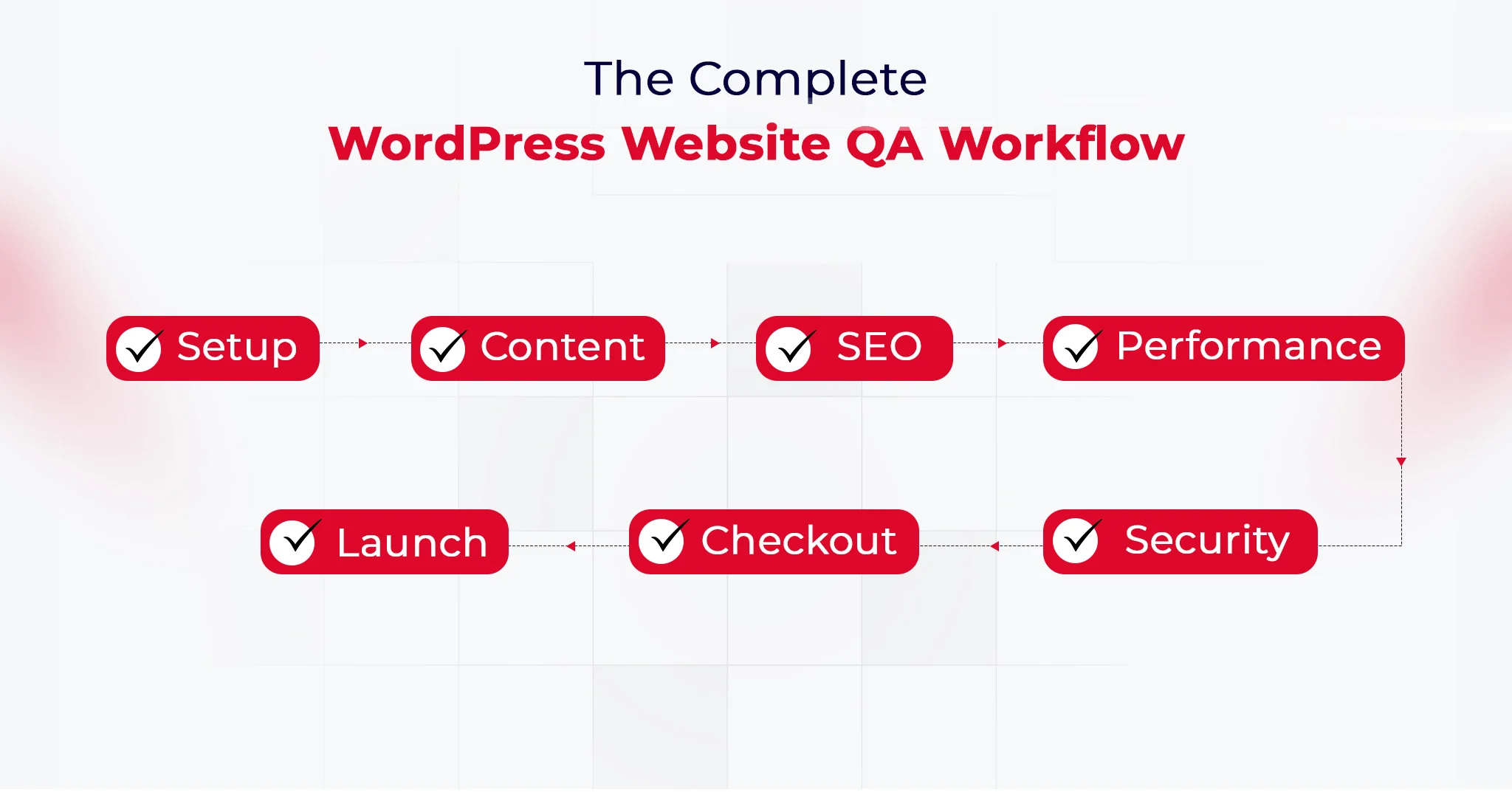
A structured WordPress quality assurance process can help identify functionality, compatibility, and implementation issues before they create additional delivery costs.

Each problem may appear manageable individually, but their combined effect can significantly reduce the profitability of an otherwise successful project.

Why Does Flexible Development Capacity Matter?

Project demand rarely remains consistent, particularly for agencies working with different industries, seasonal campaigns, and changing client budgets.

For some projects or time intervals, they may require several additional developers, while quieter periods can leave permanent technical resources with insufficient billable work.

A white label WordPress development agency can provide additional capacity without requiring the agency to maintain permanent payroll for every potential workload.

This flexibility becomes especially valuable when an agency needs specialized WordPress expertise quickly or wants to accept projects beyond its current internal capacity.

Agencies can use white-label services for agencies to access additional technical capacity while continuing to manage their own client relationships and project strategy.

How Delivery Efficiency Affects profitability

Delivery efficiency directly influences how much revenue remains after the agency completes its contractual responsibilities.

If a project requires fewer unnecessary hours, revisions, and corrections, the agency retains more of its original revenue as operating profit.

SPI Research’s 2025 Professional Services Maturity Benchmark reported billable utilization of 68.9% and EBITDA margins of 9.8% among the professional services firms included in its research. These figures highlight the relationship between resource utilization and financial performance, although they should not be treated as WordPress-agency-specific benchmarks.

Efficient delivery also improves forecasting. Agencies can estimate future projects more confidently when they understand their actual development costs and resource requirements.

That predictability becomes particularly important when agencies want to increase sales without allowing operational expenses to grow at the same pace.
Explore Flexible Development Support

5 Ways to Boost profitability with White Label WordPress Development

Your WordPress profit margin is influenced by more than what you charge clients. Development cost, resource utilization, rework, project pricing, and delivery capacity can all determine how much revenue remains after completing the work.

White-label development can help agencies improve these areas when the delivery model is structured around profitability rather than simply reducing development costs.

1. Reduce Unnecessary Fixed Development Costs

Instead of maintaining a permanent development team for every possible workload, agencies can use external resources when project requirements exceed internal capacity. This may reduce costs associated with idle capacity, recruitment, employee benefits, and training.

However, agencies should also account for partner fees, project management, communication, revisions, quality assurance, and potential rework when calculating the true cost of external delivery.

Comparing the full delivery cost with available WordPress development solutions can help agencies determine which projects are suitable for external technical support.

Why It Is Important

Lower development costs create a larger gap between your client price and actual delivery expense, directly improving the margin available from each project.

2. Handle More Billable Work Without Expanding Permanent Payroll

An agency may have enough projects to generate strong revenue but still lack sufficient technical capacity during busy periods. External development resources can help absorb temporary increases in workload without requiring permanent hiring.

Flexible development capacity allows agencies to handle workload fluctuations without hiring permanent employees whenever project demand temporarily increases.

Why It Is Important

Better resource utilization means you can support more billable work without allowing payroll and fixed development expenses to increase at the same rate.

3. Reduce Rework That Eats Into Project Margins

Every additional development hour spent correcting avoidable errors reduces the profit originally expected from a project.

Clear requirements, experienced developers, structured reviews, and proper QA can reduce unnecessary revisions before work reaches the client.

Why It Is Important

Reducing rework protects the development hours included in your original estimate, helping you retain more of the revenue already generated by the project.

4. Price WordPress Projects Around Your Target Margin

Many agencies calculate project prices around development hours without considering the complete cost of delivery.

Management time, revisions, communication, quality assurance, and development expenses should all be considered before establishing the final client price.

Agencies should also account for ongoing WordPress maintenance and support when estimating the long-term cost of delivering and managing a website.

Why It Is Important

Understanding your true delivery cost makes it easier to set project prices that provide sufficient room for your desired profit rather than discovering margin problems after delivery.

Calculating a Target Project Margin

If an agency charges $5,000 for a WordPress website, its delivery costs might include:

Cost Category Example Cost
White-label development $1,800
Project management $400
QA and revisions $300
Client communication $250
Software and infrastructure $150
Total delivery cost $2,900

The remaining $2,100 represents the gross contribution before broader agency overhead and taxes.

Agencies should calculate project profitability using the complete delivery cost rather than the development quotation alone. This includes internal management time, revisions, QA, communication, software, and support.

5. Scale Delivery Capacity Without Scaling Fixed Costs

Having larger WordPress projects can create profitability problems when agencies must immediately expand their permanent development team to fulfill new contracts.

A flexible delivery model allows agencies to increase technical capacity around confirmed opportunities while keeping their fixed cost structure relatively controlled.

Why It Is Important

You can pursue higher-value opportunities without automatically adding permanent payroll, creating a stronger path for profitable and sustainable agency growth.
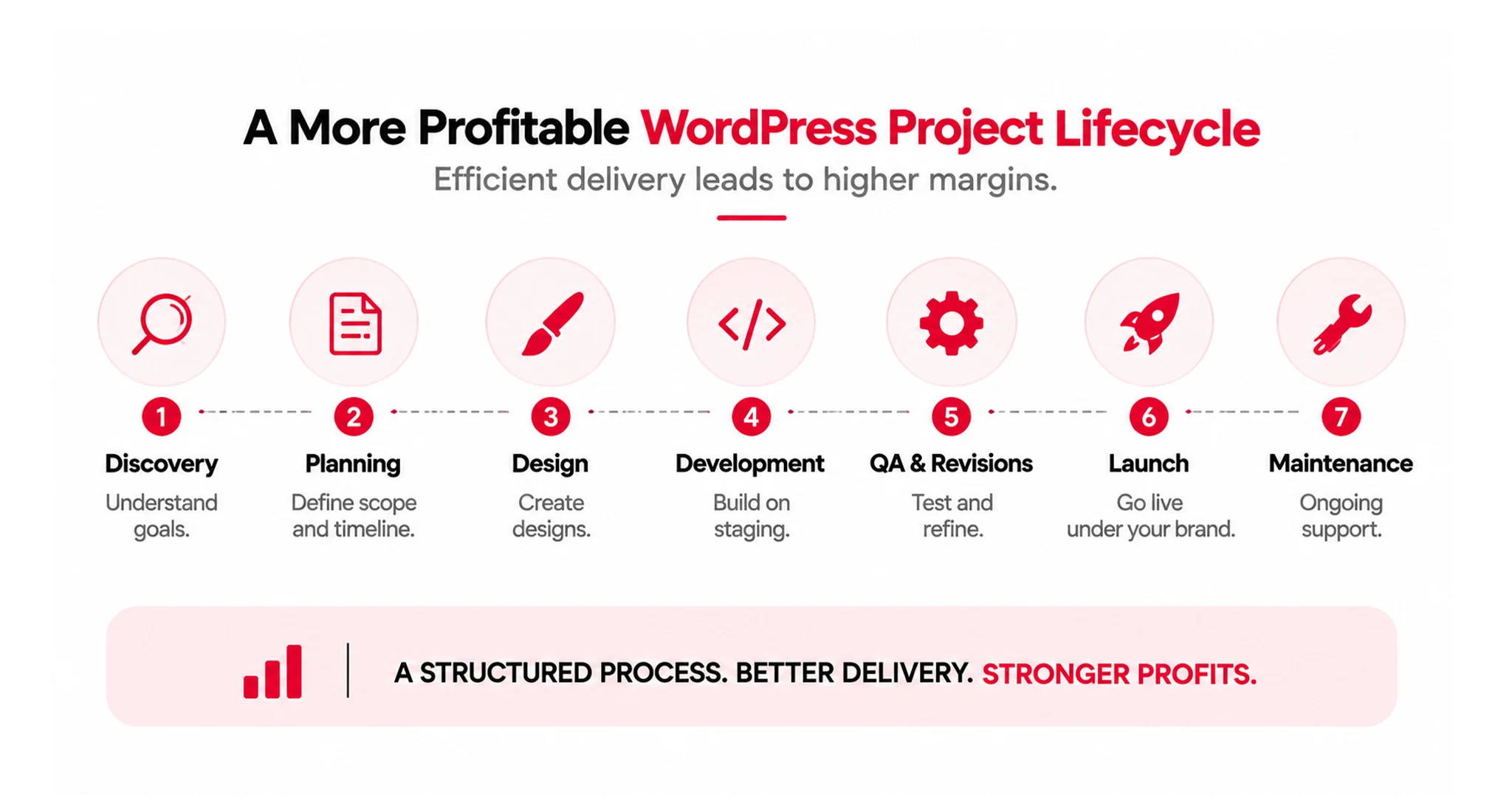
A More Profitable WordPress Project Lifecycle

White Label vs. In-House WordPress Development: Which Is Better for profitability?

Factor In-House WordPress Team White-Label WordPress Partner
Cost structure Primarily fixed payroll and employment costs Usually project-based or retainer-based
Recruitment Requires hiring and onboarding No immediate internal hiring required
Capacity Limited to available internal resources Can expand according to project demand
Slow periods Agency continues carrying employee costs External capacity can often be reduced
Technical control Direct internal control Shared through agreed processes
Project management Managed internally May include partner-side project management
Specialized skills Requires internal hiring or training Can access external expertise as needed
Quality assurance Agency responsible for internal QA Partner may provide dedicated QA processes
Best fit Stable, predictable development demand Variable or growing project demand

There is no universal answer because profitability depends on project volume, technical complexity, employee utilization, management requirements, and long-term business objectives.

An internal team can provide greater direct control, while external development offers more flexibility when workloads fluctuate.

Agencies should therefore compare both models using their actual project economics instead of choosing based solely on salary figures or development quotations.

When an In-House WordPress Team Can Be More Profitable

An in-house team can be more profitable when development demand is stable, and the agency can consistently keep its technical resources productive.

  • Consistent Workload: Permanent developers become easier to justify when the agency has a steady flow of WordPress projects throughout the year.
  • Predictable Revenue: Stable project demand allows employee costs to remain closely connected with recurring development revenue.
  • Internal Expertise: Developers become familiar with the agency’s processes, client expectations, technical standards, and frequently used WordPress solutions.
  • Faster Delivery: Familiarity with recurring project requirements can reduce communication time and improve development efficiency.
  • Better Utilization: Agencies with consistently high developer utilization can potentially achieve stronger economics from an internal team.

When White-Label Development Can Improve Profitability

White-label development may support stronger profitability when agencies need flexible technical capacity without committing to permanent hiring.

The benefit depends on partner pricing, project quality, management requirements, and the agency’s ability to maintain appropriate client pricing.

  • Fluctuating Demand: External resources can help agencies manage periods when project volumes increase or decrease unexpectedly.
  • Specialized Skills: Agencies can access specific WordPress expertise without hiring permanent developers for skills they need only occasionally.
  • Service Expansion: External development can help agencies introduce additional WordPress services without immediately increasing their internal workforce.
  • Lower Hiring Pressure: Agencies can support new projects without committing to permanent payroll before future demand becomes predictable.
  • Flexible Capacity: A white label WordPress agency can provide additional development resources while the agency retains control over client relationships, strategy, and positioning.
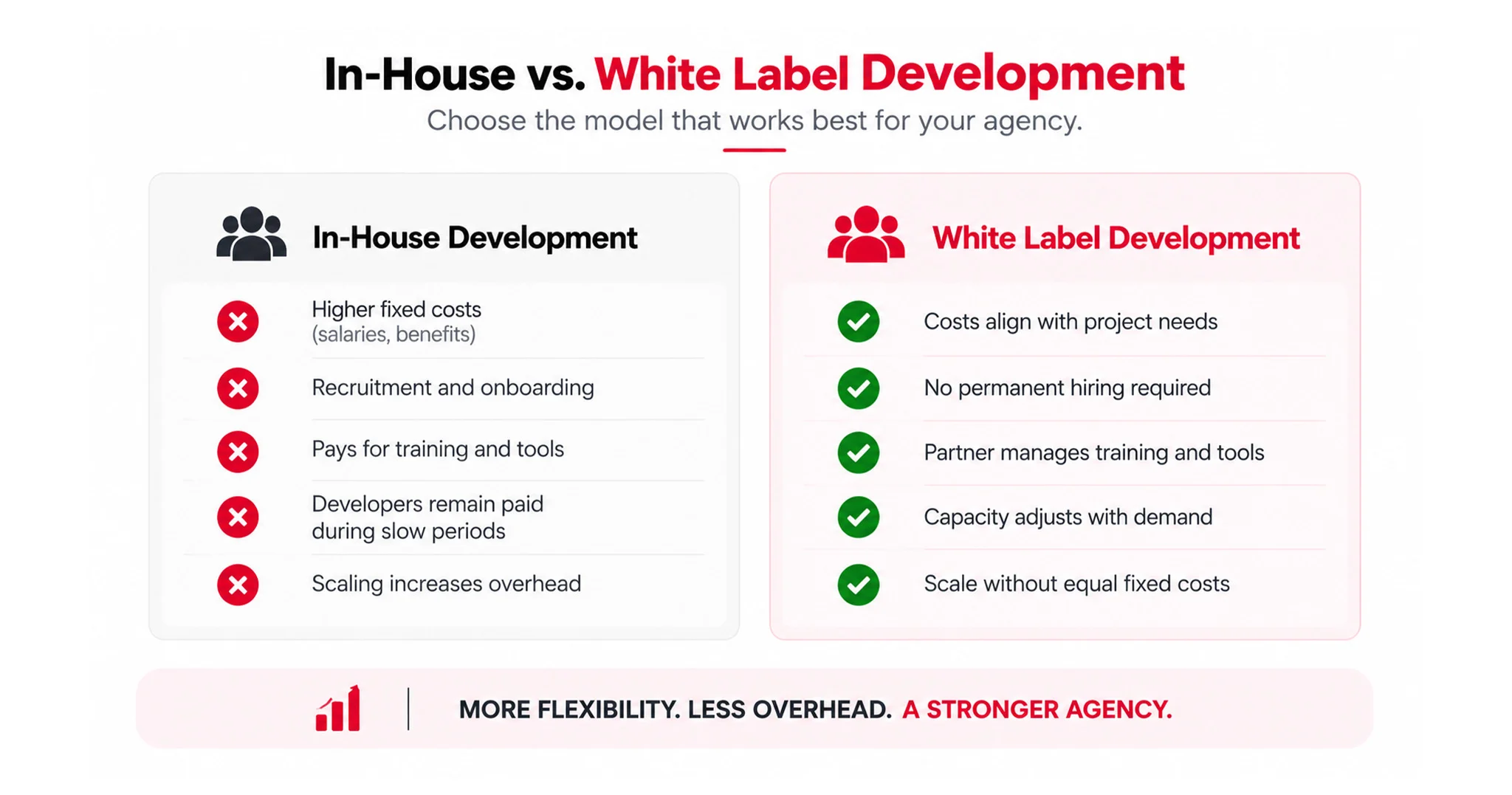
In House White Lable Development

How Agencies Should Compare White-Label and In-House Costs

Agencies should compare:

  1. Average monthly development demand
  2. Average billable utilization
  3. Fully loaded employee cost
  4. White-label partner fees
  5. Internal project management hours
  6. Average rework and revision costs
  7. Recruitment and training expenses
  8. Expected workload during slow periods
  9. Required technical specialization
  10. Long-term ownership and control requirements

The relevant comparison is not salary versus outsourcing fees. It is the fully loaded cost of maintaining internal delivery capacity versus the total cost of external delivery.
Improve Your Development Efficiency

How to Choose a White-Label WordPress Partner Without Losing Your Margins

Evaluate Development Quality Before Price

Low development pricing means little if every project requires significant internal supervision and repeated corrections.

Review previous WordPress work, technical capabilities, communication standards, development practices, and experience with projects comparable to your requirements.

Ask how the team handles custom functionality, responsive implementation, integrations, performance considerations, and technical troubleshooting before making a commercial decision.

Reliable quality can reduce hidden agency costs that are difficult to identify when providers are compared only through their quoted development prices.

Check the Development Partner’s QA and Delivery Process

Quality assurance should happen before a project reaches your client rather than becoming your agency’s responsibility after delivery.

A reliable partner should have a defined testing process covering functionality, responsiveness, compatibility, usability, and common implementation issues.

Look for processes that include:

  • Requirement review before development begins
  • Internal testing before client delivery
  • Responsive and browser compatibility checks
  • Clear revision and issue-resolution procedures
  • Defined communication and delivery milestones

A structured QA process reduces the number of issues your account managers, designers, and internal developers need to identify manually.

You should also understand how reworks, updates, and iterations are handled when requirements change or delivered work does not meet agreed specifications.

Ensure Pricing Supports Your Target Margin

A development partner should fit your financial model rather than forcing you to redesign project pricing after every engagement.

Calculate expected client revenue, development expenses, project management time, rework allowances, and desired profit before accepting the quoted delivery cost.

The right partner should leave sufficient room for your agency to manage the account profitably while maintaining a competitive client price.

Transparent pricing also makes it easier to create repeatable service packages and establish minimum project margins across different WordPress offerings.

How QeWebby Helps Agencies Build a More Profitable WordPress Delivery Model

QeWebby supports digital agencies with white-label WordPress development designed around flexible capacity, clear communication, and predictable delivery processes. Our goal is to help agencies expand their technical capabilities without taking on unnecessary permanent development overhead.

Flexible WordPress Development Capacity

QeWebby helps agencies access dependable WordPress development capacity without requiring them to build and maintain every technical resource internally.

Structured Technical Delivery

Agencies can extend their delivery capabilities for individual projects, recurring workloads, or periods when internal development resources are already fully committed.

Agency-Centered Communication

Agencies remain responsible for client relationships, communication, strategy, and overall project direction while QeWebby supports the technical execution.

Quality Assurance and Revisions

A flexible development structure can help agencies manage technical expenses according to actual project requirements instead of carrying excess permanent development overhead.

Scalable Partnership Models

QeWebby can function as an extension of an agency’s delivery team, helping businesses pursue additional opportunities while building a more scalable and profitable WordPress service model.
Start A Project Discussion

Conclusion

Strong agency margins depend on more than increasing project revenue. They require careful control of development costs, resource utilization, project scope, quality, and management time.

White-label WordPress development may help agencies increase technical capacity without immediately expanding permanent payroll. However, the model is most effective when partner costs, internal management, revisions, QA, and client pricing are evaluated together.

The right delivery structure depends on project volume, technical requirements, internal expertise, and long-term business objectives. Agencies should test potential partners through a clearly scoped project and evaluate quality, communication, documentation, and profitability before establishing an ongoing relationship.

If your agency is looking for flexible WordPress development capacity, QeWebby can help you explore a delivery model suited to your requirements.
The Ultimate Guide to White Label Web Development for Agencies

Agency owners treat a hiring plan as the default answer to cope with massive workloads. However, the numbers behind that plan rarely survive the bottlenecks of the actual talent market.

McKinsey’s March 2025 analysis of the technology talent gap highlights talent scarcity as a significant barrier to digital transformation. For agencies, this raises an important operational question: Is hiring the fastest and most sustainable way to increase development capacity?

So the question is not whether your agency needs more development capacity. It is whether a hire is even the fastest way to get it. This is where white label web development enters the picture, and where most guides stop at a definition instead of the decision behind it.

This guide explains how white label web development works, how it differs from other delivery models, what costs and risks to consider, how project handoffs are managed, and when hiring or another partnership model may be a better fit.

What is White Label Web Development?

Most agencies think white labeling is just outsourcing with better manners. However, once you look at how the contract, the brand, and the client relationship actually work, the difference is structural, not cosmetic.

White Label Web Development is a B2B arrangement where a specialized third-party development company builds websites, web applications, or digital products on behalf of another agency. Your agency buys these white-label web development services at wholesale rates, sets your own retail pricing, and sells the finished work entirely under your own brand.

The development partner runs as a silent execution engine behind the scenes. They stay 100% invisible to the end client. No code footprints, meta tags, style sheet credits, directory paths, or branding traces link the site back to the backend partner. Your agency keeps full ownership of the client relationship, the strategy, and the credit for the delivered product.

So, what does this actually cover?

Custom builds across WordPress, Webflow, Shopify, and React. E-commerce setup, custom database configuration, API integrations, and ongoing post-launch maintenance retainers. The scope is the full technical execution layer, not a slice of it.

Explore White Label Development Services-1

What White Label Web Development is Not

The issue at hand is that “white label” gets used loosely across six different structures. Each one shifts risk, control, or margin differently. Here’s where the line actually sits.

1. Not Traditional Outsourcing

Traditional outsourcing hires an external vendor to deliver a project, but it typically skips brand integration. The end client usually knows a third party is doing the technical work.

When providing white label web development services, the partner operates as a seamless, invisible extension of your agency. The team signs strict Non-Disclosure Agreements (NDAs), works behind neutral or agency-branded staging environments, integrates into your project management tools like ClickUp, Slack, or Asana, and can even run an alias email under your domain, for example [email protected].

2. Not Freelancing

Freelance developers are a common tactical move. However, this route carries real systemic risk: inconsistent quality, fragmented accountability, no project management, and the chance a developer ghosts mid-build.

A proper white label web development agency hands you a full project team, project managers (PMs), UI/UX designers, developers, and QA testing protocols.

3. Not a Reseller Model

Reseller programs sell a named, visible third-party SaaS platform to your clients at a set markup. The reason behind such a scenario is simple: the vendor’s brand stays fully visible, so your agency has limited pricing control and constant risk of the client going straight to the vendor.

In white-label web development, the supplier’s identity is stripped out entirely. This is where the model gives your agency 100% pricing autonomy and client retention.

4. Not a Commission or Referral Program

Commission programs are simple: you pass a lead to a software vendor or dev firm and take a percentage of the sale. Once you refer the client, you give up pricing, delivery quality, and long-term retention.

In a white-label model, you own the contract, the billing relationship, and the deliverable.

5. Not a Joint Venture

A Joint Venture (JV) is co-branded and co-managed, with two entities splitting operational responsibility and revenue on a pre-negotiated split, typically 50/50, often with combined pitch decks and joint client meetings.

White labeling is structurally a customer-supplier relationship. The provider builds the site at a wholesale rate, and your agency marks it up, typically targeting 50 to 70% gross margins, and keeps 100% of the profit.

Explore White Label Development Services

Why Agencies Are Shifting to White Label Web Development

Most agencies believe growth is a headcount problem: more clients means more developers on payroll. However, that relationship breaks the moment a growth curve isn’t perfectly linear, and agencies are turning to white label web development to fix exactly that bottleneck.

So, what’s actually driving the shift? Here are the reasons.

1. Breaking the Linear Scaling Bottleneck

In traditional growth models, taking on more client accounts forces a proportional increase in in-house technical headcount. However, running a full-time internal engineering department carries real fixed costs.

This fixed cost becomes a liability the moment client volume dips, whether from seasonality or a broader downturn. White label partnerships can also help agencies expand their ecommerce service offerings

Verdict: fixed engineering headcount scales with your worst month. Variable white label capacity scales with your actual pipeline.

2. Resolving Talent Scarcity and Sourcing Risk

Recruiting and onboarding technical talent is slow. The reason behind such a scenario is straightforward: qualified developers are in short supply relative to demand, and hiring cycles routinely stretch across months.

Freelancers are one workaround. However, freelancing carries systemic risk: inconsistent delivery quality, no structured project management, and the real chance a developer disappears mid-project.

A structured white label web development agency solves this differently by handing you a full team, project managers, developers, and QA, with built-in redundancy, so the project keeps moving even if one person is unavailable.

Verdict: a white label partner replaces individual hiring risk with team-level redundancy.

3. Expanding Service Portfolios and Deal Size

Clients increasingly want one full-service partner instead of five fragmented vendors. That preference puts pressure on specialized shops, SEO-only or branding-only agencies, to add web development to the menu.

Partnering with a provider for full-stack white label website development adds those platforms to your service menu without adding headcount.

So, what does that unlock? The ability to sell platform builds and custom development alongside your existing services, instead of referring that work out and losing the margin entirely.

Verdict: portfolio breadth is what turns a single-service vendor into a full-service agency of record.

4. Accelerating Speed to Market

Recruiting and onboarding a new in-house developer is a multi-month process end to end. An established white label partner, by contrast, already has the team in place. Scoping and kickoff timelines run in days rather than months, because there’s no hiring cycle standing between the brief and the build.

This is where speed compounds: faster kickoff means faster delivery, which means your agency can commit to tighter client timelines without overstaffing to hit them.

Verdict: the fastest path to shipping a client site is a team that already exists.

5. Creating Predictable, High-Margin Revenue

Offshore white label developers, often based in talent-dense hubs like India, typically operate at a lower cost basis than US or UK in-house hires. Your agency buys development at wholesale rates and resells it at your market rate, capturing the margin between the two.

Post-launch maintenance is the second revenue layer. Security updates, performance tuning, and general upkeep wrap into a monthly retainer that your agency marks up and bills recurring.

Verdict: white label execution turns one-time project revenue into a recurring, marked-up line item.

6. Freeing Teams for High-Value Work

Managing code, server deployments, database integrations, and technical troubleshooting pulls agency leadership away from growth work. So, what happens when a white label partner absorbs that layer silently?

Your internal team redirects its attention to client relationships, account strategy, creative direction, brand positioning, and selling- the work that actually grows the agency.

Verdict: the technical execution layer and the growth layer are different jobs, and white labeling lets you staff them separately.

Ultimately, the scaling bottleneck isn’t a talent problem or a tooling problem. It’s a cost-structure problem, and white label web development is the mechanism that fixes it.

Talk to Our Development Team new

How a White Label Web Development Partnership Actually Works

Most agencies picture a white label partnership as a ticket queue: submit a request, wait, hope for the best. However, a properly run partnership behaves nothing like that. It functions as an invisible, full-service engineering department, one where your agency keeps absolute ownership of the client relationship, the brand narrative, and the margin.

So, what makes that operating reality possible? Structured standard operating procedures (SOPs), integrated communication systems, and strict legal protocols. Here’s how the mechanics actually run.

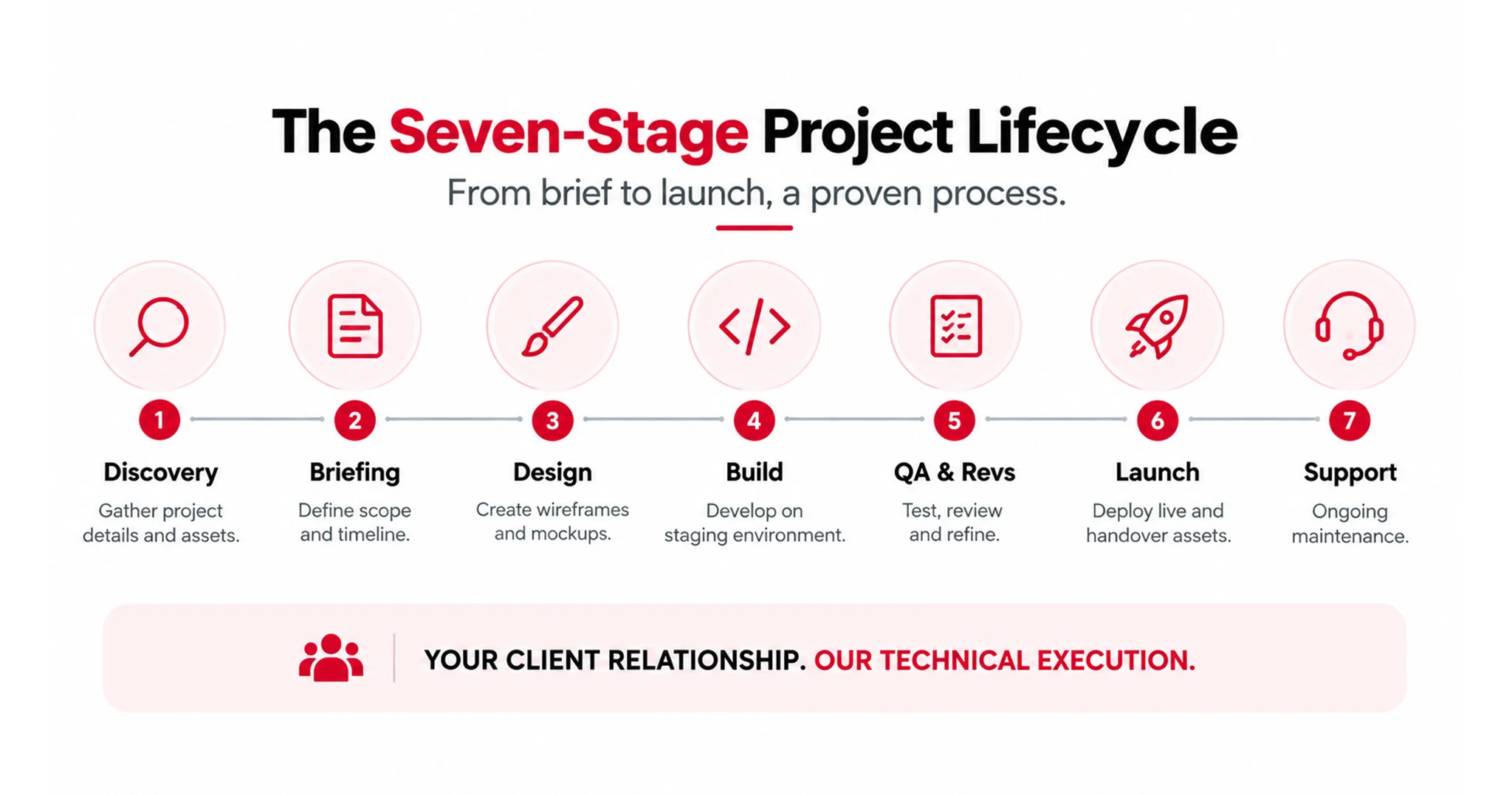
1. The Seven-Stage Project Lifecycle

A successful build follows a repeatable, stage-gated pipeline. This is where ownership boundaries get drawn: your agency faces the client, the partner faces the code.

THE SEVEN-STAGE LIFECYCLE
1. Discovery Agency gathers sitemap and assets from client
2. Briefing Agency translates brief; partner locks scope/timeline
3. Design Visual wireframes/mockups signed off before coding
4. Build Partner writes code in isolated staging environments
5. QA & Revs Joint review passes; structured revisions completed
6. Launch Partner deploys live; hands over rebranded assets
7. Support Transition to monthly white-labeled maintenance

Discuss Your Next Project

Stage 1: Discovery and Requirements Gathering

You are the main strategic consultant for your agency, meeting with the end client to gather your client’s business objectives, target audiences, brand guidelines, and page count requirements. At this point, it’s all up to you and your agency. That’s what keeps partner invisibility safe during white label website development.
A good way to get started is to ask the client what he or she doesn’t like about the existing website, rather than asking what they want. This question helps to identify more technical pain points.

Stage 2 Briefing & Planning

Your agency passes over the creative brief, layout files, API needs, and branding elements to the white-label developer. The Developer will review all the above and identify the areas of gaps along with a fixed scope quote with a locked timeline and milestone dates.

Stage 3: Design, Wireframing, and Prototyping

Designers use the requirements to create visual sitemaps, wireframes, and interactive mockups, mostly in Figma. A designer uses the requirements to build visual sitemaps, wireframes, and interactive mockups, mostly in Figma.

Client sign-off on the mock-up is required. The answer to such a situation is very simple- when making changes to the layout, it is inexpensive to do so in a design file, but once development is underway, it is costly to make changes.

Stage 4: Build Execution and CMS Configuration

The development partner now takes over once the design is agreed to. They write code for the front-end of the site, create custom back-end databases, and connect third-party tools, e.g., CRMs or payment gateways. Preventing client-facing errors, each build is performed on isolated and secure staging servers instead of live servers.

Stage 5: Internal QA & Structured revisions:

The build is subjected to a comprehensive checklist by the partner’s own Quality Assurance (QA) team before it’s ever viewed by the agency: mobile responsiveness, cross-browser compatibility, form submission, and Web Content Accessibility Guidelines (WCAG) standards and Core Web Vitals page speed.

Your agency checks the website, then leads the client through a series of steps to revise the site, usually two to three rounds of revisions as outlined in the master agreement.

Stage 6: Launch and Handover

Once the white label web development services are complete and the client signs off, the partner will handle live deployment. After they are live, they provide you with all their clean source code, credentials, and documentation with your brand name.

Stage 7: Continuous Maintenance and Support:

The project is handed over to the partner’s maintenance team. They ensure that there are no downtimes, they install security patches, and they execute backups in your agency’s name. Recurring revenue begins here: Your agency sells the client maintenance retainers at a high premium.

Verdict: the seven stages exist to draw one line clearly: client-facing work stays with your agency, execution work stays with the partner, and the two never cross.

Talk to Our Development Team

2. How Invisibility is Maintained in Practice

A partnership only holds up if the developer stays completely hidden. Agencies enforce that through three operational pillars.

Email Aliases And Name Masking

If the development team needs to join client calls, they’re introduced under your agency’s banner, as your “senior dev team lead” or “engineering partners,” with zero mention of their independent brand. Where direct client email is necessary, the partner works under an alias on your domain, for example [email protected].

Neutral Staging Environments

Staging URLs and client-review portals are fully white-labeled, configured on neutral domains or your agency’s subdomains, for example staging.youragency.com, with your agency’s logo on the login screen.

Zero-Footprint Code Cleanliness

A genuinely professional white label web development agency strips all metadata. Stylesheets, theme folders, databases, plugins, and source code comments get scrubbed of any trace of the third-party developer’s brand. A technically curious client should not be able to find the seam.

Verdict: invisibility isn’t a courtesy; it’s an operational discipline enforced at the domain, login screen, and code comment level.

3. Integrated Workflows and Communication

The partner doesn’t operate as an isolated black box where you submit tickets and wait. However, a properly structured partnership makes them an active extension of your team instead.

Dedicated project managers (PMs). You get a single, named point of contact acting as your account lead. Your agency’s PM communicates directly with the partner’s PM, which keeps client feedback translation clean and avoids the telephone-game problem.

Shared project dashboards. The partner plugs directly into your existing project management stack, ClickUp, Slack, Asana, or Jira. Your team sees sprint boards, active milestones, and QA reports in real time.

Asynchronous rhythms. For teams spread across time zones, offshore developers in India optimizing build cost is a common setup; a daily asynchronous update rhythm keeps both sides aligned. A short written summary at the end of each workday replaces the need for constant live syncs.

Verdict: the difference between a black-box vendor and a real extension of your team is whether you can see the sprint board without asking for it.

4. Legal and Structural Safeguards

Before a single project asset or database changes hands, three contracts formalize the relationship and protect your agency’s brand equity.

Non-Disclosure Agreement (NDA)- binds the partner to absolute confidentiality, contractually prohibiting them from claiming credit for the work, showcasing your projects in their portfolio, or disclosing the relationship with your agency.

Non-solicitation and non-compete clauses- prevent the developer from poaching your clients, pitching services directly, or bypassing your agency in any way.

Intellectual Property (IP) assignment- specifies that 100% of the custom source code, design assets, and licenses transfer to your agency on final payment, so you’re never locked into one vendor and can take the code wherever you need to.

Verdict: the NDA protects your invisibility, the non-compete protects your client base, and the IP assignment protects your leverage. Skip any one of the three and the arrangement stops being white label and starts being a liability.

Ultimately, a white label partnership works because every stage, every communication channel, and every contract is built around one line: your agency owns the relationship, the partner owns the execution, and neither side crosses it.

Schedule a Consultation

Final Thoughts

The decision is not “should my agency use white label web development.” It is “do I hire, or do I partner, at my current volume,” and that question has a number attached. Deloitte’s 20%-plus savings figure for centrally governed delivery, and McKinsey’s finding that 60% of companies name talent scarcity as a transformation blocker, both point the same direction for any agency running below its break-even volume: a partner wins on cost and on hiring risk until volume says otherwise.

So, run a scoped pilot project before you run a hiring process. It answers the question faster, and it costs less to be wrong when testing white label web development services

The Zero-Cost WordPress Security Checklist for Small Businesses

Most small business owners think hackers are only interested in large companies with valuable customer data or deep pockets. That’s exactly what makes smaller websites easy targets.

Cyberattacks today aren’t personal. They’re automated. Bots scan thousands of WordPress websites every hour, looking for outdated plugins, weak passwords, exposed login pages, and other common vulnerabilities.

Imagine waking up to discover your homepage redirects visitors to a gambling website, Google has marked your site as unsafe, and your customers can no longer trust your business. It happens far more often than most business owners realize, and recovering can take weeks while damaging your rankings, reputation, and customer trust.

The good news is that WordPress security for small businesses doesn’t have to be expensive. In fact, most of the protection your website needs is completely free.

This free WordPress security checklist shows you how to secure your WordPress website for free using trusted plugins, built-in WordPress settings, and simple best practices. No coding. No premium software. Just practical steps that every small business owner can implement today.

Why Are Small Businesses Vulnerable to Cyberattacks?

Most cyberattacks don’t begin with someone choosing a specific business to target. They begin with automated bots scanning thousands of WordPress websites for common weaknesses.

Before diving into the free WordPress security checklist, it’s important to understand why WordPress security for small businesses deserves immediate attention.

The Dangerous Myth That Small Sites Are Safe

Many business owners believe hackers only pursue high-profile companies. In reality, automated bots scan millions of WordPress websites every day, searching for weak passwords, outdated plugins, vulnerable themes, and exposed login pages. They don’t evaluate business size.

What a Hack Actually Does to a Small Business

A compromised WordPress website can do far more than display unwanted content. Attackers may steal customer information, inject malware, redirect visitors to fraudulent websites, or trigger Google’s security warnings that remove your pages from search results. Even a single outdated plugin has cost small businesses thousands in recovery expenses, lost revenue, and damaged customer trust.

The Good News: Free Security Covers Most Small Business Needs

The encouraging part is that effective security doesn’t have to be expensive. Regular updates, strong passwords, free WordPress security plugins, free WordPress malware protection, and free WordPress two-factor authentication stop the majority of common attacks. Spend one afternoon implementing the right measures, and your website instantly becomes far more difficult for automated bots to compromise.

No Free Security

The Complete Zero-Cost WordPress Security Checklist

A secure website isn’t built with one tool. It’s built through small, consistent improvements. Complete the following free WordPress security checklist to strengthen WordPress security for small businesses using trusted free tools and settings that take only minutes to configure.

1. Keep WordPress, Themes & Plugins Updated

Every WordPress update strengthens your website against newly discovered vulnerabilities. Keeping your core files, themes, and plugins updated reduces the chances of malware infections, unauthorized access, and compatibility issues. It’s one of the easiest yet most effective ways to improve WordPress security for small businesses without spending anything.

Why It’s Necessary

  • Closes known security vulnerabilities before hackers exploit them.
  • Protects your website from malware and automated attacks.
  • Improves plugin compatibility and website stability.
  • Keeping your website optimized also improves performance. Our WordPress Speed Optimization Services help businesses maintain both security and loading speed.

In Verizon’s 2024 Data Breach Investigations Report, 14% of data breaches involved the exploitation of vulnerabilities as the initial access method, nearly three times higher than the previous year. Hackers don’t need sophisticated techniques if websites aren’t patched. That’s exactly why updating WordPress, plugins, and themes every week should be your first security habit.

2. Install Wordfence Free: One of the Best Free Security Plugins

A good security plugin acts like a gatekeeper for your website. Wordfence provides WordPress malware protection for free, a free WordPress firewall, login monitoring, and WordPress brute force protection, making it one of the most comprehensive free security solutions available.

Why It’s Necessary

  • Blocks suspicious traffic before it reaches your website.
  • Scans files for malware and security issues.
  • Limits repeated login attempts from bots.
  • Combines multiple security features into one plugin.
  • Reduces plugin conflicts by replacing several separate security tools.

3. Enable Two-Factor Authentication on Every Admin Account

Passwords can be guessed, leaked, or stolen, but two-factor authentication adds another layer of protection. Even if someone knows your password, WordPress two-factor authentication free prevents unauthorized access by requiring a second verification step.

Why It’s Necessary

  • Protects administrator and editor accounts.
  • Prevents unauthorized dashboard access.
  • Reduces risks from stolen passwords.
  • Adds security without affecting everyday usability.

According to Verizon’s 2024 DBIR, 68% of breaches involved a human element, including stolen credentials, phishing, or user errors. Technology alone can’t secure a website. Strong passwords, two-factor authentication, and good security habits often make a bigger difference than expensive software.

4. Change the Default WordPress Login URL

The default WordPress login page is one of the first places automated bots try to access. Changing it to a custom URL adds another layer of WordPress login protection, free, making your website a far less obvious target for brute force attacks.

Why It’s Necessary

  • Reduces automated login attempts targeting /wp-admin.
  • Makes your login page harder for bots to discover.
  • Adds an extra security layer without affecting legitimate users.
  • Prevents unnecessary server load caused by repeated login requests.

5. Use Strong Passwords and a Free Password Manager

Even the best security setup can fail because of a weak password. Long, unique passwords generated with tools like Bitwarden or WordPress’s built-in password generator dramatically reduce the risk of unauthorized access while making account management much easier.

Why It’s Necessary

  • Prevents attackers from guessing or cracking passwords.
  • Reduces the risk of credential reuse across multiple websites.
  • Stores complex passwords securely in one place.
  • Makes password management simple without sacrificing security.
  • Protects every user account, not just administrators.

6. Set Up SSL and Force HTTPS

An SSL certificate protects the data exchanged between your website and its visitors by encrypting every connection. Most hosting providers offer free SSL certificate through Let’s Encrypt, allowing you to improve security and build visitor trust in just a few minutes.

Why It’s Necessary

  • Encrypts sensitive information during transmission.
  • Displays the secure padlock icon in modern browsers.
  • Prevents data interception on public networks.
  • Supports better user trust and browsing confidence.
  • Meets Google’s recommendation for secure websites.

7. Set Up Automated Backups to Google Drive

Backups don’t stop cyberattacks, but they make recovery quick and stress-free. A recent backup allows you to restore your website after malware infections, failed updates, accidental deletions, or hosting issues without rebuilding everything from scratch.

Why It’s Necessary

  • Restores your website quickly after a security incident.
  • Protects your content from accidental data loss.
  • Stores backup copies away from your hosting server.
  • Automates backups to reduce manual effort.
  • Supports reliable WordPress backup free with cloud storage.

8. Disable XML-RPC

XML-RPC is rarely needed on modern WordPress websites, yet it remains a popular target for attackers. Disabling this unused feature removes a common attack vector and strengthens your website without affecting normal day-to-day functionality.

Why It’s Necessary

  • Blocks a frequently exploited attack method.
  • Reduces opportunities for brute-force login attacks.
  • Improves overall website security with a simple change.
  • Doesn’t affect most business websites or blogs.
  • Check with your developer if remote publishing is enabled.

9. Harden WordPress Files. No Code Knowledge Required

Strong security starts with secure website files. Basic WordPress file hardening practices, including disabling the built-in file editor and applying correct file permissions, reduce the chances of unauthorized changes while making your website more resilient against attacks.

Why It’s Necessary

  • Prevents unauthorized editing of plugin and theme files.
  • Reduces accidental code changes by users.
  • Limit file access using recommended WordPress file permissions.
  • Complements other security measures instead of replacing them.
  • Strengthens your website’s overall defense strategy.

10. Connect Google Search Console for Free Security Monitoring

Not every security issue is immediately visible. Google Search Console continuously monitors your website and notifies you about malware, phishing attempts, manual actions, and other problems that could impact your visitors and search visibility.

Monitoring search visibility is equally important. Our Technical SEO Services help identify indexing issues, crawl errors, and technical problems before they affect rankings.

Why It’s Necessary

  • Sends alerts when Google detects security issues.
  • Helps identify malware before rankings are affected.
  • Monitors manual actions and indexing problems.
  • Protects your website’s reputation and organic traffic.
  • Requires only a few minutes to set up and monitor.
  • Google also warns you if malware causes Safe Browsing issues.


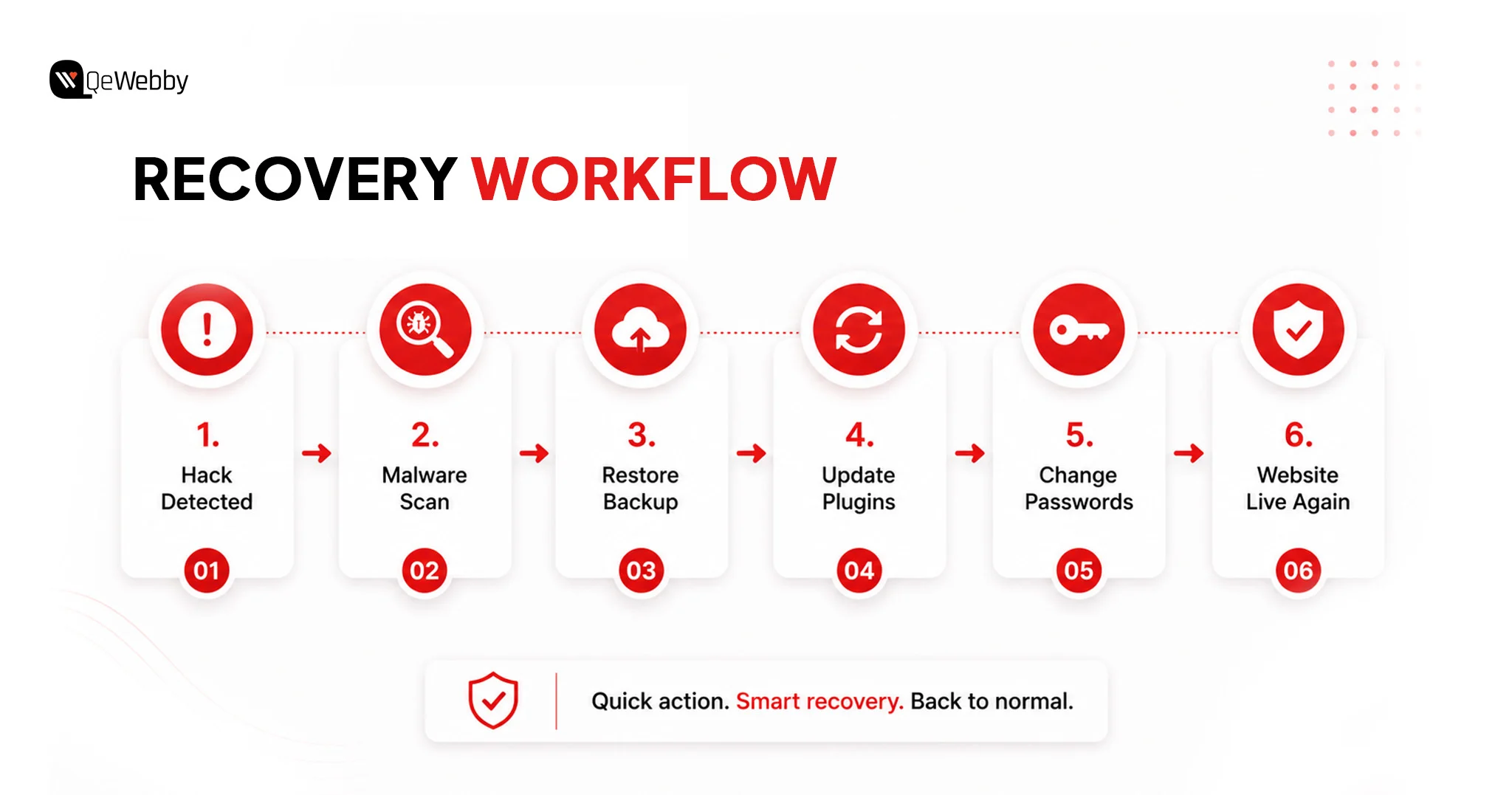
Recovery Workflow

3 Mistakes Small Business Owners Make With Free Security Tools

Installing free security tools is a great start, but using them incorrectly can create new problems. These are the three mistakes that leave many small business websites vulnerable, even when they believe they’re fully protected.

Mistake 1: More Security Plugins Doesn’t Mean More Security

Running multiple security plugins might seem like extra protection, but it often creates conflicts. One plugin’s firewall can interfere with another’s login protection, leading to false alerts, broken functionality, or even locking legitimate users out of the dashboard.

What to do instead

  • Install Wordfence as your primary security plugin.
  • Configure its firewall, malware scanner, and login protection correctly.
  • Avoid installing additional security plugins that perform the same tasks.

Mistake 2: Treating Security as a One-Time Setup

Many website owners secure their WordPress site once and never look back. Meanwhile, plugins receive updates, new vulnerabilities emerge, and your website gradually becomes less protected without you noticing.

What to do instead

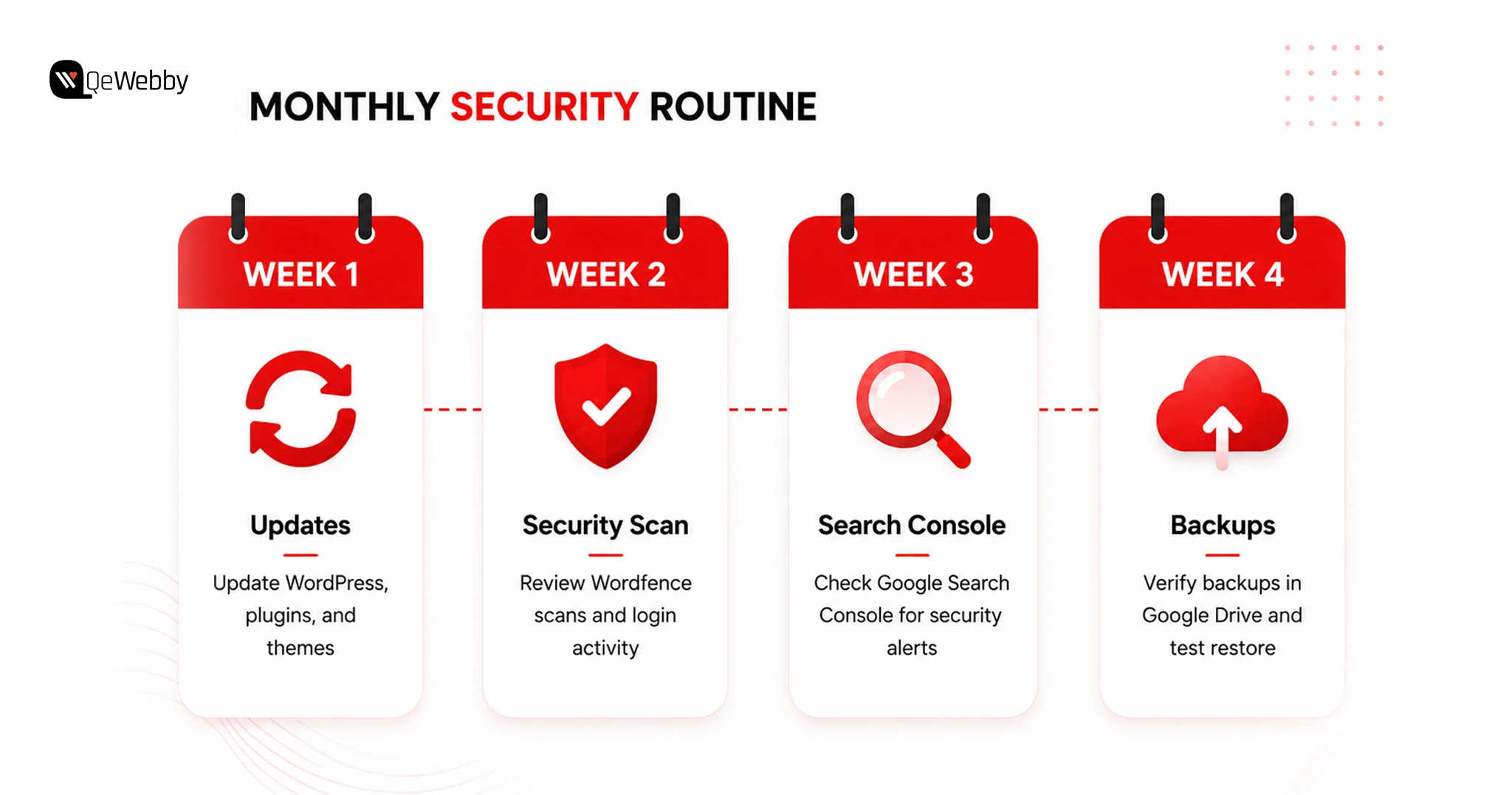
  • Spend 15 minutes each month reviewing your security.
  • Update WordPress, plugins, and themes.
  • Check Wordfence scan reports.
  • Confirm that your automated backups completed successfully.

Mistake 3: Assuming Your Backup Will Work

A backup only has value if it can actually restore your website. Many businesses discover their backup is incomplete or corrupted only after a hack or server failure, when it’s already too late.

What to do instead

  • Download your latest backup once every quarter.
  • Perform a test restore on a staging website.
  • Verify that files, media, plugins, and the database restore correctly before you actually need them.

Book a Free Call

The Monthly 15-Minute Security Routine for Small Business Owners

The easiest way to maintain WordPress security for a small business is to spread small tasks across the month. Instead of spending hours fixing problems later, dedicate just a few minutes each week to keeping your website healthy.

Monthly Security Routing

How QeWebby Can Help You Secure Websites?

Every security layer needs to be configured correctly, monitored regularly, and maintained as your website evolves. QeWebby helps businesses build a stronger security foundation with practical solutions that keep websites protected, reliable, and easy to manage.

  • Security Setup: We configure essential WordPress security features, including firewalls, malware protection, login security, SSL, backups, and file hardening to reduce common vulnerabilities from day one.
  • Proactive Protection: Our team continuously follows security best practices, helping your website stay protected against emerging threats instead of reacting after an attack occurs.
  • Website Maintenance: With our WordPress website maintenance service, we handle updates, monitor website health, review backups, and ensure plugins and themes remain secure and compatible.
  • Performance & Security Balance: A secure website should also perform well. We optimize your WordPress environment to maintain speed, stability, and security without compromising the user experience.
  • Security Designed for Small Businesses: Our WordPress security service for small businesses is designed to provide enterprise-level protection in a practical and cost-effective way, giving growing businesses the confidence to focus on their customers instead of website security.

Conclusion

Website security isn’t just about preventing attacks. It’s about protecting your reputation, customer trust, and long-term business growth. A secure WordPress site protects your reputation, strengthens customer confidence, and supports consistent online growth, making it an essential part of your digital presence rather than just another maintenance task.

Our professional WordPress Development Services combine security, performance, and long-term website management to help businesses build reliable digital experiences.

If you’re ready to strengthen your WordPress website with confidence, contact us to discuss the right solution for your business.

Security Review

White Label WordPress Hosting & Support: The Hidden Recurring Revenue Model for Agencies

Winning new clients feels great. But what happens after the website goes live?

For many web design and development agencies, that’s where the revenue stops.

Months of prospecting, pitching, designing, developing, revising, and launching a website often result in a single payment. Once the project ends, the agency is back to finding its next client. It’s a cycle that creates inconsistent cash flow, unpredictable workloads, and constant pressure to sell.

Now imagine what if every website you built could continue generating revenue month after month, even years after launch.

Instead of treating hosting and maintenance as an afterthought, successful agencies are packaging them into recurring service plans. The result is a stable monthly income, stronger client relationships, and a business model that scales far more efficiently than relying on one-time projects alone.

Having an increased 5% customer retention can result in profits by 25% to 95%, as per the report by Bain and Company. So, this is why agencies are increasingly investing in recurring service models.

What Is White Label WordPress Hosting?

For many agencies, offering website hosting seems like the logical next step after delivering a WordPress website.

However, managing hosting infrastructure, server security, software updates, backups, and uptime monitoring requires technical expertise that most agencies would rather invest elsewhere.

White label WordPress hosting solves this challenge by allowing agencies to provide fully managed hosting services under their own brand while a specialized infrastructure partner handles the technical execution behind the scenes.

From the client’s perspective, every interaction remains with your agency. They receive hosting, maintenance, and technical support branded as your own service, while the white-label provider manages the servers, security, monitoring, and performance optimization invisibly.

How Does White Label WordPress Hosting Work?

The delivery model is straightforward.

  • The agency sells managed WordPress hosting as its own service.
  • Client websites are hosted on the white-label provider’s infrastructure.
  • The hosting partner manages all technical operations.
  • The agency continues to own the client relationship, communication, and billing.

This allows agencies to focus on strategy, development, and client growth while technical infrastructure is managed by specialists.

Why Clients Prefer Managed Hosting From Their Agency

Most business owners don’t want separate vendors for development, hosting, maintenance, backups, and technical support. They prefer working with one trusted partner who already understands their website. White label hosting allows agencies to deliver that experience without building their own infrastructure.

Why Recurring Revenue Has Become the Foundation of Scalable Agency Growth?

The economics of recurring revenue fundamentally differ from those of project-based services.

Instead of generating income only when new work is secured, recurring services establish a predictable revenue base that compounds as the client portfolio grows.

Every new client represents not only an immediate project opportunity but also a long-term revenue stream through hosting, maintenance, security, technical support, and ongoing website optimization.

Predictable monthly recurring revenue improves cash flow visibility, simplifies resource planning, and enables agencies to make hiring and investment decisions based on reliable income rather than anticipated project pipelines. As recurring revenue increases, agencies become less dependent on continuously replacing completed projects with new engagements.

Over several years, recurring hosting and support services often exceed the financial value of the original development project while requiring significantly lower acquisition costs.

The difference between the two business models is substantial.

Project-Based Revenue Recurring Revenue Model
One-time project income Predictable monthly recurring revenue
Continuous client acquisition required Existing clients generate ongoing revenue
Revenue fluctuates with the project pipeline Greater financial stability
Lower customer lifetime value Higher long-term account value
Limited post-launch engagement Continuous client relationship and upselling opportunities

White Label WordPress Support: The Missing Piece in Agency Retainers

Hosting keeps a website online, but long-term client satisfaction depends on much more than server availability. WordPress websites require continuous maintenance to remain secure, compatible, and optimized as plugins, themes, PHP versions, and the WordPress core evolve.

This is where white-label WordPress support becomes an equally valuable recurring service.

Rather than responding only when a client reports a problem, agencies can offer proactive website management as part of a monthly support plan. This transforms the agency’s role from project vendor to long-term technology partner while creating predictable recurring revenue.

Services Typically Included in White Label WordPress Support

A professionally managed support service commonly covers:

Service Business Value
WordPress core updates Maintains compatibility and security
Plugin and theme updates Prevents conflicts and vulnerabilities
Daily or scheduled backups Enables rapid disaster recovery
Malware scanning and removal Protects websites against cyber threats
Website uptime monitoring Detects downtime before users are affected
Performance optimization Improves loading speed and user experience
Technical troubleshooting Resolves website issues quickly
Monthly maintenance reports Demonstrates ongoing service value

By combining hosting with continuous support, agencies provide clients with a complete website management solution rather than a standalone hosting package.

Many agencies bundle WordPress maintenance services into the same monthly care plan, helping clients keep their websites secure, updated, and performing reliably while creating an additional recurring revenue stream.

Book a Free Consultation

Why Managed WordPress Hosting Has Become a Strategic Agency Service?

Over the past decade, websites have evolved from static digital brochures into mission-critical business assets. For many organizations, even a few hours of downtime, security compromise, or poor website performance can result in lost revenue and diminished customer trust.

As a result, businesses increasingly expect their agencies to manage not only website development but also the ongoing health of their digital platforms.

This shift has elevated white label managed WordPress hosting from an optional add-on to a strategic service offering.

Unlike traditional hosting, managed hosting combines infrastructure, security, monitoring, maintenance, and performance optimization into a single solution. Clients benefit from a simplified experience with one trusted partner, while agencies strengthen long-term relationships through continuous service delivery.

The difference between traditional hosting and managed hosting illustrates why more agencies are adopting this model.

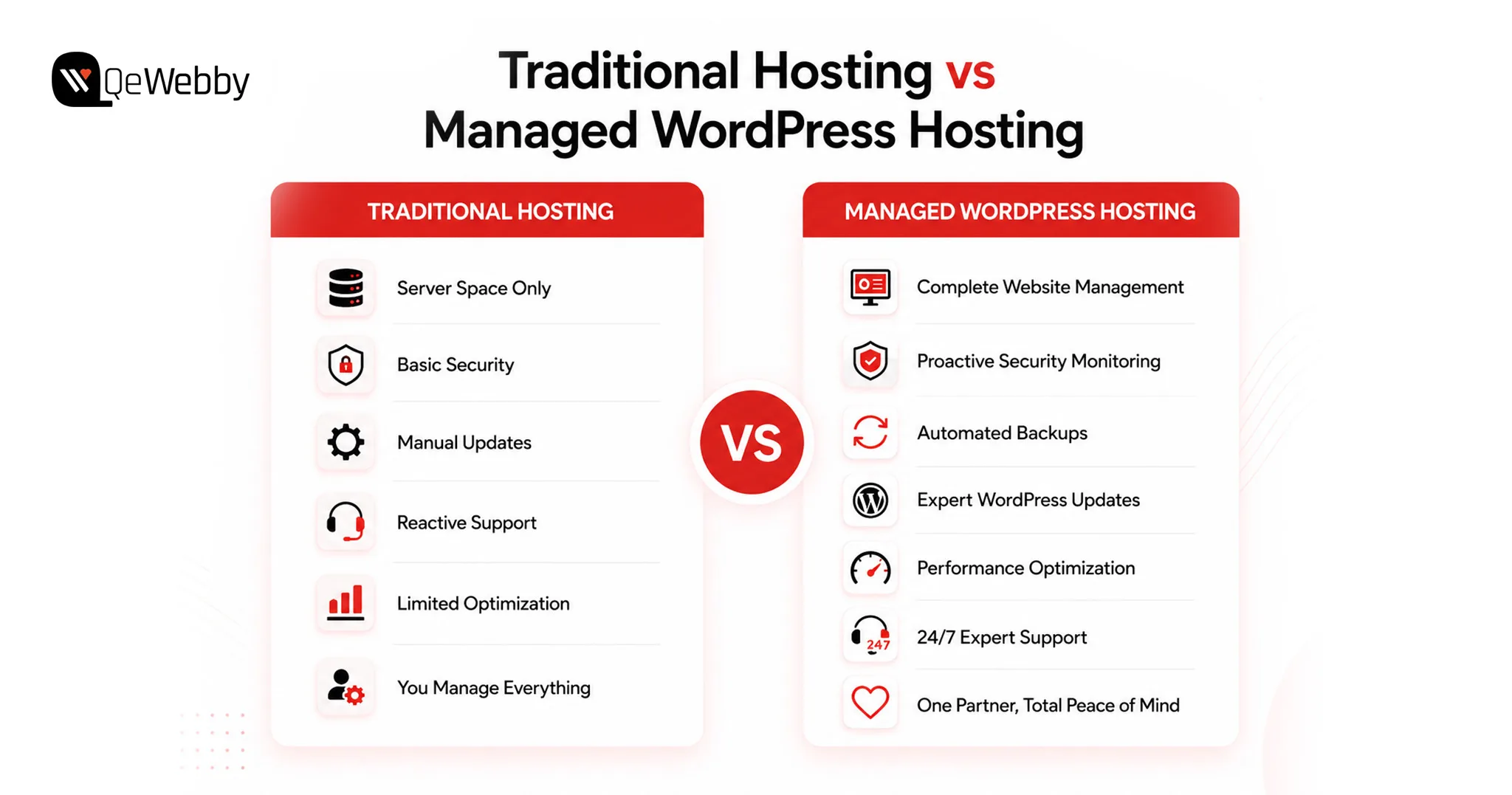
Traditional Hosting vs Managed WordPress Hosting

Traditional Hosting White Label Managed WordPress Hosting
Server space only Complete website management
Reactive issue resolution Proactive monitoring and maintenance
Client manages updates Updates managed by specialists
Limited optimization Continuous performance improvements
Basic security Multi-layer security monitoring
Separate maintenance providers Single integrated solution

For agencies, this integrated approach creates opportunities that extend far beyond hosting fees.

How Agencies Price White Label WordPress Hosting

Service Typical Monthly Fee
Hosting $25–$75*
Hosting + Maintenance $75–$150*
Premium Care Plan $150–$500+*

The exact pricing depends on website complexity, traffic, support requirements, and included services.

The Hidden Recurring Revenue Opportunity Most Agencies Overlook

Every website project represents more than a one-time development engagement. It also creates an opportunity to deliver ongoing services that clients will continue to require throughout the lifecycle of their website.

Unfortunately, many agencies stop at project delivery.

Once the website is launched, hosting is often outsourced to third-party providers, maintenance becomes reactive, and technical support is provided only when clients raise issues. In doing so, agencies unintentionally hand over a significant recurring revenue opportunity to hosting companies and managed service providers.

A more sustainable approach is to treat every website launch as the beginning of a long-term service relationship.

The progression typically looks like this:

Website Development
↓
Managed WordPress Hosting
↓
Website Maintenance
↓
Security Monitoring
↓
Technical Support
↓
Performance Optimization
↓
Monthly Reporting
↓
Additional Digital Services

Each layer increases client value while creating another predictable revenue stream for the agency.

Over time, these recurring services often generate more cumulative revenue than the original development project itself. More importantly, they strengthen client retention because the agency becomes responsible for the ongoing performance, security, and reliability of the client’s digital presence.

Why Do Agencies Choose White Label Partners Instead of Building Everything In-House?

Offering managed hosting independently requires considerably more than purchasing server space. Agencies must also establish monitoring systems, backup processes, security protocols, disaster recovery plans, performance optimization workflows, and technical support capabilities.

Building and maintaining this infrastructure requires continuous investment in both technology and specialist expertise.

For many agencies, this approach introduces unnecessary operational complexity.

Partnering with a white-label WordPress agency offers a more efficient alternative. Instead of managing infrastructure internally, agencies leverage an experienced fulfillment partner while maintaining complete ownership of the client relationship.

The difference between the two approaches is substantial.

Checklist Before Choosing a White Label WordPress Partner

Managing In-House White Label WordPress Hosting
Invest in hosting infrastructure Infrastructure managed by partner
Hire server and security specialists No additional technical hiring
Maintain monitoring and backup systems Fully managed operations
Handle 24/7 technical issues Expert support team manages incidents
Higher operational overhead Lower operating costs
Longer service launch timeline Immediate market readiness

For growing agencies, this model enables faster expansion while minimizing operational risk. Internal teams remain focused on delivering high-value client work rather than managing hosting infrastructure.

What to Look for in a White Label WordPress Agency?

Not every hosting provider is designed to support agency growth. Selecting the right white label WordPress agency requires evaluating both technical capabilities and operational maturity.

The ideal partner should function as an extension of your agency, delivering enterprise-grade hosting and support while remaining completely invisible to your clients.

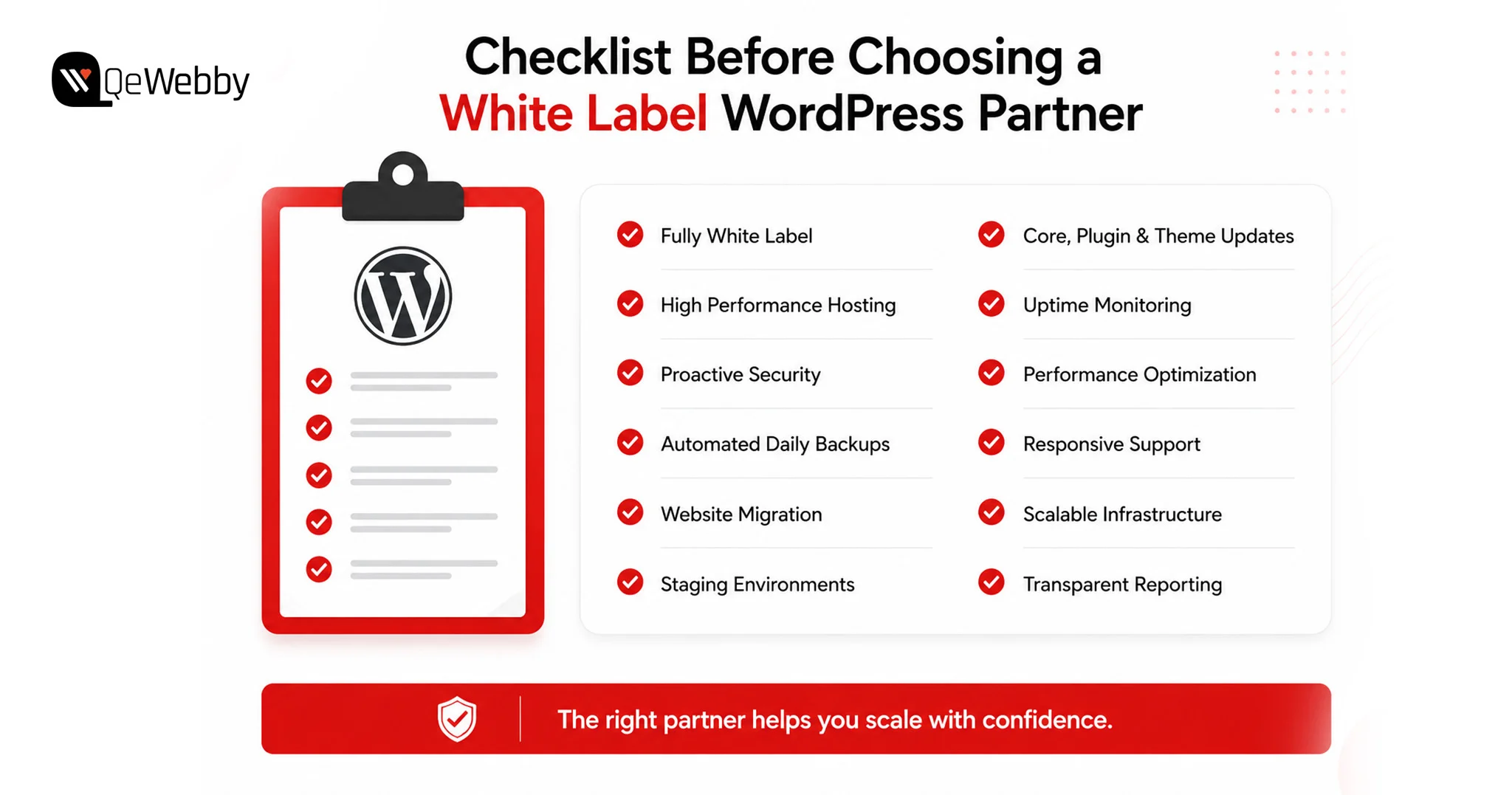
When evaluating providers, consider the following capabilities:

  • Fully white-labelled service delivery
  • High-performance managed WordPress hosting
  • Proactive security monitoring
  • Automated daily backups
  • Malware detection and removal
  • WordPress core, plugin, and theme updates
  • Website migration assistance
  • Performance optimization
  • Staging environments
  • Reliable uptime monitoring
  • Responsive technical support
  • Scalable infrastructure for growing client portfolios

Beyond technical expertise, agencies should also evaluate communication standards, service-level commitments, and the provider’s ability to support long-term growth.

How QeWebby Helps Agencies Build Predictable Recurring Revenue?

At QeWebby, we understand that agencies want to expand their service offerings without increasing operational complexity. Our white label managed WordPress hosting and white label WordPress support services are designed to help agencies achieve exactly that.

Rather than investing in infrastructure, technical resources, and ongoing server management, agency partners gain access to a fully managed WordPress environment delivered under their own brand.

  • Our services include:
  • Fully managed WordPress hosting
  • White-label WordPress maintenance
  • Security monitoring and malware protection
  • Daily backups and disaster recovery
  • Performance optimization
  • Website migration
  • Core, plugin, and theme updates
  • Technical troubleshooting
  • Continuous uptime monitoring
  • Scalable hosting infrastructure

Throughout the engagement, agencies remain the primary point of contact for their clients while QeWebby manages the technical execution behind the scenes.

Talk To Our Experts

Conclusion

Winning new projects will always matter, but predictable recurring revenue is what creates a sustainable agency. White label WordPress hosting and support transform every website launch into a long-term business relationship, allowing agencies to increase client lifetime value while reducing dependence on constant project acquisition.

At QeWebby, we help agencies expand their capabilities with reliable white label WordPress hosting and support solutions that integrate seamlessly into their existing service portfolio.

Our expertise enables agencies to scale confidently while maintaining complete ownership of the client experience. Contact us to explore how we can help you build a stronger recurring revenue model for your agency.

White Label AEO Services: The Strategic Advantages Agencies Cannot Afford to Overlook

Your clients are already asking the question. It showed up in a Q2 retainer review, phrased exactly like this: “Why does our competitor appear in ChatGPT answers, and we don’t?”

Here’s why it matters now. Zero-click searches hit 69% in 2025, up from 56% a year earlier. Google AI Overviews now appear on 13.14% of U.S. desktop queries. That number has doubled since January. When AI Overviews trigger, 83% of users never click through to any site.

The organic rankings your team reports every month still matter for commercial queries. But the informational layer is different. That’s where brand authority gets built. Where purchase decisions start. And that layer now belongs to AI-generated responses.

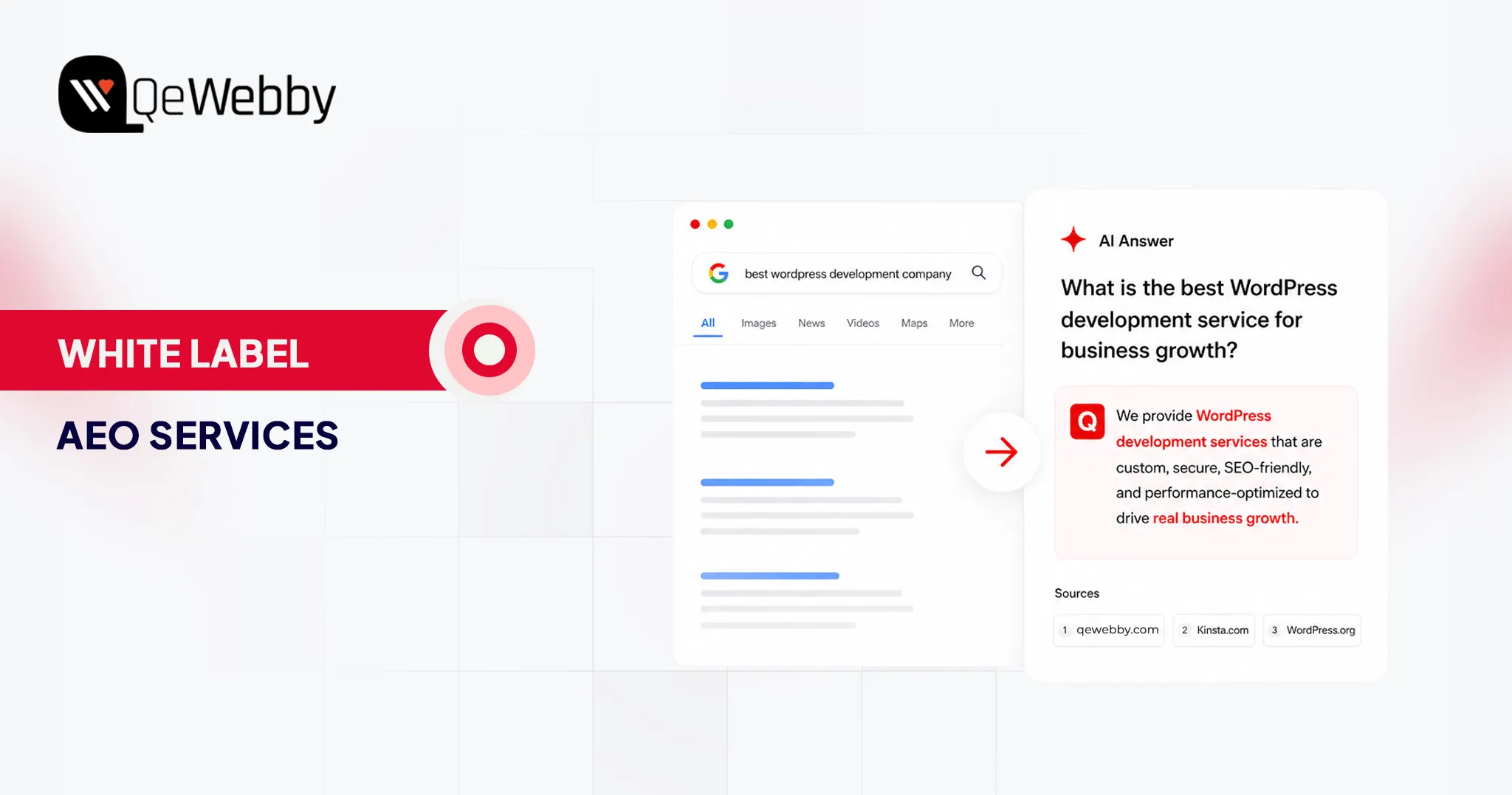
Answer Engine Optimization (AEO) structures content so AI platforms cite your clients’ brands as sources. White-label AEO services let you deliver that capability under your own brand without building specialist teams or tooling from scratch.

This piece breaks down the strategic, operational, and client-retention reasons for adopting white-label AEO. No pricing analysis. No margin math.

Why Agencies Cannot Defer the AEO Decision

Technology adoption cycles in digital marketing services are well-documented. Advantageous periods for new service categories typically last 18 to 24 months, after which the capability becomes a baseline expectation and competitive differentiation shifts to price. AEO is approximately 12 to 18 months into meaningful commercial availability as a service category.

65% of digital marketing practitioners identified AI-driven search changes as their single biggest challenge in 2026, according to a Goodfirms survey of 100-plus practitioners across 20 countries. Only 43% had actively implemented GEO or AEO strategies at the time of the survey.

That gap between problem recognition and active response is the operational window that agencies offering white-label AEO can close for their clients.

The competitive implication is direct. Agencies offering AEO in 2026 are positioning themselves as capability leaders. Those entering when AEO becomes standard practice will compete on price alone. The service category rewards early entrants with durable brand authority that late movers cannot replicate by simply launching the same offering in a saturated market.

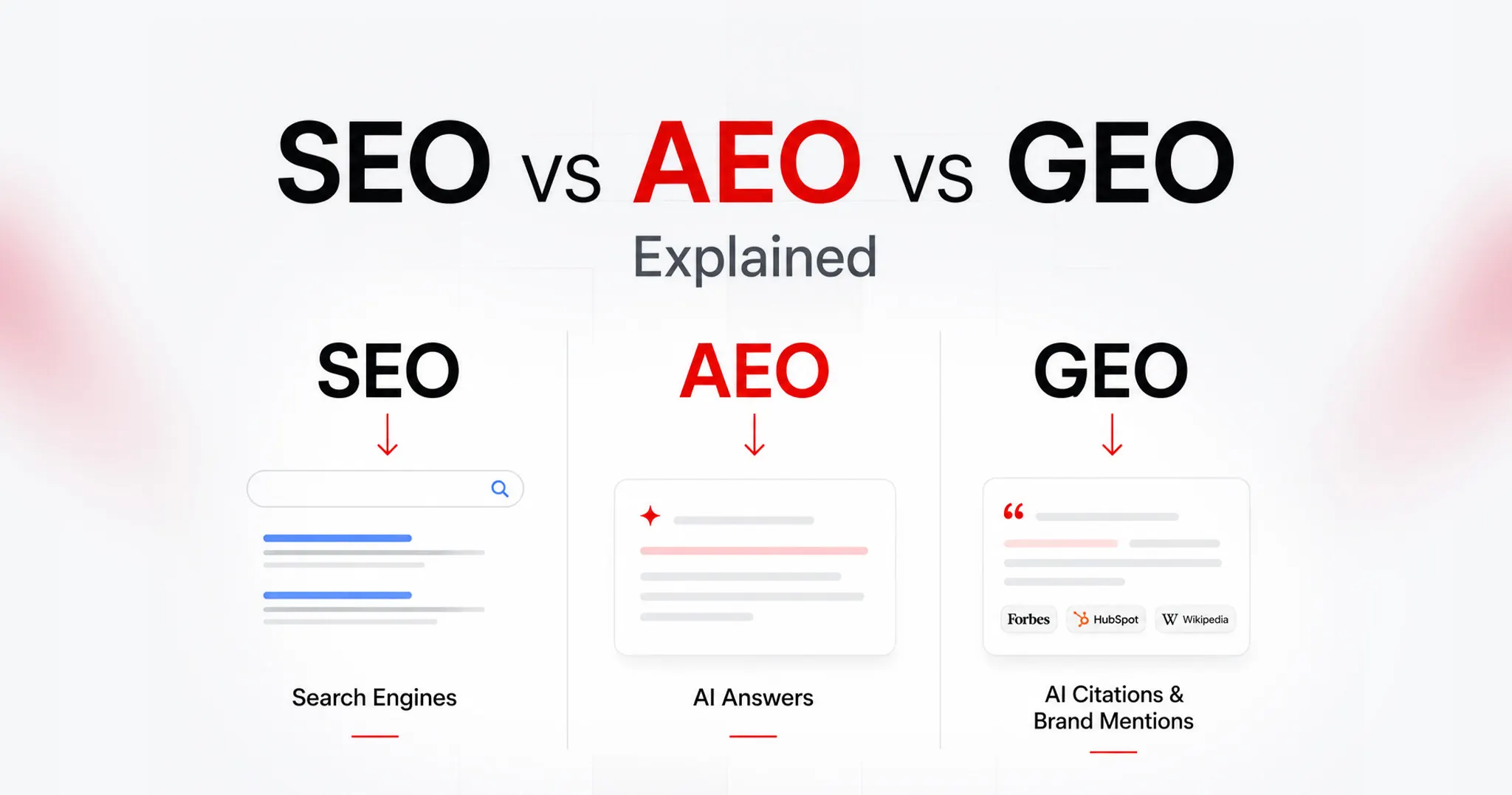
Dimension Traditional SEO AEO GEO
Target output Blue-link rankings in Google and Bing Featured snippets, AI Overviews, PAA boxes Brand citations in ChatGPT, Perplexity, and Gemini answers
Optimisation signal Backlinks, on-page factors, and Core Web Vitals E-E-A-T, schema markup, answer-first structure Topical authority, entity coverage, citation-worthy content
Measurement Rankings, organic traffic, CTR Snippet wins, PAA appearances, AIO share AI citation rate, brand mention monitoring across LLMs
Service maturity Established, high competition Growth phase, mid adoption Early stage, low saturation, high differentiation potential

The table above is not a theoretical framework. It reflects the actual service architecture that enterprise clients are increasingly requiring of retained agencies.

Six Strategic Benefits of White Label AEO for Agencies

The case for white-label AEO rests on six distinct operational and strategic advantages. Each operates independently of pricing considerations. Together, they represent a structural improvement in how agencies serve clients, retain accounts, and compete for new business.

Benefit What It Means for Your Agency Measurable Outcome
Instant capability Offer enterprise-grade AEO from day one without building specialist expertise in-house Faster service launch timeline
Complete service portfolio Address every client question about AI search visibility without referring work outward Higher contract value per retainer
Client retention protection Agencies with AEO retain clients at materially higher rates than SEO-only operations Stronger renewal conversations
Competitive differentiation Offer a capability most regional and mid-size agencies cannot deliver independently Improved new business win rate
Operational scalability Add new clients without proportional headcount growth or technical recruitment Preserved delivery margins
Early-mover positioning Establish authority before AEO becomes a commoditized baseline service Durable brand positioning

SEO Aeo Geo

1. Immediate Access to Specialist Capability Without Internal Recruitment

AEO requires a convergence of expertise that most generalist agencies lack on staff: schema markup architecture, answer-first content restructuring, entity authority building, and multi-platform AI visibility monitoring across ChatGPT, Perplexity, Gemini, and Bing Copilot.

Building this competency in-house requires dedicated recruitment, onboarding time, and ongoing investment in specialist tooling.

White-label AEO eliminates that runway. A white-label fulfillment partner absorbs that operational cost as part of the service structure. Your agency has access to the full capability stack from the first client engagement.

The practical consequence is a compressed time-to-market. An agency that decides today to offer AEO through a white-label partner can have a fully structured engagement delivered to its first client within one to two weeks.

An agency that decides to build the same capability internally faces a materially longer timeline before any client-facing delivery is possible.

2. Portfolio Completeness as a Client Retention and Acquisition Asset

Agencies with an incomplete service offering create referral risk. When a retained client asks about AI search visibility and the agency cannot address it, the conversation introduces a competitor into the account. QeWebby’s white-label marketing services are designed specifically to close that gap: agencies maintain a single point of contact for clients across the full search visibility spectrum, from traditional SERP optimization through to AEO and GEO.

Portfolio completeness also changes the nature of new business conversations. Prospects evaluate agencies not only on what they have delivered for comparable clients but also on the breadth of problems they can address in the future.

An agency that can present a unified strategy covering traditional SEO, featured snippet capture, and AI citation building occupies a structurally stronger position in a competitive pitch than one that leads with keyword rankings alone.

3. Measurable Improvement in Client Retention Rates

Client retention is the most direct indicator of service value in an agency business model. A clear retention gradient across service configurations: agencies delivering traditional SEO only report 72 to 78% retention, with the primary churn reason being clients citing a lack of AI visibility.

Agencies offering SEO with basic AI awareness report 82-87% retention. Agencies offering proactive, comprehensive AEO report the strongest retention performance in the cohort.

The mechanism behind that gradient is straightforward. Clients experiencing declining organic traffic are now aware that AI search behavior is a contributing factor.

An agency that can address that concern directly, with structured AEO deliverables and monthly reporting on AI citation rates, provides an evidence-based response to the question every client is beginning to ask. An agency that cannot address it creates an opening for a competitor that can.

The retention implication extends to renewal contract value. Clients who understand AI visibility as a measurable, improving outcome are more likely to authorize expanded scope and longer contract terms. This is not a marginal effect.

4. Competitive Differentiation in a Crowded Service Market

The differentiation value of AEO as a service offering is a function of supply, not demand. Demand is clear and growing. ChatGPT recorded 5.8 billion monthly visits in late 2025, with users sending 14 billion daily queries. Client awareness of these platforms as discovery channels is now mainstream.

Supply, however, remains constrained. Most regional and mid-size agencies lack the specialist expertise to execute AEO independently. The agencies that can credibly present AEO capability in a pitch, back it with a structured delivery methodology, and report against measurable AI visibility outcomes occupy a differentiated position that competitors without the capability cannot match on service grounds alone.

White-label delivery through a specialist partner like QeWebby provides the methodology, tooling, and delivery infrastructure that makes that credibility possible. The agency presents the capability. QeWebby executes it, invisibly, under the agency’s brand.

5. Operational Scalability Without Proportional Headcount Growth

The operational constraint that limits most agencies from launching new service lines is not a lack of capability. It is capacity. Adding a genuinely new technical service requires recruitment, training, process design, tooling acquisition, and quality assurance infrastructure before the first client deliverable can be produced. That sequence is time-consuming and operationally expensive.

White-label AEO removes that constraint from the equation. The fulfillment infrastructure, specialist team, tooling stack, and quality assurance process are part of the white-label partner’s operations. The agency adds AEO to its service portfolio and begins delivering it to clients without any of the internal scaling work that would otherwise precede the first engagement.

The scalability principle compounds. An agency that adds five AEO clients through a white-label model adds five retainer accounts without a corresponding increase in headcount, management overhead, or delivery risk. The same logic applies to ten, twenty, and beyond. QeWebby’s services infrastructure is built to absorb that scale, meaning the agency’s growth ceiling is not constrained by the white-label partner’s capacity.

6. Early-Mover Brand Positioning Before Market Saturation

Brand authority in a service category is built through consistent, visible execution before the category reaches saturation. Brands and agencies that establish entity authority before answer engines are saturated with optimized content accumulate more citations, which in turn build further authority. This dynamic rewards early movers with a compounding advantage that late entrants cannot replicate through volume alone.

The same dynamic applies at the agency level. An agency that is known in its market for AEO capability in 2026 is positioned differently from one that adds the service in 2028, when it has become a standard offering.

The former can speak to client outcomes, case evidence, and delivery methodology built over two years of active engagements. The latter is entering a commoditized market on the same footing as every other late adopter.

White-label delivery through QeWebby enables agencies to establish that positioning now, without the internal development timeline that building the capability independently would require. The brand authority belongs to the agency. QeWebby’s specialist team manages the execution infrastructure.

Differentiate Your Agency

What White Label AEO Actually Delivers: The Engagement Structure

Understanding the operational benefits of white-label AEO requires a clear picture of what a structured engagement includes. The following breakdown represents the standard deliverable framework QeWebby operates under for agency partners.

#1. AI Visibility Audit

Every engagement begins with a baseline audit. This establishes which queries in the client’s category currently trigger AI-generated answers across ChatGPT, Perplexity, Google AI Overviews, and Bing Copilot; whether the client brand appears in any of those answers; which competitors are being cited; and where structural content gaps prevent citation.

The audit output is branded to the agency and presented to the client as the evidence base for the engagement scope.

#2. Answer-First Content Restructuring

AI systems do not read full articles. They extract the first one to two sentences of each H2 or H3 section. Answer-first restructuring rewrites section openings so they lead with a direct, extractable answer. It adds definition blocks in the 40- to 60-word format that trigger featured snippet eligibility.

It introduces the FAQ schema for question-based content and the HowTo schema for process content. On a WordPress site, this restructuring integrates directly into existing page architecture without requiring a full content rebuild.

#3. Schema Markup Implementation

FAQ schema, Article schema, and HowTo schema form the machine-readable layer that signals content structure to AI crawlers. Without a structured schema, well-optimized content may not be correctly parsed by the AI systems that depend on structured signals to identify extractable answers.

Schema implementation is a technical deliverable that sits squarely within WordPress development competency, making it a natural complement to existing wordpress seo optimization service operations.

#4. Entity Authority Building

AI systems associate brands and practitioners with specific topic areas through entity relationships built from third-party citations, knowledge graph data, and cross-platform mentions.

Entity authority building creates and reinforces those associations: securing citations from sources that AI systems assign high trust weighting, building topical associations with the right industry entities, and ensuring the client’s knowledge graph profile is accurate and comprehensive.

This is the GEO layer of AEO work. It compounds over time and creates durable AI visibility that is significantly harder for a competitor to replicate than a schema update or content restructure.

#5. AI Visibility Monitoring and Reporting

Monthly reporting tracks featured snippet wins, PAA appearances, and brand citation rates across all major AI platforms.

This is the retainer-justification layer. Clients who receive a monthly report showing their AI visibility score improving quarter over quarter do not cancel.

The reporting cadence also provides the agency with a consistent touchpoint to discuss expanded scope, additional pages for restructuring, and new query categories as the client’s visibility footprint grows.

Is Your Agency Positioned to Add AEO? A Practical Readiness Assessment

The following indicators are not prerequisites. They are signals that the operational and commercial conditions for a successful AEO service launch are already in place. Two or more positive responses indicate that the structural conditions for a successful launch are in place.

  • Existing retainer clients have asked about AI search visibility or have questioned why their brand does not appear in AI-generated responses.
  • A client mentioned ChatGPT, Perplexity, or Google AI Overviews by name in a retainer review conversation in the past six months.
  • Retainer renewal conversations require more justification than they did 12 to 18 months ago, and declining organic click-through rates are part of that conversation.
  • The agency currently delivers wordpress seo optimization services and is positioned to add a complementary AI visibility layer to existing engagements.
  • New business pitches require a differentiation narrative that goes beyond keyword rankings, traffic volume, and content production capacity.
  • The agency wants to expand the addressable contract value per client without the recruitment and onboarding timeline required to build a new internal service line.

If two or more of these apply, the commercial and operational rationale for white-label AEO is already present in your client base. The question is not whether to offer AI visibility services. It is whether your agency is positioned to offer them before the competitive window narrows.

Become an Early aor Leader

Final Thoughts

White-label AEO is not a short-term revenue play. It is a structural response to a permanent shift in how consumers and B2B decision-makers discover, evaluate, and engage with brands. The agencies that build AEO capability into their service portfolio now, through white-label delivery or otherwise, are establishing a defensible position before the capability becomes a commodity.

The white-label model accelerates that positioning. It removes the internal development timeline. It provides immediate access to specialist tooling and methodology.

This allows agencies to compete on capability from the first client conversation, without waiting for an internal team to reach production readiness. Our white-label AEO services operate on exactly that model: your brand, your client relationship, QeWebby’s execution.

The search landscape your clients operate in has changed. The agencies that acknowledge that change and act on it now will be the ones leading retainer renewal conversations in 2027 from a position of demonstrated capability.

Complete WordPress & WooCommerce QA Checklist Before Website Launch

Launching a website isn’t just about going live. It’s about getting everything right before your audience ever clicks. When you’re working with both WordPress and WooCommerce, the stakes are even higher. A missed detail can break checkout flows, slow down pages, or hurt search visibility before you even start scaling.

That’s where a structured WordPress QA checklist becomes essential. It helps you validate performance, functionality, design consistency, and security across every page. At the same time, a focused WooCommerce site testing checklist ensures your product listings, cart behavior, payment gateways, and order workflows function exactly as expected. Why does it matter? Because, as per the reports, approx 50% of consumers will abandon their cart if the checkout process takes longer than 30 seconds.

Think of this as your pre-launch safety net. Without it, you are guessing. With it, you are systematically eliminating risks.

This blog brings together a practical, conversion-focused checklist designed specifically for WordPress and WooCommerce websites. Not generic tips. Real checks that impact revenue, user experience, and long-term growth.

If you want fewer post-launch issues, smoother transactions, and a site that actually performs from day one, this checklist will become your go-to framework.

Why Is a WordPress & WooCommerce QA Checklist Important Before Launch?

Launching without a clear QA process is risky. What looks perfect on the surface can quickly fall apart when real users start browsing, adding products to carts, or completing payments. WordPress and WooCommerce together create a powerful ecosystem, but they also introduce multiple layers where issues can hide.

A well-structured WordPress QA checklist ensures your website is technically sound. It helps you validate page speed, responsiveness, plugin compatibility, SEO readiness, and security. These are not optional checks. They directly influence how users interact with your site and how search engines rank it.

At the same time, a dedicated WooCommerce site testing checklist focuses on revenue-critical elements. Product pages must load correctly. Cart functionality should work without friction. Payment gateways need to process transactions smoothly. Even a small glitch here can lead to abandoned carts and lost sales.

This is where professional website QA testing services and WordPress QA services bring real value. They go beyond surface-level checks and uncover issues that are easy to miss internally. Broken workflows, inconsistent user journeys, or hidden performance bottlenecks can all impact your launch success.

A strong QA checklist is not just about avoiding errors. It is about delivering a seamless experience, building trust with users, and ensuring your WordPress and WooCommerce website performs the way it is meant to from day one.

QA Checklist for WordPress and WooCommerce Website Launches

A successful launch is never accidental. It is the result of a structured process where every element is tested, validated, and optimized before going live. This combined WordPress QA checklist and WooCommerce site testing checklist ensures your website is not only functional but resilient, scalable, and ready for real-world usage. It reflects how professional website QA testing services and WordPress QA services approach launch readiness.

WordPress Website QA Checklist

#1. WordPress Core Configuration

Configure site title, tagline, timezone, language, and permalink structure. Ensure canonical URLs and preferred domain formats are correctly set to avoid duplication. Validate reading settings, homepage display, and indexing visibility before going live.

Why does this matter?

Incorrect configurations can create SEO conflicts and tracking inconsistencies. A strong WordPress QA checklist ensures a clean and stable technical foundation.

#2. Essential Plugins

Install and validate plugins for security, backups, SEO, caching, and performance. Remove unused or outdated plugins and verify compatibility between active plugins and themes. Ensure plugin updates do not break existing functionality.

Why does this matter?

Plugin conflicts are one of the most common causes of failures. Website QA testing services focus on compatibility to maintain stability.

#3. Content Readiness

Review all core pages including homepage, about, contact, and policy pages for accuracy and completeness. Check formatting, internal linking, media rendering, and CTA placements across devices. Ensure there is no placeholder or duplicate content.

Why does this matter?

Incomplete or inconsistent content reduces credibility and engagement. WordPress QA services ensure your site is ready for real users.

#4. SEO and Analytics

Set up GA4, Google Search Console, XML sitemap, and robots.txt configuration. Validate meta tags, schema markup, and canonical tags to ensure proper indexing. Test event tracking and goal configurations for accurate reporting. These checks form the foundation of effective technical WordPress SEO.

Why does this matter?

Without proper tracking and indexing, performance cannot be measured. A WooCommerce site testing checklist often overlaps here to support growth tracking.

#5. Performance Optimization

Optimize images using WebP, enable caching, and configure CDN delivery. Minify CSS and JavaScript files and test Core Web Vitals across devices. Monitor server response time and eliminate render-blocking resources.

Why does this matter?

Slow performance directly impacts SEO and conversions. Investing in WordPress performance optimization before launch helps improve Core Web Vitals and user experience.

#6. Security Hardening

Enforce HTTPS across the site and configure firewall and login protection. Disable unused endpoints like XML-RPC and validate file permissions. Ensure admin access and roles are properly restricted.

Why does this matter?

Security gaps can lead to data breaches or downtime. WordPress security services ensure your website is protected from common vulnerabilities.

#7. Mobile Responsiveness and Cross-Browser Testing

Test layouts, navigation, and interactive elements across mobile, tablet, and desktop. Validate compatibility on browsers like Chrome, Safari, and Firefox. Ensure consistent UI behavior and touch responsiveness.

Why does this matter?

A broken experience on any device leads to immediate drop-offs. A complete WordPress QA checklist ensures consistency across platforms.

#8. Forms and Lead Capture Validation

Test all forms for submission accuracy, email triggers, and backend storage. Validate spam protection and integrations with CRM or email marketing tools. Ensure error handling works correctly.

Why does this matter?

Broken forms result in lost leads without visibility. Website QA testing services ensure data capture works reliably.

#9. Broken Links and 404 Handling

Scan for broken internal and external links and resolve redirects. Configure a custom 404 page that guides users back to relevant sections. Validate navigation paths across the website.

Why does this matter?

Broken links negatively impact SEO and user experience. WordPress QA services ensure smooth navigation and proper indexing.

#10. Accessibility and Compliance

Validate accessibility basics such as alt text, keyboard navigation, and contrast ratios. Ensure GDPR compliance through cookie consent and privacy policy visibility. Test usability for assistive technologies.

Why does this matter?

Accessibility improves usability and reduces compliance risks. Website QA testing services increasingly include these checks.

Wordpress QA Workflow

WooCommerce Website QA Checklist

#1. Store Setup

Configure currency, store location, tax display, and business details accurately. Validate regional settings and ensure they align with your target audience. Test storefront visibility and catalog configurations.

Why does this matter?

Incorrect setup leads to pricing and compliance issues. A structured WooCommerce site testing checklist ensures accuracy from the start.

#2. Product Listing

Add and validate product details including images, pricing, SKU, and inventory. Test variations, attributes, and structured data for proper display. Ensure consistency across category and product pages.

Why does this matter?

Product data directly impacts conversions and operations. WordPress QA services ensure product integrity and accuracy.

#3. Financial Configuration

Set up and test payment gateways, including success, failure, and refund scenarios. Validate transaction security, currency handling, and payment confirmation flows. Ensure logs are generated correctly.

Why does this matter?

Payment issues lead to direct revenue loss. Website QA testing services simulate real transactions to ensure reliability.

#4. Shipping and Tax Setup

Define shipping zones, methods, and tax rules based on business requirements. Test multiple scenarios, including international orders and edge cases. Validate real-time calculation accuracy.
Why does this matter?

Incorrect calculations can lead to financial discrepancies and customer dissatisfaction. WooCommerce site testing checklist ensures compliance and accuracy.

#5. Core Pages Functionality

Validate Shop, Cart, Checkout, and My Account pages for usability and performance. Test navigation flow, responsiveness, and page transitions. Ensure no broken elements exist across devices.

Why does this matter?

These pages define the entire buying journey. WordPress QA services ensure a seamless and frictionless experience.

#6. Transactional Emails

Configure and test all order-related emails for accuracy and branding. Validate triggers, delivery timing, and formatting across devices. Ensure links within emails function correctly.

Why does this matter?

Emails are critical for customer communication and trust. Website QA testing services ensure consistency and reliability.

#7. End-to-End Testing

Simulate complete user journeys from product selection to order completion. Test different payment methods, user roles, and edge cases. Validate refund, cancellation, and order tracking flows.

Why does this matter?

End-to-end testing uncovers issues missed in isolated checks. WooCommerce site testing checklist ensures real-world readiness.

#8. Cart and Checkout UX Optimization

Test cart updates, coupon application, guest checkout, and autofill behavior. Validate error handling and form validations during checkout. Ensure the process is fast and intuitive.

Why does this matter?

A complex checkout increases abandonment rates. WordPress QA services optimize this flow for better conversions.

#9. Coupon and Discount Logic Testing

Test various discount rules, including percentage, fixed, and conditional offers. Validate stacking rules, expiry conditions, and cart-level restrictions. Ensure correct price calculations.

Why does this matter?

Incorrect discounts impact margins and user trust. Website QA testing services ensure promotional accuracy.

#10. Inventory and Stock Management Validation

Test stock updates after purchases and validate backorder settings. Ensure low stock alerts and inventory sync with external systems. Monitor real-time stock behavior.

Why does this matter?

Inventory errors can lead to overselling or missed opportunities. WooCommerce site testing checklist ensures operational accuracy.

Talk To QA Specialist

How to Execute a WordPress and WooCommerce QA Checklist Effectively?

A checklist alone does not guarantee a smooth launch. Execution does. The difference between a stable website and a problematic one often comes down to how systematically you apply your WordPress QA checklist and WooCommerce site testing checklist.

Here is a practical way to approach it:

Start in a staging environment: Always test on a staging site before pushing changes live. This allows you to experiment, break things safely, and fix issues without impacting real users.

Prioritize critical workflows first: Focus on high-impact areas like homepage loading, product pages, cart behavior, and checkout flows. These directly influence conversions and user experience.

Test across devices and browsers: Run checks on mobile, tablet, and desktop. Validate performance on Chrome, Safari, and other major browsers to ensure consistency.

Validate integrations and dependencies: Plugins, payment gateways, and third-party tools should work together without conflicts. Even a small mismatch can disrupt the entire flow.

Simulate real user journeys: Don’t just click through pages. Add products to cart, apply coupons, complete payments, and test account creation. This is where most hidden issues surface.

Document and fix iteratively: Track every bug, prioritize fixes, and retest. Professional website QA testing services follow this structured loop to ensure nothing slips through.

Conclusion

A launch is not just a milestone. It is a reliability test in real conditions. What truly matters is how your website behaves when traffic, transactions, and user expectations collide at once. That is why a well-executed WordPress QA checklist and WooCommerce site testing checklist go beyond pre-launch tasks. They create a foundation for stability, scalability, and continuous improvement.

QeWebby brings a structured, engineering-led approach to website QA testing services, combining precision with real-world testing scenarios. Their WordPress QA services are designed to reduce risk while improving performance and user trust. If you are aiming for a launch that holds up under pressure, the right QA partner makes all the difference.

If you are planning your next launch or want to strengthen your QA process, contact us to build a more reliable WordPress and WooCommerce experience.

Request QA Audit

WordPress Maintenance vs Managed Hosting: What’s the Difference and do You Need Both?

A WooCommerce checkout breaks after a plugin update. Your theme stops rendering correctly on mobile. Customers cannot complete purchases. You contact your hosting provider and receive a familiar response: “The server is running normally.”

That’s because managed hosting and WordPress maintenance solve different problems. Hosting keeps the infrastructure online. Maintenance keeps the WordPress application functioning properly.

The server can be healthy while the website is broken.

At revenue-generating sites, there’s no choice of words. Managed hosting is not the same as WordPress maintenance; where one stops, the other begins.

What is WordPress Maintenance?

WordPress maintenance services are regular maintenance schedules that control all the elements above the server: Plugins, themes, core files, database integrity, and security. This is typically offered in monthly WordPress support packages, ranging from the level of your site to the amount of time you will receive support. The top layer is the application layer, and it is called the scope. Not the hardware that’s under it.

That’s something many website owners don’t realize. Managed hosting is responsible for keeping the server online, while comprehensive WordPress maintenance services focus on keeping the website itself secure, updated, optimized, and functioning properly. They solve different problems at different layers of the stack.

What’s inside a WordPress maintenance plan:

  • All plugin updates are also tested in a ‘staging’ environment before being deployed to production. This is the one thing that most managed hosting plans out there don’t have, and that’s why most of the site breakages can be attributed to plugin conflicts.
  • WordPress core updates include security fixes, as well as new features. These releases are also tested and scheduled by maintenance providers, instead of being pushed automatically to live environments where an unexpected release may break any custom functionality.
  • Theme updates, though it might seem otherwise, are more disruptive. Theme updates have the potential to mess up custom CSS, break layouts of page builders, and reset the header/footer settings. A maintenance provider approves the visual rendering before the update gets to the live site.
  • Security monitoring includes malware scanning, login attempt monitoring, file integrity monitoring, and suspicious code injections. Partial scanning might be provided by managed hosts. The maintenance providers fix what they find.
  • Backups mean daily or real-time off-site copies with tested restore procedures. The operative word is tested. A backup nobody has verified isn’t a backup strategy. It’s an assumption waiting to fail at the worst possible time.
  • Performance checks address database optimization, image compression audits, plugin load time analysis, and wordpress seo performance optimization, including Core Web Vitals monitoring and page speed improvements. These aren’t optional maintenance tasks for revenue-generating sites. Slow-site degradation compounds quietly until it starts costing conversion rates.
What is Managed WordPress Hosting?

Managed WordPress hosting isn’t a premium tier of generic hosting. It’s a server environment built and operated specifically for WordPress workloads. The hardware, network architecture, and software stack are configured for WordPress, not shared across a hundred unrelated applications running on commodity infrastructure. Managed WordPress hosting pricing reflects that specialization, and the performance gap over self-managed VPS setups is real for any operator without a dedicated DevOps function.

What it does well, it does very well. Infrastructure-level performance and security sit in a different category from what most site owners can replicate independently. What it doesn’t do is touch the WordPress application running on top of that infrastructure. That boundary is where most buyers get into trouble.

What’s inside a managed WordPress hosting plan:

  • Server management covers operating system updates, server software patching, PHP version management, and hardware resource allocation. The provider owns this layer completely.
  • CDN serves content from edge nodes geographically close to each visitor, cutting page load times without any configuration on your end. Most managed hosts include CDN natively or through a Cloudflare integration.
  • Caching combines server-side page caching, object caching via Redis or Memcached, and opcode caching to absorb traffic spikes without creating database bottlenecks. This is where managed hosting earns its cost premium at scale.
  • Infrastructure security runs Web Application Firewalls, DDoS protection, IP reputation filtering, and network-level threat blocking. Outside-in protection: threats stopped before they reach WordPress. What it doesn’t cover is the application logic running inside.
  • Uptime monitoring backs a provider SLA, typically 99.9% at standard tiers and 99.99% at premium. The distinction worth noting: providers monitor their infrastructure. They don’t monitor whether your site is functioning correctly on top of it.

WordPress Maintenance vs Managed Hosting Comparison

Put these two services side by side, and the gaps become obvious. The confusion in the market isn’t about what managed hosting does; it’s about what it doesn’t do, and whether buyers notice that absence before something breaks.

Feature Maintenance Managed Hosting
Plugin Updates Full (staged) Limited (automated only)
Core Updates Tested Partial (auto-push)
Backups Off-site, tested Server-level
Hosting Infrastructure Not included Full management
Malware Monitoring Detect + Remediate Partial (detect only)
Technical Support App-layer issues Server-layer issues
Database Optimisation Included Not standard
Staging Environment Standard Sometimes included

Get a Free Consultation

Pricing Comparison in 2026

Understanding website maintenance cost versus managed WordPress hosting pricing separately is useful; understanding them together is more useful still. These are not competing budget lines; they cover different functions. Most growing businesses end up running both, which is why combined planning matters.

Monthly Cost Breakdown

Website Type Maintenance Managed Hosting
Small Business $20-$100/mo $20-$80/mo
Growing Business $100-$500/mo $50-$300/mo
Enterprise $500-$2,000+/mo $300-$5,000+/mo

What’s Included at Each Pricing Tier?

WordPress maintenance pricing and hosting costs don’t scale uniformly. What you’re actually buying at each tier is different in kind, not just in volume.

Budget tier ($20–$100/mo maintenance | $20–$80/mo hosting)

Automated backups, core and plugin updates, uptime monitoring, and monthly reporting. Support runs on a ticket system with 24–48 hour response windows. Hosting at this level covers shared or entry-level managed environments with CDN and basic caching. WordPress maintenance pricing here rarely includes staging environments, which means updates go straight to production untested. Workable for brochure sites and low-traffic blogs where a broken checkout isn’t a business event.

Growth tier ($100–$500/mo maintenance | $50–$300/mo hosting)

Staged updates are tested before deployment, malware remediation, performance optimization, priority support, and dedicated account management. Hosting shifts to dedicated resources with staging environments and faster SLA response times. This is where WooCommerce maintenance services typically land. Transactional sites carry update risk that budget plans aren’t built to handle. Staged testing and faster remediation aren’t upsell features at this level; they’re the baseline requirement for any site processing revenue.

Enterprise tier ($500–$2,000+/mo maintenance | $300–$5,000+/mo hosting)

Full-service maintenance with custom development hours, dedicated support engineers, SLA-backed response commitments, advanced security auditing, and proactive performance management. Hosting runs on isolated server environments with multi-region redundancy and enterprise-grade SLAs. Agencies operating white-label WordPress maintenance programs for multiple clients work in this tier. The pricing reflects accountability, not just capability.

Can You Use Managed Hosting and Maintenance Together?

Not only can you generate revenue from any site, but running both is the baseline standard. These services aren’t redundant. They cover different layers of the same stack, and the gap between those layers is exactly where sites break.

Why Hosting Doesn’t Replace Maintenance

Managed WordPress support at the server level tells you when the infrastructure is down. It doesn’t tell you when a payment gateway plugin conflict introduced during an automated update is silently failing your WooCommerce checkout. It won’t clean malware injected through a vulnerable contact form plugin. It won’t touch a database that has bloated to 2GB of autoloaded data.

According to WPScan’s WordPress Vulnerability Database, over 97% of WordPress vulnerabilities originate in plugins and themes, not the server. No managed host is scoped or paid to resolve application-layer problems. That’s a maintenance function.

Why Maintenance Doesn’t Replace Hosting

A maintenance provider manages your WordPress application on whatever server infrastructure you give them. If that server is under-resourced, misconfigured for WordPress workloads, or running on shared hosting with noisy neighbors throttling performance, plugin update management won’t fix it. Infrastructure constraints sit outside the scope of any care plan. A maintenance provider operating on a poorly configured server is competent work applied to the wrong constraint.

Best Combined Setup for Growing Businesses

The professional standard for revenue-generating sites: a premium managed host, WP Engine, Kinsta, Flywheel, or Cloudways, handling infrastructure performance, paired with a dedicated WordPress maintenance services provider managing the application layer. The host owns the server. The maintenance provider owns the site. Each vendor’s accountability is clear, and no coverage gap exists between them.

Agencies serving multiple clients often formalize this model through white-label WordPress maintenance programs, outsourcing application management to a specialist while retaining the client relationship. Maintenance labor is predictable at scale, and white-label providers price to reflect that predictability.

Businesses migrating from shared hosting often combine managed hosting with professional wordpress migration services before implementing ongoing maintenance.

WordPress Maintenance vs Managed Hosting: Who Is Responsible When Something Breaks?

Issue Managed Hosting Maintenance Provider
Server outage ✓ ✗
Plugin conflict ✗ ✓
Theme issue ✗ ✓
Database cleanup ✗ ✓
Malware cleanup Sometimes ✓
PHP updates ✓ ✗
Core Web Vitals optimization Partial ✓

Hidden Costs Most Website Owners Miss

Advertised WordPress maintenance pricing and managed WordPress hosting pricing are starting points, not total costs. Both categories carry expenses that only surface when something breaks or when the site outgrows its initial plan scope.

Maintenance costs that don’t appear in the plan:

Emergency fixes sit outside most WordPress support plans. Urgent remediation for a broken WooCommerce checkout during a product launch typically runs $200 to $500 per incident, billed separately from the monthly care plan.

Malware cleanup follows the same pattern: basic plans detect the problem; remediation, especially forensic cleanup across hundreds of pages of injected SEO spam, is a separate line item.

Custom development is another gap buyers miss. Care plans cover updates and monitoring. When a plugin conflict requires a code-level fix, that’s development work billed outside the plan entirely. Content updates follow the same logic: most maintenance plans don’t include them, and assuming otherwise leads to invoices that weren’t in the budget.

Hosting costs that don’t appear in the plan:

Traffic overages are the most common surprise. Plans price at bandwidth or visitor thresholds, and a product launch or press mention driving 10x normal traffic can generate overage charges that exceed the monthly plan cost.

According to Kinsta’s managed hosting documentation, overages are calculated per visit above the tier limit, which compounds quickly under unexpected traffic spikes. Storage upgrades hit media-heavy sites faster than expected, priced per increment with no retroactive adjustment.

Migration costs add a one-time $150 to $500 charge when switching hosts, regardless of “free migration” language in the plan terms, which typically applies to one site, one direction, one time.

The pattern across both categories: the advertised price covers the predictable scenario. Every edge case is an add-on.

Which Option is Right for Your Business?

The answer depends less on budget than on what’s currently broken and what failure mode you’re most exposed to. A slow server is a hosting problem. A plugin conflict is a maintenance problem. Most sites eventually face both.

Choose Maintenance If:

  • You’re already satisfied with your hosting performance and uptime
  • You need to update management and staged deployment to prevent site breakages
  • You need ongoing managed WordPress support for plugin conflicts, security incidents, and troubleshooting
  • You’re running a complex plugin stack where automated updates carry genuine risk

Choose Managed Hosting If:

  • Your current host is slow, and performance is the primary complaint from users
  • You’re experiencing uptime instability or unplanned outages
  • You need infrastructure-level support: server configuration, PHP versions, caching
  • You’re migrating from shared hosting and need a WordPress-optimized environment

Choose Both If:

  • You operate a revenue-generating website where downtime has a direct cost
  • You run a WooCommerce store. WooCommerce maintenance services plus managed hosting is the minimum viable setup for transactional sites.
  • You’re an agency managing multiple client sites and need reliable, scalable coverage.
  • You run a membership platform, LMS, or subscription site where application stability is critical.

Schedule a WordPress Audit

Typical Service Provider Categories

The market for both services has stratified significantly. Knowing which provider type fits your situation prevents overpaying for complexity you don’t need or underinvesting in coverage that matters.

DIY Maintenance Tools

With plugins such as ManageWP, MainWP and WP Umbrella, technically competent operators will have dashboard control over updates, backups and uptime monitoring for multiple sites.

They are suitable for the developer/agency who wants control but not the expense of a managed care plan. The downside of this is that human decision-making and remediation continues to rest on the operator.

WordPress Maintenance Agencies

Full-service WordPress maintenance companies can provide updates, security surveillance, custom development, content assistance, and more. They’re ideal for companies looking to have one place to monitor the health of applications, but that they don’t have to create it themselves. Basic plans are $50 per month, enterprise level is $2,000+/month.

White-Label Maintenance Providers

White label WordPress maintenance services are the same services provided under a different name, often by a web design agency who would like to offer maintenance services under their own brand without having to create an internal maintenance service. The agency is responsible for the client relationship, the white-label provider is responsible for the work. For agencies with 10+ client sites, the financial sense of outsourcing maintenance becomes clear, and this model makes sense.

Managed Hosting Providers

These providers, such as WP Engine, Kinsta, Flywheel, and Cloudways, prioritize infrastructure performance and reliability. The price of managed WordPress hosting from these providers starts at $20/month and can climb as high as $500+/month for enterprise-level hosting. Their value proposition is a (WordPress optimized) server stack, their scope is everything above the server layer.

Enterprise Hosting Platforms

For enterprises that have compliance needs, multi-environment workflows, and integration needs with DevOps, there are three options: Pantheon, Acquia, and WP VIP. These are platforms that combine hosting and maintenance capabilities with developer tools, pipelines and professional services and charge an appropriately high price with such capabilities.

WordPress Maintenance vs Managed Hosting: Final Decision Matrix

Most businesses complicate this decision by treating it as a single choice. There are two choices, one for each layer of the stack. Use this matrix to identify where you currently have gaps.

Scenario Recommended Solution
Brochure Website (low traffic, few plugins) Managed Hosting alone (handle updates manually)
Growing Business Site (10+ plugins, moderate traffic) Both maintenance + managed hosting
WooCommerce Store Both WooCommerce maintenance services + managed hosting are non-negotiable
Enterprise Site (compliance, high traffic) Both enterprise hosting platform + dedicated maintenance plan
Infrastructure Problems Only (slow server, outages) Managed Hosting upgrade
Application Problems Only (plugin conflicts, malware) WordPress maintenance services
Agency Managing Multiple Clients Both white-label WordPress maintenance + managed hosting per client

The Bottom Line

Managed hosting and WordPress maintenance services solve different problems at different layers of the same stack. Confusing one for the other is how revenue-generating sites end up exposed at exactly the layer nobody’s watching. The server being up doesn’t mean the site is working. For any business where downtime carries a real cost, the right question isn’t hosting or maintenance. It’s which provider owns which layer, and whether that accountability is clearly defined before something breaks.

9 WordPress Security Tips to Protect Your Website From Hackers

WordPress runs more than 43% of all websites on the internet. That dominance is what makes it the most targeted platform in the world.

Most site owners know security matters. Far fewer treat it as the ongoing, active discipline it actually needs to be. Attackers are not waiting for you to get around to it.

According to Patchstack’s State of WordPress Security 2025 report, 11,334 new vulnerabilities were identified in the WordPress ecosystem in 2025 alone. That is a 42% year-over-year jump. The median time between a vulnerability’s public disclosure and an attacker’s active exploitation is now just 5 hours.

This guide covers practical WordPress security tips that move the needle: regular updates, strong access controls, two-factor authentication, secure hosting, reliable backups, and a few hardening steps that most sites skip. By the end, you will have a clear WordPress security checklist you can act on today, not someday.

Why WordPress Security Is Critical?

WordPress’s dominance as a platform makes it the most targeted in the world, with new vulnerabilities primarily in plugins identified daily. Ignoring security can lead to persistent threats such as brute-force attacks and cross-site scripting (XSS), which often require no authentication to exploit. A breach is costly, resulting in lost search rankings, account suspensions, and high recovery fees, underscoring the necessity of proactive security measures.

The Platform’s Size Makes It a Permanent Target

WordPress does not get attacked because it is poorly built. It gets attacked because the math works out in the attacker’s favor. A single vulnerability in a plugin installed on 500,000 sites lets an automated scanner find and attempt to exploit it across all those sites within hours. That is a structural problem no individual site owner can solve at the platform level.

Ninety-one percent of vulnerabilities found in 2025 came from plugins rather than WordPress core itself, per Patchstack’s research. Core WordPress is actively maintained and patched quickly. The risk concentrates in the plugin ecosystem: vast, inconsistently maintained, and often abandoned by developers years before anyone notices.

Common Attack Types That Target WordPress Sites

The attack surface on a WordPress site is broader than most owners think. Brute-force login attempts are constant background noise on any public WordPress installation. SQL injection through vulnerable plugin forms still works reliably against unpatched sites.

Cross-site scripting (XSS) flaws in themes let attackers inject code that runs in your visitors’ browsers. And broken access-control vulnerabilities, which became the most-exploited class in 2025, let attackers perform admin-level actions with zero credentials.

43% of new WordPress vulnerabilities in 2025 required no authentication to exploit, according to Patchstack. An attacker does not need your password to use these vulnerabilities. They just need your site to be running an outdated plugin.

What Does a Breach Actually Cost?

A hacked site is not just a technical mess. Search engines blacklist compromised sites, wiping organic rankings that took months to build. Customer data exposure triggers regulatory consequences. Hosting providers suspend accounts when malware is detected. Rebuilding from a compromised state, without a working backup, regularly costs more in recovery time and contractor fees than a year of proper security maintenance would have.

Recovering lost rankings after a security incident can be a lengthy process, which is why security and WordPress SEO should be treated as complementary parts of a long-term website strategy.

Accenture’s State of Cybersecurity Resilience 2025 report found that only 1 in 10 organizations globally are adequately prepared to defend against current cyber threats. For small business site owners, that gap between confidence and actual readiness tends to be wider still.

Why Core WordPress Updates Are Non-Negotiable?

Regular updates are a fundamental security discipline, as every patch publicly announces a vulnerability that attackers immediately start exploiting. Core WordPress updates are non-negotiable, while plugin and theme updates require discipline and testing, ideally in a staging environment, to prevent compatibility issues while eliminating known vulnerabilities.

Every WordPress update that patches a security issue is, implicitly, also a public announcement of the vulnerability that was just fixed. The moment that announcement goes live, automated scanners start testing every site on the internet for the unpatched version. A site running an older WordPress release after a security patch is out is a visible, searchable target.

Updating WordPress core takes under two minutes through the dashboard. For sites where manual update management is not reliable, enabling automatic background updates for minor releases in wp-config.php is a straightforward hardening step. The line is:

define(‘WP_AUTO_UPDATE_CORE’, ‘minor’);

Plugin and Theme Update Discipline

Plugin updates require more judgment than core updates because they occasionally create compatibility issues. That said, leaving a plugin unpatched because you are worried about breaking something trades a certain risk for an uncertain one.

For businesses that do not have the time or technical resources to manage updates, backups, and monitoring internally, managed WordPress maintenance can help ensure security best practices are applied consistently.

A known vulnerability in an installed plugin is a guaranteed exposure. A compatibility issue from an update is a possibility you can test and roll back if needed.

The practical approach: maintain a staging environment to test updates before pushing to production. For agencies managing multiple client sites, this is standard practice. For individual owners, it is worth the setup time.

Use Strong Passwords and Manage User Roles Carefully

Weak passwords remain a reliable attack vector, not because attackers are especially sophisticated, but because so many sites still use them. Passwords for WordPress admin accounts should be at least 16 characters and include uppercase and lowercase letters, numbers, and symbols. Password managers like 1Password or Bitwarden generate and store these without requiring anyone to memorize them.

User role management is the piece most site owners skip. WordPress has five default roles: Administrator, Editor, Author, Contributor, and Subscriber. Every account on your site should have the minimum access level needed to do the job.

A copywriter who publishes blog posts does not need Administrator access. Giving it by default, for convenience, doubles your attack surface. If that account gets compromised, the role determines what an attacker can do with it.

Auditing your user list periodically takes about five minutes. Remove stale accounts. Downgrade roles that were set to Administrator without much thought. These are small actions that meaningfully reduce your exposure.

Implement Two-Factor Authentication (2FA)

Two-factor authentication is a login verification method that requires a second proof of identity beyond the password, typically a time-sensitive code from an authenticator app. Even if an attacker obtains a valid password through phishing or a leaked credential database, they cannot access the account without the second factor.

For WordPress, enabling 2FA on all Administrator and Editor accounts is one of the most efficient security changes available. Plugins like WP 2FA, Google Authenticator, or Wordfence’s built-in module handle this without custom development. Setting up a site with multiple admin users takes under half an hour.

One point that often gets missed: if your hosting provider offers 2FA at the hosting account level, enable it there too. A compromised hosting account bypasses WordPress entirely, granting direct file system access. The hosting layer needs to be as protected as the WordPress layer.

Two Factor Authentication

Install a Trusted Security Plugin and Configure It Properly

A WordPress security plugin is a monitoring and enforcement tool. It is not a passive, install-and-forget solution. Many site owners install one, see a green status dashboard, and assume they are covered. The plugin is only as useful as its configuration.

Wordfence Security, Sucuri Security, and iThemes Security Pro are three consistently solid options. Each provides a web application firewall (WAF), malware scanning, login attempt monitoring, and IP blocking.

Wordfence’s free tier is genuinely capable when configured correctly. The firewall needs to be in enforced mode, not learning mode, which it often defaults to after installation.

Regardless of which plugin you use, verify that the firewall is active in enforced mode, that malware scans run at least weekly, that login attempt limits are set, and that email alerts are active for high-severity events. A security plugin that generates no alerts and runs no scans is not protecting your site.

Use HTTPS and Choose Secure WordPress Hosting

Establishing a secure foundation for your site requires using HTTPS to encrypt data in transit and choosing a robust hosting environment. HTTPS is non-negotiable for security and search visibility. The choice of host determines the security floor, with managed WordPress hosting offering isolation and server-level protection that significantly reduces the risk inherent in shared hosting environments.
HTTPS Is the Baseline, Not an Advanced Feature

HTTPS encrypts data transmitted between your visitors’ browsers and your server. Without it, passwords, contact form submissions, and other data travel across the network as readable plain text. Search engines have treated HTTPS as a ranking signal since 2014. In 2025, a site running HTTP has both a security gap and a search visibility disadvantage.

Most reputable hosting providers include free SSL certificates through Let’s Encrypt. Installation is typically a single click in the hosting control panel. If your site still runs on HTTP, this is the first item to address.

Your Hosting Environment Sets the Security Floor

The quality of your hosting environment determines how much protection you can build on top of it. Shared hosting environments pool resources across thousands of accounts. A vulnerability in another tenant on the same server can, in some configurations, expose your files. That cross-contamination risk sits outside your control.

Managed WordPress hosting from providers like Kinsta, WP Engine, or SiteGround’s managed tier provides server-level firewalls, automatic malware scanning, PHP version management, and infrastructure isolation. The price premium over shared hosting is genuine. So is the security difference.

If your current hosting environment lacks modern security controls, migrating to a more secure infrastructure may be the safest long-term option. A structured WordPress migration ensures the transition happens without data loss or downtime.

Back Up Your Site Regularly and Test the Restoration Process

A backup is only valuable if it works when you need it. That point sounds obvious and gets ignored constantly. Many site owners discover that their backups were incomplete, pointing to an incorrect storage location, or simply broken, only when a breach makes restoration urgent.

The minimum for any WordPress security checklist: daily automated backups stored in at least two locations, one of which is off-site. Plugins like UpdraftPlus, BlogVault, or WP Time Machine handle scheduling and cloud storage integrations with services like Dropbox, Google Drive, or Amazon S3. Backup frequency should match the frequency with which your content changes.

Test it. Once a quarter, restore a recent backup to a staging environment and confirm the site loads, forms work, and no content is missing. That restoration test is the only way to know the process functions. Without it, you have a backup file that may or may not be usable when you actually need it.

Disable File Editing in the WordPress Dashboard

WordPress ships with a built-in code editor accessible through Appearance > Theme Editor and Plugins > Plugin Editor. It exists for convenience. It also creates a significant risk.

If an attacker gains access to any Administrator account, the file editor gives them direct access to your site’s PHP code through the dashboard. They can inject malware, plant backdoors, and modify core functionality without touching the server directly. Disabling the editor removes this escalation path entirely.

One line in wp-config.php does it: define(‘DISALLOW_FILE_EDIT’, true);

This does not affect any front-end functionality. Legitimate developers can still update files through FTP or server-side file management. The dashboard editor is the only thing removed, and it should not be used in production environments anyway.

Following secure development practices is equally important when making theme or plugin customizations. Experienced WordPress development services help ensure new functionality is implemented without introducing unnecessary security risks.

This is one of the most underused items on any WordPress security checklist. It takes thirty seconds and eliminates a meaningful category of post-breach damage.

WordPress Security Checklist: Quick Reference

  • Keep WordPress core updated
  • Update plugins and themes monthly
  • Use 16+ character passwords
  • Enable 2FA
  • Install a security plugin
  • Enable HTTPS
  • Use managed hosting
  • Run daily backups
  • Disable file editing
  • Remove unused plugins
  • Limit login attempts
  • Test backup restoration quarterly

Building a WordPress Security Checklist That Holds Over Time

A one-time hardening pass is not a security strategy. WordPress security problems compound when attention lapses: plugins get installed and forgotten, user accounts accumulate, backup schedules break silently, and hosting environments drift. Maintenance has to be ongoing; otherwise, it does not hold.

A working WordPress security checklist for ongoing maintenance looks like this: monthly review of user accounts and roles, monthly verification that all plugins and themes are up to date, quarterly backup restoration tests, quarterly review of security plugin logs for unusual activity, and annual review of the hosting environment and SSL certificate status.

For agencies managing client sites, this checklist should be included in a service agreement. For individual owners, a recurring calendar reminder is enough. The discipline matters more than the tool you use to track it.

Many agencies incorporate these security processes into their white-label WordPress development workflows, helping clients maintain secure, well-managed websites without expanding internal technical teams.

The Sites That Get Hacked Are Not Unlucky. They Are Unprepared.

The WordPress security tips in this guide are not advanced. None of them requires deep technical knowledge. What they require is consistency: keeping software current, managing access with intention, maintaining tested backups, and using the right tools configured properly.

Most breached sites in 2025 were not under-resourced. They were under-prioritized. Security was something to get to later, and later arrived at the wrong moment.

If you manage your own WordPress site, the WordPress security checklist above gives you a concrete place to start. If you manage sites for clients, these practices are the standard they are paying you to uphold.

And if you want professional WordPress security services that treat this as an ongoing discipline rather than a one-time task, QeWebby’s WordPress team is built to do exactly that.

That Get Hacked Today

What to Expect in WordPress 7: Features, Roadmap and Changes

WordPress 7.0 launched on May 20, 2026, and it is the most consequential release the platform has shipped in nearly a decade.

This is not a point release with incremental improvements. WordPress 7.0 formalizes Phase 3 of the Gutenberg roadmap, ships a provider-agnostic AI infrastructure layer, rebuilds the admin interface using React, and restructures how editorial teams collaborate inside the editor.
The release was originally scheduled for April 9, 2026, but the core team delayed it to address architectural concerns, a decision that signals where priorities sat. WordPress 7.0 has officially arrived. It came with one flagship feature removed and the platform’s foundations meaningfully strengthened.

This guide covers every meaningful change, skips the minor patches, and ends with the exact three things you should test before clicking Update on a live site.

What’s Actually New in WordPress 7.0 vs 6.0

  • Here’s what changed at the feature level (not just bug fixes):
  • Redesigned block editor toolbar — unified controls, reduced cognitive load
  • Native font library — upload and manage custom fonts without a plugin
  • Interactivity API improvements — better client-side state management for dynamic blocks
  • Performance: Core Web Vitals improvements averaging 15-18% faster LCP
  • Full-site editing: new template hierarchy controls for finer page-level design
  • Updated media library: bulk edit, better search, and folder-like collections

Tip: If you’re updating from 6.3 or earlier, read the migration notes for each version between yours and 7.0 some intermediate releases introduced breaking changes for specific plugin categories

Why WordPress 7.0 Matters More Than Recent Updates

WordPress 7.0 formalizes Gutenberg Phase 3, which shifts the platform’s editorial model from individual-user publishing to team-based content operations.

Infrastructure Evolution, Not Just an Interface Refresh

WordPress 7.0 is not a cosmetic update. The admin interface, AI integration model, media processing pipeline, and PHP support boundaries have all been rearchitected to touch every layer of a running WordPress installation.

That separation from typical incremental updates changes the risk profile for agencies and enterprise teams planning upgrades, and it is the first thing worth understanding before a single plugin compatibility check.

WordPress 7.0 as the Foundation for AI-Ready Sites

The most important thing WordPress 7.0 ships is not a single feature. It is the AI infrastructure layer that governs how every future AI-powered plugin interacts with the platform.

Before this release, WordPress had accumulated a fragmented set of competing AI implementations, in which each plugin built its own permission system, provider connection, and access logic. That fragmentation created security exposure and unpredictable behavior across sites running multiple AI tools simultaneously.

WordPress 7.0’s AI Client and Abilities API resolve that fragmentation structurally rather than through guidelines alone. Whether or not you activate any AI features today, your site now runs on a platform that has defined how AI integration should work for the entire ecosystem going forward.

whats new in wordpress 7

Major Features in WordPress 7.0: A Complete Breakdown

WordPress 7.0 introduces fundamental shifts in how the platform handles artificial intelligence, backend management, and team collaboration. Here is an optimized look at what you need to know about this landmark update.

1. AI Client and AI Connectors: A Provider-Agnostic AI Layer

WordPress 7.0 officially brings AI into the core experience by shipping a Web Client AI API. This establishes a standardized, deeply integrated interface that plugins and themes can use to connect to external AI providers.

According to WordPress.com’s official release documentation, the platform includes three pre-registered connectors right out of the box: OpenAI, Anthropic, and Google.

Why this matters:

  • Vendor Neutrality: The core team deliberately avoided locking users into a preferred AI service. You aren’t forced into a single model provider.
  • Centralized API Management: Site administrators simply enter one API key per provider. Any plugin built against the AI Client can leverage that connection immediately without requiring a separate plugin-level setup.
  • Future-Proofing: This design protects site owners from lock-in as the AI landscape shifts and gives developers a highly stable API surface to build against.

Practically, this streamlined setup powers features like:

  • Smart content suggestions
  • Auto-generated alt text
  • One-click summarization
  • Translation assistance

The Abilities API: Enterprise-Grade Security

To keep these powerful tools in check, WordPress 7.0 introduces the Abilities API. This defines exactly what AI tools are permitted to do within your installation.

Plugins must explicitly register their capabilities (e.g., creating posts, editing metadata, generating image descriptions). AI tools read these permissions in a structured way and operate strictly within defined boundaries. For enterprise site owners managing complex automation workflows, this boundary enforcement provides foundational security architecture, not just a convenience layer.

2. DataViews Admin Redesign: A Modern SaaS-Style Control Center

Say goodbye to WordPress’s classic PHP-rendered admin list tables. DataViews is a new React-based content management interface for posts, pages, media, and users. This redesign fundamentally alters how the backend behaves, not just how it looks.
The DataViews Upgrade:

  • Zero Reloads: Filtering, sorting, and bulk editing happen instantly without a full-page reload.
  • Seamless Toggling: Site administrators can fluidly switch between table, grid, and list views on the exact same screen.
  • Instant Updates: Grouping by status, author, or category updates on the spot.

This operational speed saves measurable hours per month for teams managing large content libraries. By bringing the admin experience closer to modern SaaS workflows like Notion and Airtable, editorial teams no longer have to justify a clunky backend to stakeholders.

3. Notes and Editorial Collaboration

Editorial workflows are getting a massive asynchronous upgrade, though the highly anticipated live-editing feature has been pushed back.

Real-Time Co-Editing Delayed

Real-time collaborative editing was officially removed from WordPress 7.0 on May 8, 2026. The core team pulled the flagship feature after race conditions, fuzz testing failures, and server memory concerns under concurrent load made it unsafe to release at scale.

If you were planning to restructure your editorial workflow around live co-editing, you will need to look toward a future WordPress release.

What Shipped: The Block-Level Notes System

While live co-editing is delayed, the new block-level Notes system has successfully shipped, and it covers the vast majority of what editorial teams actually need daily.

Key Collaboration Features:

  • Targeted Feedback: Editors can leave comments tied directly to specific blocks or text selections.
  • Team Tagging: Easily loop in teammates using @mentions.
  • Suggestions Mode: Propose changes that preserve the original text until the author explicitly accepts or rejects the edit.

This asynchronous collaboration model resolves major coordination friction without demanding the heavy WebSocket infrastructure that live co-editing requires from hosting environments.
Book a wordpress upgrade audit

Performance and Infrastructure Improvements

WordPress 7.0 Upgrade Guide: What Changes Under the Hood

Browser-side media processing is one of the most significant infrastructure changes in WordPress 7.0, profoundly impacting both site performance and plugin compatibility.

Uploaded images are now processed directly in the browser using WebAssembly before ever reaching the server. This means compression, resizing, and thumbnail generation all happen on the client side.

The media uploader now features real-time compression previews via slider controls, alongside saliency detection for automatic smart cropping based on an image’s most visually significant area.

With WordPress 7.0, the Block Editor loads noticeably faster. The iframe isolation model, which prevents style bleed between the admin area and the frontend, has also been refined, improving editing accuracy across both Block and Classic theme configurations.

The Benefit: This shift drastically reduces server resource consumption and adds native support for modern image formats, including HEIC and AVIF, without requiring server-side library updates or changes to your hosting environment. It also demonstrates how performance improvements are shaping modern web design by delivering faster, more efficient media handling directly in the browser.

PHP 7.4 Minimum Requirement and PHP 8.3 Compatibility

WordPress 7.0 officially draws a line in the sand regarding server environments:

  • The Baseline: It sets the PHP 7.4 Minimum Requirement, officially dropping support for PHP 7.2 and 7.3. Sites running those outdated versions will remain on the 6.9 branch (which receives security patches only) and will not receive the WordPress 7.0 update. Discovering this non-negotiable boundary on upgrade day is an avoidable operational disruption.
  • The Goal: The core team strongly advocates for PHP 8.3 Compatibility. Running PHP 8.3 or higher delivers measurable performance improvements, stronger type safety, and better alignment with modern development tooling. Upgrading to 8.3 positions your site safely for the next two to three release cycles.
  • Action Item: Check your hosting control panel or contact your host to verify your PHP version before scheduling your upgrade.

What Website Owners Should Check Before Updating to WordPress 7.0

Your WordPress 7.0 Upgrade Guide: Pre-Update Checklist

The only safe path to upgrading to WordPress 7.0 runs through a staging environment first. You must clone your production site, apply the update, and test comprehensively before pushing it live. This is entirely non-negotiable for installations that run custom blocks, have heavy admin modifications, or use server-side image plugins.

Your Pre-Update Checklist:

  • Full Backup: Secure the database and file system. WordPress 7.0 alters database structures and file handling, complicating mid-upgrade recovery if things go wrong.
  • PHP Verification: Confirm your version at the hosting level.
  • DataViews Compatibility: Review plugin changelogs for explicit DataViews support notes.
  • Editor Testing: Verify theme behavior within the new iframe-based editor.
  • React 19 Audit: Test custom block compatibility with React 19’s updated patterns.
  • Rule Validation: Check your caching and CDN rules following the admin interface change.

WordPress 7.0 Upgrade Guide: Plugin and Theme Compatibility Testing

The shift from classic PHP list tables to the React-based DataViews interface means certain plugins are at risk. Admin plugins that add custom columns, filters, bulk actions, meta boxes, or custom quick-edit fields to the Posts, Pages, or Users screens may not render correctly until their maintainers ship compatibility patches. This is especially important when evaluating the best A/B testing plugins compatible with WordPress 7.0, as they should be updated to support the new DataViews interface.

Media Plugins: Because image processing now begins in the browser before server-side hooks fire, media plugins that rely on early-stage upload interception must update their integration points. Actively maintained plugins should already have patches.

WordPress 7.0 WooCommerce Compatibility: What Store Owners Need to Know

Major ecosystem players WooCommerce, Yoast SEO, ACF, and Elementor have already shipped WordPress 7.0 compatibility updates ahead of the May 20 release. WooCommerce’s compatibility advisory confirmed rigorous testing across the release candidate cycle; standard configurations with major eCommerce extensions passed without regressions.

Where the risk lies:

  • Older, poorly maintained WooCommerce extensions.
  • Custom payment gateway integrations using legacy WordPress admin hooks.
  • Modified checkout flows are dependent on classic list table structures for order management.

If your store runs a standard WooCommerce setup, your risk is low. If your order management relies on custom admin modifications, prioritize those on your staging checklist immediately.

Will WordPress 7.0 Break Existing Plugins or Themes?

Yes, WordPress 7.0 carries a meaningfully higher risk profile than a typical point update. This is due to architectural depth, not careless engineering. The core shifts to the admin interface, media processing pipeline, and React version create new surface areas where older integrations can break without warning.

However, the core team’s commitment to backward compatibility remains firm:

  • Classic themes remain fully supported.
  • The Font Library, previously restricted to Block Themes, now officially extends to Classic Themes.

Custom blocks built against older React patterns require focused attention. Because the admin move to React 19 alters component lifecycle behaviors, any custom block development untouched in the last 18 months needs a dedicated compatibility audit on a staging site.

Is WordPress 7.0 Safe to Update Immediately?

  • For personal sites & standard blogs: Yes. Test on staging first, then update.
  • For Enterprise, Agencies & WooCommerce: No. Wait for the 7.0.1 and 7.0.2 minor patch releases before touching production.

Minor patches historically address the edge-case failures that crop up in the first 2–4 weeks. Given the architectural depth of 7.0, an active issue queue is guaranteed. Waiting costs little, but protects you from disproportionate recovery efforts in complex environments.

Agency Best Practice: Build a validation workflow. Require staging confirmation, plugin compatibility sign-off, client communication regarding interface changes, and a verified rollback path. WordPress 7.0 is stable, but planning for edge cases is the only professional response.

The Verdict

WordPress 7.0 is a genuine infrastructure release, not a marketing milestone. The AI Client, DataViews admin redesign, and browser-side media processing collectively shift what WordPress can do for content teams operating at scale. While real-time collaborative editing did not ship, the platform’s foundations are substantially stronger, highly AI-ready, and better suited to modern content operations than they were before May 20, 2026.

talk to a wordpress expert

Migrate Your WordPress Sites: A Definitive Guide [Easy & Fast]

Over 43% of the web runs on WordPress, yet the moment someone needs to migrate a WordPress site to a new host, the process feels anything but routine.

The fear is legitimate.

A failed WordPress migration does not just break a website. It can affect SEO rankings, form submissions, analytics tracking, checkout functionality, and customer trust within hours.

According to W3Techs WordPress Usage Statistics, WordPress powers more than 43% of all websites globally, making migration reliability a critical operational concern for businesses of every size.

What most migration guides miss is that failure rarely happens during the transfer itself. It usually happens before the migration begins or after the new site goes live.

This guide covers the complete process, including:

  • pre-migration preparation
  • plugin-based migration
  • manual migration
  • SEO preservation
  • downtime prevention
  • post-launch validation
  • common troubleshooting scenarios

So you can migrate your WordPress website safely without damaging performance, visibility, or user experience.

Pre-Migration Checklist: What to Do Before You Start

The WordPress site migration checklist isn’t administrative busywork. Every item on it represents a failure mode caught in advance, rather than a recovery task you’ll face under pressure with a live site down. Skipping even one step can mean a corrupted database, missing media files, or an SSL mismatch that takes days to trace.

#1. Build Your WordPress Site Migration Checklist Around a Full Backup First

A full site backup means your database export (.sql file) AND your complete WordPress file directory, including wp-content, all themes, all active plugins, and your .htaccess file.

There are many tools that let you store backups to Google Drive, Dropbox, and Amazon S3. Run a fresh backup immediately before migrating, not the one from yesterday. The few minutes this takes pays off the moment something breaks mid-transfer.

#2. Create a Staging Environment Before Any Live Migration Work

A staging environment is a private, non-indexed copy of your site hosted on a subdomain or locally, where you can test the migrated version before switching DNS. Managed hosts like Cloudways, SiteGround, and WP Engine offer one-click staging environments.

If your current host doesn’t, set one up by pointing a subdomain at a temporary directory. Testing on staging catches the majority of migration errors before they touch your live site.

#3. Audit Your Plugin Stack, Theme Dependencies, and PHP Version

Check the PHP version your current site runs on and confirm your new host supports the same version. Plugin conflicts post-migration are frequently traced back to PHP version mismatches, not the migration process itself.

Deactivate any plugins you no longer use before migrating: fewer files, smaller export, and a cleaner environment on the new host. This step alone reduces migration time noticeably on sites with bloated plugin libraries.

#4. Document Your Current SEO Configuration as a Baseline

Record your current permalink structure, sitemap URL, and robots.txt setup. Screenshot your Google Search Console coverage report. These become your post-migration benchmarks.

A spike in 404 errors or crawl anomalies in Search Console within 48 hours of going live on the new host is the signal to investigate; a clean baseline tells you exactly what changed.

talk-to-a-migration-expert

How to Avoid Downtime During WordPress Migration

DNS propagation issues, incomplete file transfers, or untested staging environments usually cause downtime during a WordPress migration. The safest migrations reduce risk before the DNS switch happens.

Practical Steps to Reduce Downtime
  • Lower DNS TTL 24 hours before migration
  • Complete all testing inside a staging environment
  • Keep the old hosting account active during propagation
  • Verify forms, images, redirects, and SSL before switching DNS
  • Schedule migrations during low-traffic hours
  • Avoid making content changes during migration windows

A properly planned migration often completes with minimal or no visible downtime for users.

Choosing the Right Migration Method

When Plugin-Based Migration Is the Smarter Call

Plugin-based migration handles file transfer, database export, import, and URL rewriting in a single coordinated workflow. For most site owners and small agencies, a WordPress migration plugin reduces a four-hour manual process to approximately 45 minutes.

Duplicator, with over 1 million active installs and a 4.9-star rating on WordPress.org, is the most commonly used tool for this. All-in-One WP Migration and Migrate Guru each cover the same core workflow with different trade-offs on file size limits, automation depth, and server-side processing.

The right choice depends on site size and technical comfort. All-in-One WP Migration works well for sites under 512MB with no technical configuration required. Duplicator’s free tier handles unlimited restore sizes and includes recovery tools. For large sites or multisite networks, Migrate Guru runs the migration on the server side, so your local machine never becomes a bottleneck.

When Manual Migration Gives You the Control You Need

Manual migration takes longer but gives you direct visibility into every layer of the process. Developers migrating sites with complex custom database tables, multisite configurations, or non-standard directory structures often find the manual route less prone to unexplained failures. If a plugin migration fails silently at the database import step, identifying which table caused it requires digging into logs. Manual migration makes every failure point explicit.

That said, manual migration is not inherently more reliable than a well-configured WordPress migration plugin. The reliability difference depends on the site’s complexity and your familiarity with phpMyAdmin, FTP, and wp-config.php, not on the method itself.

Best WordPress Migration Plugins in 2026

The right WordPress migration plugin depends on your website size, technical comfort level, and hosting environment.

Plugin Best For Key Strength
Duplicator Most WordPress websites Flexible and reliable migration workflow
All-in-One WP Migration Beginners Simple drag-and-drop interface
Migrate Guru Large websites Server-side migration handling
UpdraftPlus Backup-focused migrations Cloud backup integration
WPVivid Small-to-medium sites Easy scheduled backups and migrations

As per the WordPress Plugin Repository Duplicator reports over 1 million active installs, making it one of the most widely used migration tools in the WordPress ecosystem.

How to Migrate a WordPress Site Using a Plugin (Step-by-Step)

This walkthrough uses Duplicator, since it handles the widest range of site sizes, and the free version covers most common migration scenarios without file size restrictions on restores.

Step 1: Install and Activate Your WordPress Migration Plugin

Log in to your WordPress admin dashboard. Go to Plugins > Add New, search for Duplicator, install it, and activate. Once active, Duplicator appears in your left sidebar under its own menu.

Step 2: Create the Migration Package on Your Current Site

Click Duplicator > Packages > Create New. Run the pre-build scan to catch any configuration warnings: large files, oversized databases, and non-standard table prefixes. Name your package, run the build, and download both the installer file (.php) and the archive (.zip). Both files are required for the next steps. The installer file is useless without the archive.

Step 3: Prepare a Fresh Database on Your New Host

On your new host, create a MySQL database, create a database user, and assign full privileges. If your new host uses cPanel, the MySQL Databases section handles all three in under five minutes. Note the database name, username, and password; you’ll enter these during the Duplicator import step.

Step 4: Upload the Package Files and Run the Installer

Upload both Duplicator files to your new host’s root directory via FTP using FileZilla, or through your host’s cPanel file manager. Navigate to yoursite.com/installer.php in a browser. The installer walks you through database connection, archive extraction, and URL updating in a guided interface. Enter your new database credentials when prompted.

Step 5: Complete Your WordPress Site Migration Checklist Verification

After the installer finishes, log in to your new WordPress admin dashboard. Check that pages load, images display correctly, and no critical functions are broken. Run a URL search-replace if Duplicator didn’t handle it automatically; the Velvet Blues Update URLs plugin covers this. Update your DNS pointing to the new host only after this full verification step passes.

How to Migrate WordPress Site Manually (Step-by-Step)

Manual migration covers the same destination as the plugin method but gives you direct access to every component of the transfer.

Step 1: Export Your WordPress Database via phpMyAdmin

Log in to your current hosting cPanel and open phpMyAdmin. Select your WordPress database from the left panel, click the Export tab, choose the Quick export method, set the format to SQL, and click Go. Save the .sql file locally. This file contains every post, page, user, plugin setting, theme option, and WordPress configuration your site holds. Back it up separately before importing to the new host.

Step 2: Download All WordPress Files via FTP

Connect to your current server using FileZilla or an equivalent FTP client. Navigate to your WordPress root directory, typically public_html or www. Download the entire directory including wp-content, wp-includes, wp-admin, and the .htaccess file. Download time ranges from 15 minutes for a lean site to over an hour for wp-content folders heavy with media.

Step 3: Create a New Database on Your Destination Host

On your new host’s cPanel, open MySQL Databases. Create a fresh database, create a user, and assign all privileges to that user. Record the database name, username, and password precisely. The WordPress site migration checklist requirement at this step is exact credential matching: a single character mismatch between your wp-config.php and the actual database credentials will produce a database connection error.

Step 4: Import the Database and Reconfigure wp-config.php

Open phpMyAdmin on your new host, select the new empty database, click Import, and upload your .sql file. Once imported, open wp-config.php in a text editor and update DB_NAME, DB_USER, DB_PASSWORD, and DB_HOST to match your new database credentials. Upload the updated wp-config.php and all your WordPress files to the new host’s public root via FTP.

Step 5: Update URLs and Complete Your WordPress Site Migration Checklist

Navigate to your new site using the host’s temporary URL during the staging period. Run a database search-replace to update all instances of your old domain with the new one.

Better Search Replace handles serialized data correctly, which is critical for sites built with Elementor, Divi, or WooCommerce, where hardcoded URLs nest inside serialized arrays. Flush your permalinks by going to Settings > Permalinks and clicking Save Changes. That single action resolves approximately 90% of 404 errors that appear immediately after a manual migration.

how-to-migrate-a-wordpress-site-manually

How to Migrate WooCommerce Sites Safely

WooCommerce migrations require additional caution because they involve customer accounts, order data, payment gateways, and transactional functionality.

Important WooCommerce Migration Checks
  • Place the store in maintenance mode before migration
  • Backup WooCommerce orders separately
  • Test checkout and payment gateway functionality after migration
  • Reconnect Stripe, PayPal, and shipping integrations if needed
  • Verify transactional emails and automation workflows
  • Check product image references and inventory sync

Even when pages load correctly, payment or checkout issues can remain hidden until customers attempt purchases. That is why live transactional testing is essential after migrating WooCommerce websites.

Important Post-Migration Tasks You Shouldn’t Skip

The migration is not finished when the site loads correctly on the new server. These tasks are where most people create the problems they later spend hours debugging.

Verify SSL installation and HTTPS consistency. Confirm HTTPS works correctly on the new host. If your old host provisioned the SSL and your new host requires a fresh certificate, your site may load on HTTP but not HTTPS, which breaks any hardcoded HTTPS links stored in the database.

Recheck Google Analytics and Search Console tracking. Confirm your analytics tracking code fires on the new environment. If you changed domains, update your Search Console property and resubmit your XML sitemap to trigger a fresh crawl indexing the correct URLs.

Test every form, integration, and payment gateway. Contact forms, WooCommerce checkout flows, and third-party API connections (Mailchimp, Stripe, CRM hooks) need live testing. API keys and environment variables don’t transfer automatically, and a visual check of the page doesn’t confirm a form submission actually routes correctly.

Run a full crawl within 24 hours of going live. Screaming Frog or Sitebulb will surface broken internal links, redirect chains, missing image references, and duplicate content signals that a manual browse misses entirely. Even a 15-page site can return a crawl report with 30 actionable items.

Reduce DNS TTL 24 hours before the migration, not after. Lowering TTL to 300 seconds before you switch DNS means propagation completes in minutes rather than 24 to 48 hours. Set it back to 3600 once propagation confirms fully across major DNS resolvers.

WordPress Migration SEO Checklist

Moving a WordPress website without protecting SEO can quietly damage rankings, traffic, and indexed pages even when the migration itself appears successful. A structured SEO migration checklist helps preserve visibility and reduces the risk of crawl or indexing issues after launch.

Key SEO Checks Before and After Migration

  • Preserve the existing URL structure whenever possible
  • Configure 301 redirects for changed URLs
  • Verify canonical tags after migration
  • Re-submit your XML sitemap in Google Search Console
  • Review robots.txt configuration on the new environment
  • Monitor crawl errors and indexing coverage for at least two weeks
  • Check Core Web Vitals and page speed after DNS propagation
  • Validate internal links and image URLs after migration

According to Google Search Central, proper redirects and sitemap resubmission are critical steps when migrating websites without losing search visibility.

Even small migration errors like broken redirects or incorrect noindex settings can affect organic performance within days.

get-a-free-migration-consultation

Common Migration Issues and How to Fix Them

404 errors across all pages. Go to Settings > Permalinks and click Save Changes without modifying anything. This regenerates the rewrite rules in .htaccess and resolves the majority of post-migration 404 issues within seconds.

White screen of death after migration. This points to a PHP version mismatch or an exhausted memory limit on the new host. Check the server error logs first. If logs show a memory error, add define(‘WP_MEMORY_LIMIT’, ‘256M’); to wp-config.php. If logs show plugin errors, rename the entire plugins folder via FTP to deactivate all plugins at once, confirm the admin loads, then reactivate plugins one by one to isolate the conflict.

Images not loading after the transfer. Hardcoded image URLs in the database still reference the old domain. Run Better Search Replace, searching for your old domain and replacing with the new one, with the dry-run option turned off. Confirm the serialized data checkbox is enabled.

Database import timeout or file size error. Large .sql files frequently exceed phpMyAdmin’s default upload limit. Compress the file to .sql.gz before importing, or use a tool like BigDump for databases exceeding 200MB. Alternatively, import via SSH: mysql -u username -p database_name < backup.sql.

Admin login broken after migration. This is typically a cookie domain mismatch or a siteurl/home URL conflict. Add define(‘COOKIE_DOMAIN’, ”); to wp-config.php to reset the cookie domain configuration, then log in and correct the URLs under Settings > General.

Bonus Tips to Make WordPress Migration Even Faster

Use your new host’s free migration service. Per hosting industry data, 63% of managed WordPress hosting plans include free site migrations. Providers like Kinsta, WP Engine, and Cloudways move your site at no additional charge and handle technical edge cases that trip up self-managed migrations. For non-developers, this is consistently the fastest and lowest-risk path.

Move to NVMe-based hosting while you’re migrating. Sites migrated from SATA SSD to NVMe infrastructure typically see a 50 to 70% reduction in server response time (TTFB), according to hosting benchmark data from Hostingstep. If your migration is performance-driven, the hosting infrastructure choice matters more than the migration method you use.

Migrate during low-traffic hours. Schedule migrations between midnight and 6 AM in your site’s primary audience timezone. Any DNS propagation window falls during minimum traffic, errors surface before peak audience hours, and your monitoring tools catch anomalies before users do.

Use WP-CLI for databases over 1GB. WP-CLI, WordPress’s command-line interface, handles database exports, imports, and search-replace operations directly on the server, with no phpMyAdmin file size caps and no browser timeout risk. For any site with a database above 1GB, command-line tooling is the correct approach, not a browser-based phpMyAdmin interface.

Conclusion

Getting the process of how to migrate a WordPress site right is not primarily a technical challenge. It is a sequencing challenge. Full backup happens before anything else. The staging environment gets tested before DNS changes. The post-migration checklist runs before you announce the new site is live.

Whether you use a WordPress migration plugin like Duplicator or work through the manual FTP and phpMyAdmin method, the structure of the process matters more than the specific tools. Follow the sequence, test before switching DNS, verify after switching, and most migrations complete without incident.

book a free strategy call