Some SEO strategies that worked well 18 months ago may no longer produce the same results, not because Google changed a single ranking factor, but because the relationship between search engines, AI, websites, and users is changing rapidly.
Search is no longer limited to someone typing a short keyword into a search box, scanning ten blue links, and choosing one website to visit. Google is now answering increasingly complex questions through AI features, while users are also turning to conversational AI tools to research, compare, and discover information.
That shift changes what visibility means for a website.
WordPress remains one of the most widely used website platforms on the web. As of September 2026, W3Techs reports that WordPress powers 40.1% of all websites and 58.8% of websites with a known content management system.
This guide covers WordPress SEO trends shaping that environment right now, along with practical actions site owners can take to adapt.
Why SEO Is Changing Faster Than Most WordPress Owners Realize
The biggest change in search is not that traditional SEO has disappeared. It is that the search journey now contains additional layers between a query and a website visit.
Google’s AI Overviews and AI Mode are designed to answer more complex questions and provide links to supporting websites. Google reported in 2026 that AI Overviews had more than 2.5 billion monthly active users, while AI Mode had surpassed one billion monthly users.
The old objective was straightforward: rank on page one.
The emerging objective is broader: become a useful, trusted source that can be surfaced within traditional results, AI-generated responses, rich search features, recommendations, and conversational discovery.
For WordPress owners, this is where understanding how to improve WordPress SEO becomes less about chasing individual ranking factors and more about building a site that search systems can consistently understand and trust.
Trend 1: AI Search Optimization Is Now Part of Modern SEO
The New Search Reality Most Sites Are Completely Ignoring
For years, the primary objective of SEO was to earn a position in Google’s conventional results. Today, users can discover information through Google AI Overviews, AI Mode, ChatGPT, Perplexity, Microsoft Copilot, and other AI-driven experiences.
Google’s own guidance makes an important point here: there is no separate set of technical requirements or secret optimization needed to appear in AI Overviews or AI Mode. Existing SEO fundamentals remain the foundation. Pages still need to be crawlable, indexable, useful, technically sound, and eligible for normal Search.
These changes also mean that traditional WordPress SEO tips need to expand beyond ranking for keywords and focus on making content useful, well-structured, and easy for AI systems to understand.
This makes what is often called Generative Engine Optimization (GEO) less about finding a collection of “AI hacks” and more about creating content that is useful, clearly structured, trustworthy, and accessible to search and AI systems.
That distinction matters.
A page that clearly answers a question, provides original information, demonstrates expertise, uses logical headings, and connects naturally to supporting resources is easier for both humans and search systems to understand.
What WordPress Site Owners Should Do
- Write direct answers before expanding into deeper explanations. Give readers the core answer quickly, then provide supporting detail, examples, evidence, and context.
- Build topical depth instead of publishing disconnected articles. A site covering one subject comprehensively gives search systems a clearer understanding of what the business knows.
- Add original experience to informational content. Include observations, examples, screenshots, case studies, testing results, or implementation lessons that generic content cannot easily reproduce.
- Keep important information available as crawlable text. Google specifically recommends ensuring important content is available in textual form for AI search features.
- Make key claims easy to verify. Support important statistics, recommendations, and factual claims with authoritative references where appropriate. Clear sourcing gives both readers and search systems stronger context for evaluating the information.
- Do not chase AI-specific shortcuts. Google currently says that creating special AI text files such as `llms.txt` is not required for Google AI visibility and does not improve Google Search rankings. Such files may still be relevant to other systems, but they should not replace foundational SEO work
The broader opportunity is to adapt WordPress SEO for AI-driven search by strengthening the site’s underlying content, technical architecture, and credibility rather than trying to manipulate individual AI systems.
What WordPress Site Owners Should Not Chase
Not every new SEO concept requires a new plugin, content format, or technical implementation. Site owners should be cautious about:
- Creating large volumes of AI-generated pages with little original value
- Adding structured data that does not accurately describe the visible content
- Creating FAQ sections solely to target search features
- Publishing multiple pages that target nearly identical search intent
- Adding SEO plugins or optimization tools without understanding the underlying issue
- Treating AI-specific files or tactics as replacements for crawlability, useful content, technical quality, and credibility
The goal should be to improve the website itself rather than continuously chasing the latest SEO tactic.
Trend 2: E-E-A-T Is Becoming the Foundation of Content Credibility
Why First-Hand Experience and Trust Matter More Than Content Volume
Search engines have become much better at understanding whether a page genuinely satisfies a user or simply reproduces information that already exists elsewhere.
Google’s E-E-A-T framework stands for Experience, Expertise, Authoritativeness, and Trustworthiness. Google added the additional “E” for experience to emphasize the value of first-hand knowledge where experience matters.
That changes how WordPress content should be developed.
An article written by an anonymous author with no demonstrated experience can still technically be optimized, but optimization alone does not establish why the reader should trust that person.
Compare that with an article containing an identifiable author, relevant credentials, original screenshots, implementation examples, test results, customer experiences, and a clear explanation of how the information was obtained.
The second page gives readers considerably more evidence to evaluate.
This is the practical meaning of WordPress E-E-A-T: make the experience and expertise behind the content visible rather than expecting search engines to infer everything from keywords.
E-E-A-T is not a checklist that guarantees rankings. Its practical value is that it helps make content more useful, credible, and transparent for readers while giving evaluators clearer evidence of who created the information and why it should be trusted.
What WordPress Site Owners Should Do
- Add a meaningful author bio to important content, including relevant professional experience and credentials.
- Link authors to their other legitimate publications, profiles, or professional resources where appropriate.
- Add original screenshots, photography, videos, examples, data, or implementation evidence instead of relying entirely on stock material.
- Create an About page that clearly explains who operates the site and what expertise supports its content.
- Review older articles and replace generic claims with specific examples, first-hand observations, and evidence wherever possible.
Trend 3: Core Web Vitals Remain Important for WordPress Search Experience
Why Speed Has Become a Non-Negotiable for WordPress Websites
Page experience is an important part of maintaining a usable search-driven website. Google’s Core Web Vitals provide real-world measurements for loading performance, responsiveness, and visual stability, making them useful diagnostics for understanding how visitors experience a WordPress site.
Google’s current Core Web Vitals documentation focuses on three real-world measurements: Largest Contentful Paint for loading performance, Interaction to Next Paint for responsiveness, and Cumulative Layout Shift for visual stability.
This is where Core Web Vitals WordPress optimization becomes particularly important.
One of the most practical WordPress SEO tips is to treat website performance as an ongoing process rather than a one-time optimization, especially when visitors are accessing pages from mobile devices.
WordPress sites can accumulate performance problems through heavy themes, poorly optimized plugins, oversized images, third-party scripts, inefficient hosting, and unnecessary code.
What WordPress Site Owners Should Do
- Run PageSpeed Insights on the homepage and important inner pages, because performance can vary significantly by template and content type.
- Identify the largest bottleneck before installing more optimization plugins. More plugins do not automatically create a faster WordPress site.
- Compress and properly size images, reduce unnecessary scripts, and review third-party integrations.
- Evaluate hosting, caching, CDN configuration, and server response time when performance issues persist.
- Use the Core Web Vitals report in Google Search Console to identify groups of URLs requiring attention.
For sites with substantial traffic, WordPress performance should be treated as an ongoing technical process rather than a one-time speed test. Improving performance can support both user experience and the broader quality of the site’s search experience.
Trend 4: Schema Markup Is Becoming More Strategic, Not Just More Technical
Why Structured Data Still Matters for Search Visibility
Search engines need to understand what a page represents.
Is it an article? A product? A local business? An event? A recipe? A software application?
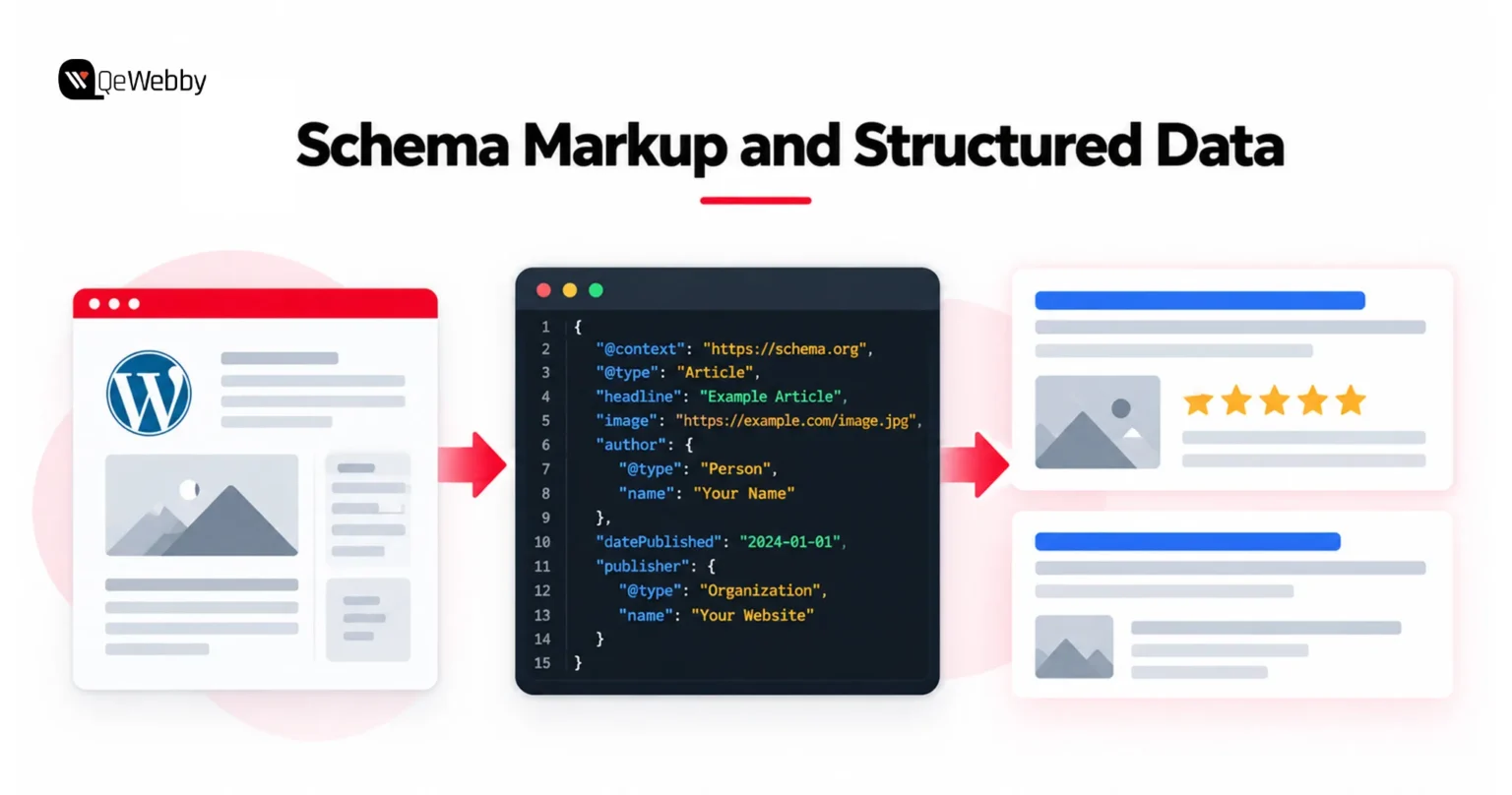
Structured data provides explicit information that can help search engines understand page content and can make eligible pages capable of appearing with richer search features.
That makes WordPress schema markup useful when it accurately represents visible page content.
The value of structured data is therefore shifting from “add every schema type possible” toward accurate, relevant implementation.
Structured data does not guarantee higher rankings or a rich result. Its purpose is to provide machine-readable context, and any enhanced search appearance remains dependent on eligibility and search-engine systems.
What WordPress Site Owners Should Do
- Use a reputable SEO plugin or custom implementation to generate structured data appropriate to the page.
- Make sure the structured data accurately matches information visible to users.
- Use Article, Product, Organization, LocalBusiness, Breadcrumb, or other supported types where they genuinely apply.
- Validate markup using Google’s Rich Results Test before deployment.
- Review Search Console after implementation rather than assuming that adding markup automatically produces a visual enhancement.
- For businesses managing more complex websites, structured data can also be considered as part of broader WordPress services covering technical implementation and site optimization.
Trend 5: Conversational Search Is Changing How Users Form Queries
Search Queries Are Becoming More Conversational
Search queries are becoming more conversational.
Someone typing into a search engine might search for:
“best WordPress SEO plugin”
Someone speaking to an assistant might ask:
“What is the best SEO plugin for my WordPress website?”
The second query contains more context, natural language, and implied intent.
Instead, content should naturally address the questions real users ask.
This is the foundation of conversational search optimization for WordPress: create useful content that answers real questions clearly without turning the page into a collection of artificial keyword variations.
What WordPress Site Owners Should Do
- Use question-based headings where they genuinely match the reader’s intent.
- Answer the primary question directly before moving into supporting details.
- Build FAQ sections for users, but do not create them solely to chase Google’s deprecated FAQ rich-result treatment.
- Include natural conversational language throughout explanatory content.
- Cover related questions within the same useful resource instead of creating dozens of thin pages.
The same approach also supports AI-powered discovery because conversational search and AI search increasingly overlap in how users formulate questions.
For businesses adapting their content to generative search experiences, AEO and GEO optimization can complement traditional WordPress SEO work.
Trend 6: Internal Linking Is One of the Fastest Technical SEO Wins Available
Why Internal Links Matter More Than Most WordPress Owners Appreciate
A WordPress site can contain hundreds of useful pages while still having a weak relationship between them.
One article may receive thousands of visits while another highly valuable article receives almost none. If the second page is rarely linked to from relevant pages, search engines and users have fewer paths to discover it.
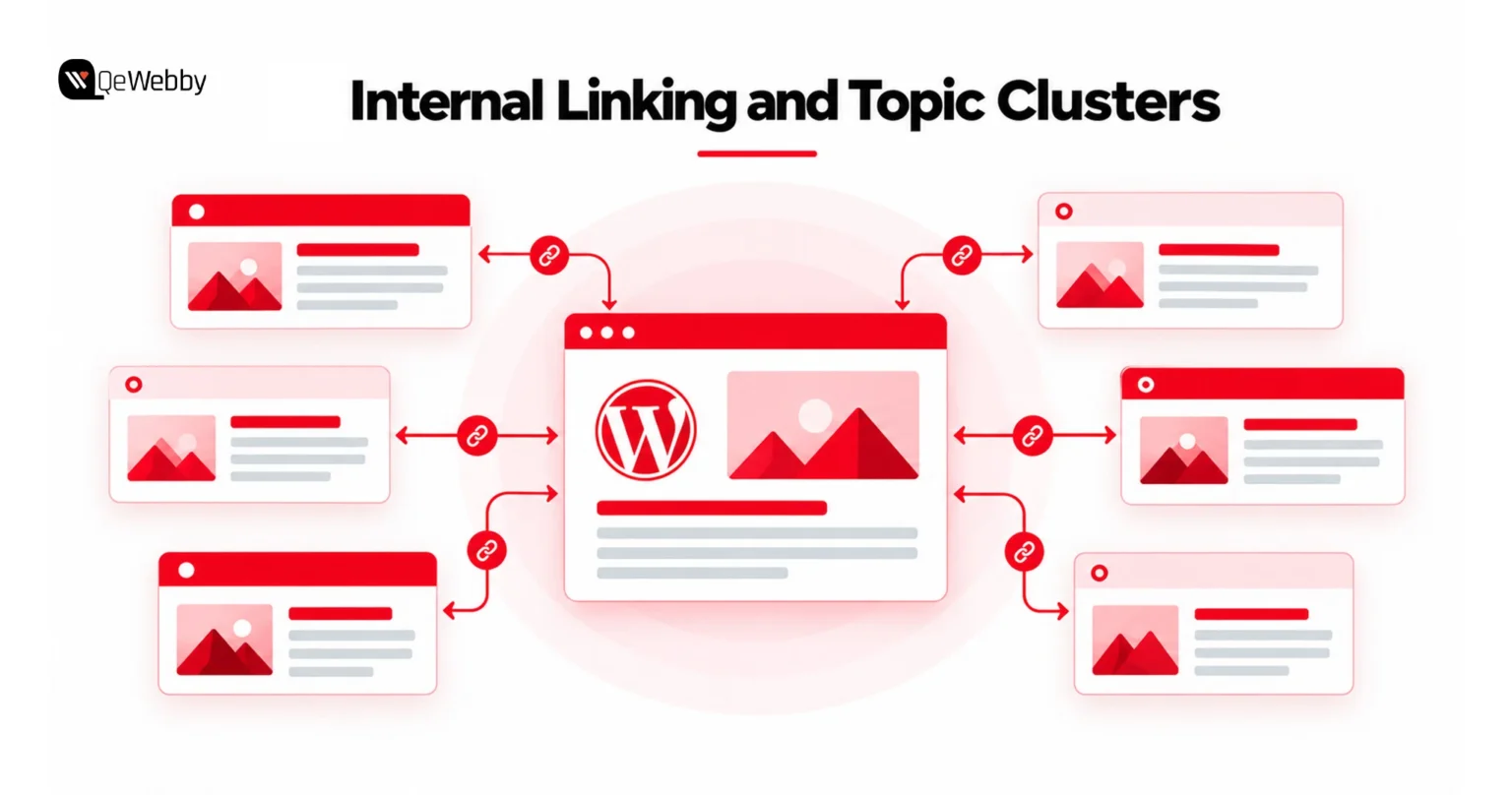
Internal links can connect related topics, move authority through the site, help users discover supporting information, and clarify the relationship between pillar pages and more specific resources.
What WordPress Site Owners Should Do
- Audit pages with few or no internal links pointing toward them.
- Add contextual links from established pages to relevant newer or underperforming content.
- Use descriptive anchor text that explains what the destination page covers.
- Create topic clusters with a central resource connected to supporting articles.
- Review internal links whenever major content is published rather than waiting for a yearly audit.
If you’re looking for practical ways to improve WordPress SEO without immediately publishing more content, internal linking is one of the first areas worth auditing. Strong contextual links can help users and search engines discover important pages while making the relationships between related topics clearer.
Trend 7: Content Refreshes Can Outperform Constantly Publishing New Content
Why Refreshing Old Content Is Often More Valuable Than Publishing Another New Post
Many established WordPress sites already possess an asset that newer competitors do not: years of indexed content, accumulated links, historical performance data, and existing topical relevance.
The problem is that some of those pages stop matching the current search landscape.
Statistics become outdated. Screenshots show old interfaces. Product recommendations change. Competitors publish better explanations. Search intent evolves.
What WordPress Site Owners Should Do
- Open Google Search Console and identify pages that previously generated meaningful impressions or clicks but have declined.
- Prioritize pages ranking around positions 5–20 where stronger content could realistically improve visibility.
- Update outdated statistics, examples, screenshots, recommendations, and references.
- Add sections that address genuinely new questions or developments rather than padding the article.
- Do not rewrite a page simply to make it longer. A useful content refresh should improve accuracy, relevance, completeness, or the user’s ability to accomplish the intended task.
- Keep publication and modification dates accurate and transparent. A changed date should reflect a meaningful update, not simply be altered to make an old page appear new.
Trend 8: Mobile-First Is No Longer a Trend; It Is the Baseline Standard
Why Mobile Optimization Is Now a Competitive Differentiator
Google uses the mobile version of a site’s content for indexing and ranking under mobile-first indexing.
That means mobile should not be treated as a secondary version of the desktop website.
Search engines therefore need to be able to access and understand the important content and functionality available to mobile users.
Yet many WordPress websites are still designed desktop-first, with mobile testing performed at the end of development. That approach can hide problems involving navigation, content visibility, tap targets, images, pop-ups, forms, and performance.
Responsive layouts, adaptive components, optimized media, and performance-conscious rendering therefore have direct implications for search visibility and conversion experience.
These requirements are also central to responsive web design, where layouts and components are designed to provide a consistent experience across mobile, tablet, and desktop devices.
What WordPress Site Owners Should Do
- Open important pages on real phones and test the experience manually.
- Check whether navigation, forms, buttons, images, tables, and embedded elements work properly without zooming or awkward scrolling.
- Run PageSpeed Insights separately for mobile and desktop.
- Make sure the mobile version contains the same important content as the desktop version.
- Monitor Search Console for indexing and page-experience issues rather than relying only on browser-based device emulation.
For businesses that want all eight areas addressed together, ranging from technical performance and structured data to content architecture and AI search readiness, a professional WordPress SEO service can bring these elements into one coordinated optimization process instead of requiring the site owner to manage every technical change individually.
These eight trends are useful as a planning framework, but they do not explain every traffic decline. When organic performance changes, the next step should be diagnosis rather than immediately implementing another SEO tactic.
When WordPress Organic Traffic Drops: What Should You Check?
Most guides tell site owners what they should do next.
But there is another question that deserves a direct answer:
What if traffic is already falling even though you have been doing SEO?
The answer is not necessarily that Google has “penalized” the site.
Traffic can decline because search behavior changed, competitors improved, search features changed the click journey, or individual pages no longer satisfy the intent behind the queries for which they rank.
A structured WordPress SEO audit can help separate technical issues from content, search-intent, performance, and competitive changes before you start making broad changes to the site.
The Real Reasons WordPress Traffic Drops Despite Good SEO Practices
Reason 1: AI features have changed the search journey
AI Overviews and AI Mode can provide users with synthesized information directly inside Search while also linking to supporting websites.
For some queries, users may need fewer clicks because the answer is immediately available. For others, the additional links can create new discovery opportunities.
This means a decline in organic clicks does not automatically mean that visibility has disappeared. Review impressions, rankings, query mix, search features, and conversions together before deciding what changed.
Reason 2: The page ranks, but it attracts the wrong search intent
A page can rank for a keyword and still fail to satisfy the visitor.
For example, an informational article targeting someone researching a concept may attract visitors who are not ready to purchase the product or service being promoted.
The result can be strong impressions but weak engagement or conversions.
The solution is not always higher rankings. Sometimes it is better alignment between the query, page format, content promise, and next step.
For commercial search queries, that may also mean creating dedicated SEO landing pages that align the search intent with a specific service, product, or conversion goal.
Before rewriting the page, compare the current search results with your content. Look at the format Google is rewarding, the questions competing pages answer, and whether the page you created actually matches the intent behind the query.
Reason 3: The content lacks visible experience and authority
Anonymous content, generic explanations, recycled examples, and unsupported claims give readers little reason to trust the information.
Look for concrete differences: author expertise, first-hand examples, original research, sourcing, transparency, depth, and how effectively the page answers the user’s actual problem.
The Traffic Recovery Audit Every WordPress Site Should Run
Start with Google Search Console rather than immediately changing the website.
1. Review impressions before clicks
Find pages receiving substantial impressions but generating relatively few clicks.
Compare the page’s title, description, search intent, and SERP context before making changes. Low click-through rate does not always mean the content itself is weak; the page may simply be targeting a query where the search result format has changed.
2. Compare current rankings with historical performance
Identify pages that previously ranked strongly but have gradually fallen. Then compare the current search results with your page to determine whether competitors have improved, search intent has shifted, or new SERP features have changed the competitive landscape.
3. Review Core Web Vitals
Google’s Core Web Vitals report can identify groups of URLs where users are experiencing performance problems. It should be treated as one diagnostic input alongside content quality, relevance, indexing, and other technical factors.
4. Inspect your strongest historical pages
Look at the pages that generated the most organic value over the previous 12 months. Determine what changed in the content, competition, search results, user intent, or technical experience.
5. Review conversions, not only sessions
Google itself recommends considering outcomes such as sales, signups, and other meaningful actions when evaluating the value of search traffic.
Businesses investing heavily in organic growth can also benefit from a WordPress website development service that considers technical SEO during architecture, development, performance optimization, and implementation rather than treating SEO as a post-launch task.
These checks go beyond the usual WordPress SEO tips because they help identify whether a traffic decline is caused by technical problems, changing search behavior, content relevance, or a combination of factors.
Quick Reference: What to Prioritize First
| SEO Trend | Effort | Primary Focus | Start With |
|---|---|---|---|
| Core Web Vitals | Medium | Page experience | PageSpeed Insights + Search Console |
| Experience and trust | Low–Medium | Credibility | Author transparency + original evidence |
| Structured data | Low–Medium | Search understanding | Relevant, accurate markup |
| Internal linking | Low | Discoverability | Link audit + contextual links |
| Content updates | Medium | Relevance | Search Console content audit |
| AI search readiness | Medium | Content accessibility and usefulness | Original content + crawlable text |
| Voice/conversational search | Low–Medium | Query intent | Question-led content |
| Mobile optimization | Medium | Mobile experience | Real-device testing + Search Console |
Conclusion: SEO Is Not Dying — It Is Evolving
SEO is not becoming less important; the way search visibility is earned is changing. WordPress sites that combine useful content, genuine expertise, strong technical foundations, fast experiences, and clear site architecture will be better prepared for an increasingly AI-driven search environment.
The bigger opportunity is to stop treating SEO as a series of isolated fixes. Technical performance, content quality, internal linking, structured data, mobile usability, and credibility should not be treated as separate SEO projects. Together, they create a website that is easier for users to navigate and easier for search systems to crawl, understand, and evaluate.
QeWebby helps businesses build and optimize WordPress websites with SEO-conscious architecture, performance optimization, content-friendly structures, and technical implementation designed to support modern search requirements.
Contact us to discuss your WordPress website requirements and build a stronger foundation for sustainable organic growth as search continues to evolve.